Shopify guides 13 min readPublished
Shopify migration SEO: how to keep your rankings
Shopify migration SEO, step by step: URL inventory, single-hop 301 redirects, content kept as it is, launch day and ranking monitoring.

Contents9 sections
- Why does a Shopify migration lose SEO?
- The vocabulary of a Shopify migration
- When is SEO most at risk?
- Seven steps to migrate without losing SEO
- How long does a Shopify migration take, and what does it cost?
- The mistakes that cost the most
- Two Shopify migrations by Lyvora
- Specifics by source platform
- Frequently asked questions
Shopify migration SEO comes down to one rule: every old URL gets a permanent redirect to its Shopify equivalent, in a single hop, live at the moment you switch over. Content, tags and internal links follow unchanged. Google expects rankings to fluctuate for a while during a move; a lasting slump almost always points to a technical error.
Key takeaways
Redirects decide the outcome: one row per old URL, pointing to the final destination, with no chains and no blanket redirect to the homepage.
Google treats 301 and 308 as permanent redirects, and 302 and 307 as temporary ones.
Shopify accepts 100,000 redirects per store, 20 million on Plus, and only redirects a URL that no longer loads a page.
Google says a medium-sized site can take "a few weeks or more" to be processed, and advises keeping redirects for at least a year.
Keep titles, meta descriptions and copy identical at launch, then rewrite one variable at a time.
Traffic lost after a migration does not come from Shopify. It comes from forgotten URLs, cut content or a crawl block left over from staging. This guide sets out the method, valid whatever platform you are leaving, with the rules published by Google and Shopify (pages consulted on 7 November 2026). Our Shopify migration page explains how we run these projects; the specifics of each source platform are covered in dedicated guides, linked at the end.
Why does a Shopify migration lose SEO?
Google applies no penalty for changing platform: it reassesses each page by its address, its content and the links it receives. A migration loses SEO when indexed URLs stop responding, or point to a page that no longer says the same thing. Three causes explain most losses.
URLs that change without a redirect. Shopify enforces its prefixes (
/products/,/collections/,/pages/,/blogs/). A product that lived at/oak-chair.htmlreturns a 404 if nothing links it to/products/oak-chair, then drops out of the index.Lost link equity. Sites that cite you point to the old addresses. A permanent redirect carries that signal to the new page; a 404 loses it.
Thinner content. A long description cut to a few lines during the migration loses its rankings even with a perfect redirect, because the destination no longer answers the same queries.
Two rarer faults do the heaviest damage: a robots.txt carried over from staging that blocks crawling, and a noindex tag left in the theme. Either can take an entire store out of the index.
Is Shopify bad for SEO?
No. Shopify handles the XML sitemap, HTTPS, canonical tags and mobile rendering natively. Its two real constraints are the URL prefixes, which you cannot remove, and the second address a product gets when it is viewed from a collection, which the theme must canonicalise. Neither stops a store from ranking. Our Shopify SEO page covers the optimisation work that follows once the migration has settled.
The vocabulary of a Shopify migration
Six terms come up throughout the project:
Permanent redirect (301 or 308): a server response saying a page has moved for good; Google then uses the new URL as the canonical one (Google Search Central on redirects);
Temporary redirect (302 or 307): a provisional move; Google does not use it as a signal that the target should become the canonical page;
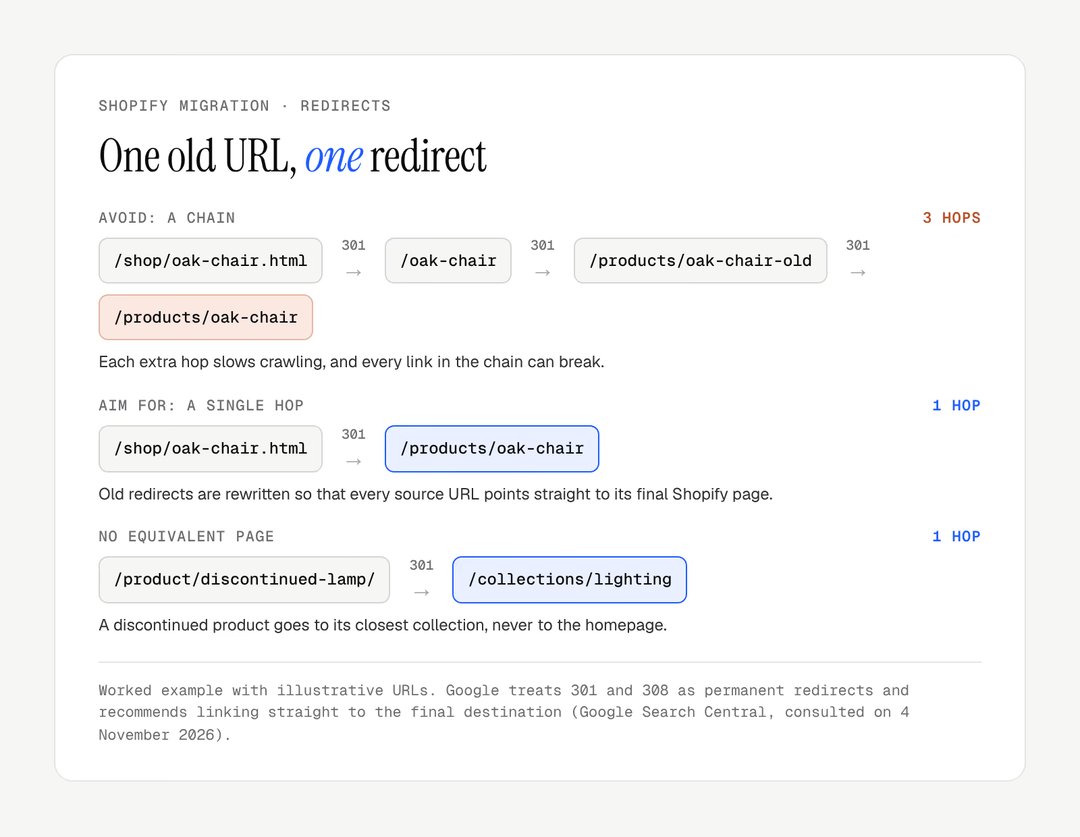
Redirect chain: URL A sends to B, which sends to C; each hop slows crawling and each link can break;
Soft 404: a page that responds normally but that Google judges empty or off-topic, such as a product redirected to the homepage;
Redirect map: the spreadsheet that pairs each old URL with its destination; it is the central deliverable of the project;
Switch-over: the moment the domain points to Shopify and the redirects take effect.
When is SEO most at risk?
SEO is most at risk when many URLs change at the same time as the content or the structure. The table ranks common situations with the precaution each one calls for.
Situation | SEO risk | Precaution |
|---|---|---|
URLs with IDs or .html (PrestaShop, Magento) | High: no URL survives | Full map, slugs cleaned beforehand |
Nested categories ( | High: the hierarchy goes flat | Categories mapped by hand |
Large blog with backlinks | High: external links concentrate there | Posts moved with their slug and text |
Domain change on top of platform change | Very high: two moves at once | Search Console Change of Address tool |
Multilingual site | Medium: hreflang to rebuild | Languages tested on staging |
Redesign at the same time | Medium: diagnosis blurred | Content and tags kept identical |
Store with under 50 indexed pages | Low | Manual entry possible, full check |
Google's Change of Address tool only applies when the domain or subdomain changes, not when the paths change on the same domain (site moves with URL changes).
Good to know
Avoid peak season. A migration needs a few calm weeks while Google recrawls the site: not in November before the holidays, not during your sales.
Seven steps to migrate without losing SEO
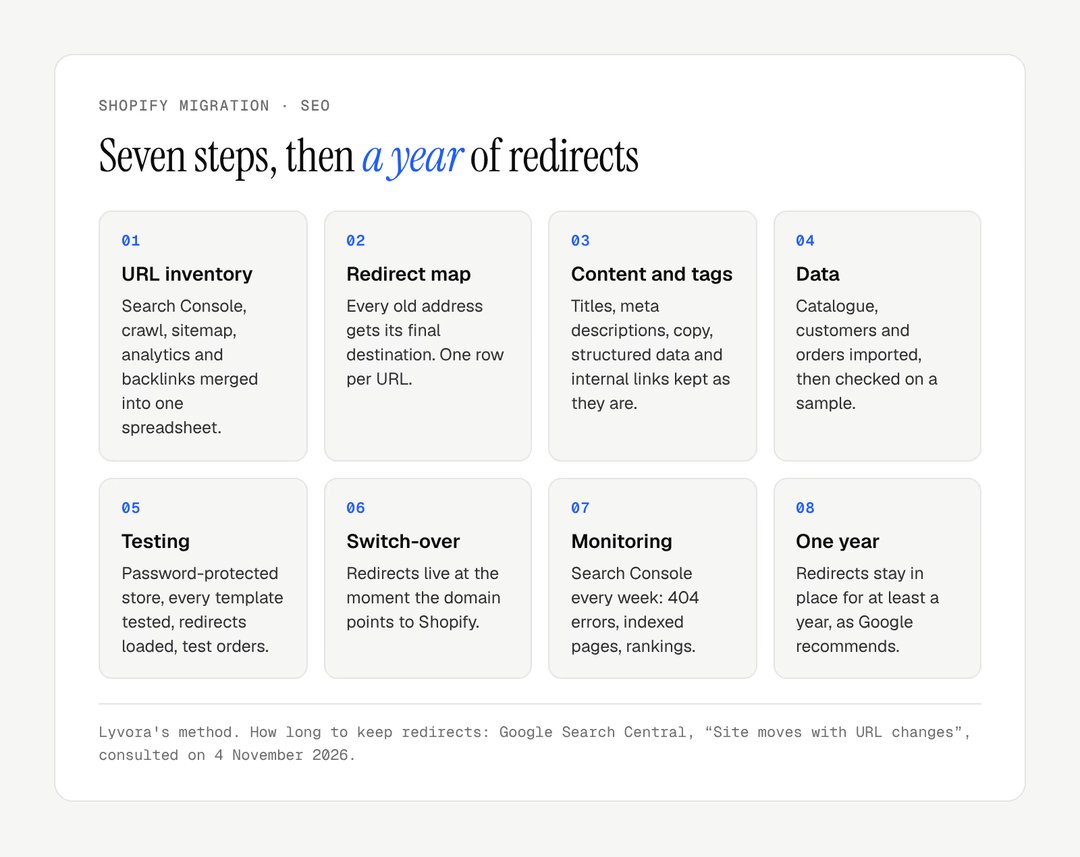
A Shopify migration that keeps its SEO follows seven steps, from the URL inventory to ranking monitoring. The table gives the deliverable of each one; the detail follows.
Step | Action | Deliverable |
|---|---|---|
1. Inventory | Cross Search Console, crawl, sitemap, analytics, backlinks | One spreadsheet of URLs |
2. Redirect map | Pair each URL with its final destination | Old → new table, one row per URL |
3. Content and tags | Carry over titles, meta, copy, structured data | Equivalent pages, tag by tag |
4. Data | Import catalogue, customers, orders | Sample checked by hand |
5. Testing | Test templates, payments, redirects | Signed-off checklist |
6. Switch-over | Domain, redirects, sitemap on the same day | Response codes checked |
7. Monitoring | Search Console every week | Redirects completed as you go |
1. Inventory every URL
You can only redirect what you have listed. No source is enough on its own, so cross them:
Google Search Console: indexed pages from the Pages report, and queries by page over twelve months;
a full crawl (Screaming Frog, Sitebulb): HTTP status, titles, meta, canonicals, in list mode on the sitemap and then in spider mode from the homepage;
the current XML sitemap, whose gap with the crawl reveals orphan pages;
Google Analytics 4: the organic landing pages that weigh in revenue, not only in sessions;
backlinks (Search Console Links report, Ahrefs or Semrush): the most cited pages are your priority redirects;
server logs, if you have access: they show URLs that Googlebot keeps visiting years later.
The deliverable is a single spreadsheet: each URL, its traffic, rankings, backlinks and a high, medium or low priority. It is also the time to prune: a product nobody has viewed in two years can go, provided it is redirected to its collection.
2. Build the redirect map
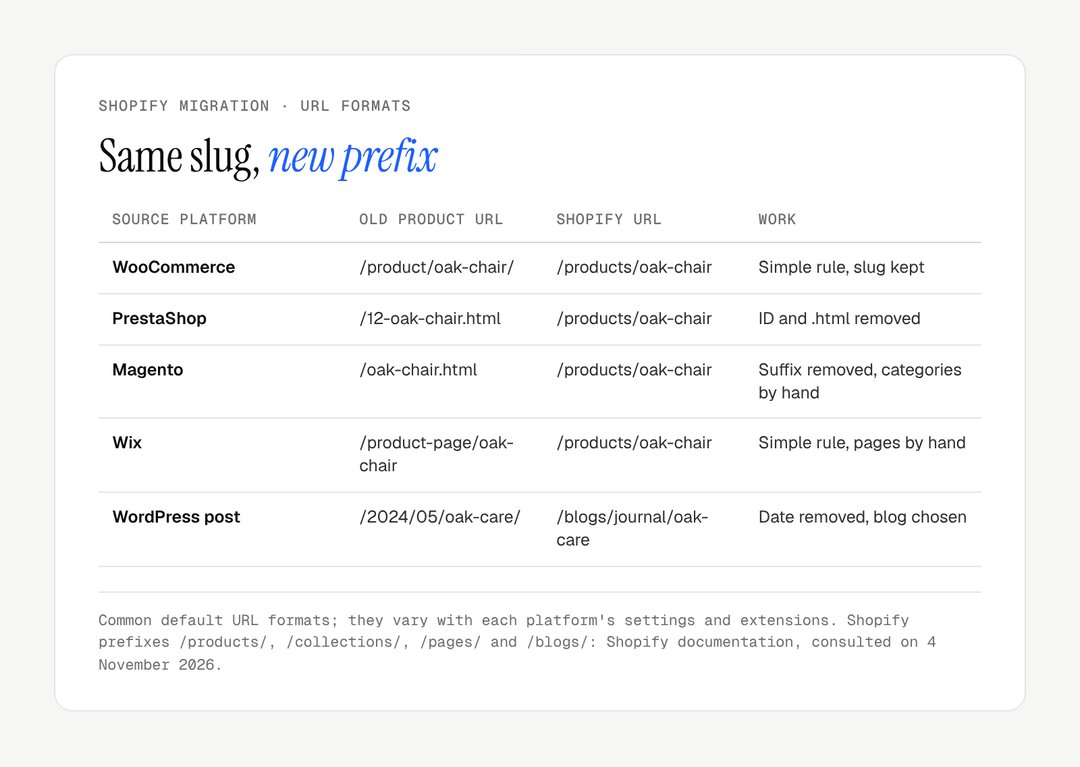
Each old URL gets one destination: the final page. Products can often be handled by rule, because the slug survives; categories are handled by hand, because a well-ranked category sent to the wrong collection can lose its position for months.
Source platform | Old product URL | Shopify URL | Work |
|---|---|---|---|
WooCommerce | /product/oak-chair/ | /products/oak-chair | Simple rule, slug kept |
PrestaShop | /12-oak-chair.html | /products/oak-chair | ID and .html removed |
Magento | /oak-chair.html | /products/oak-chair | Suffix removed, categories by hand |
Wix | /product-page/oak-chair | /products/oak-chair | Simple rule, pages by hand |
WordPress post | /2024/05/oak-care/ | /blogs/journal/oak-care | Date removed, blog chosen |
The formats above are the platforms' common defaults; they vary with settings and extensions.
The usual omissions are always the same: redirects already in place on the old site (they must point straight to the Shopify destination, not to a URL that is itself redirected), www and non-www variants, tag pages, feeds and PDFs that receive links. Google recommends redirecting straight to the final destination and, failing that, keeping chains to "ideally no more than 3 and fewer than 5" hops (site moves with URL changes).
3. Keep content, tags and internal links
A redirect passes on a signal; it is not enough if the destination page no longer says the same thing. Carry over, unchanged:
title tags and meta descriptions, imported from the inventory, never regenerated from the product name;
the copy, word for word; rewriting comes after rankings settle, one variable at a time;
the heading hierarchy: some themes turn the store name into the H1 on every page;
Productstructured data, validated with Google's Rich Results Test;internal links, which should target the new URLs rather than pass through redirects;
hreflang on a multilingual site, rebuilt with Shopify Markets and tested before the switch-over.
4. Transfer the catalogue, customers and orders
SEO is decided by URLs, but a botched data transfer costs revenue. Three tools cover most cases:
Shopify's native CSV import for products and customers, free, limited on custom fields;
Shopify Store Migration, a free app by Shopify that imports product and customer data from Square, WooCommerce, Etsy, Wix, Amazon, eBay, Clover and Lightspeed R/X (app listing); Magento and PrestaShop are not on that list, and the listing says nothing about redirects;
Matrixify, with a free plan limited to 10 items per file, then $20, $50 or $200 a month; it also imports orders, blog posts and redirects.
Customer passwords never transfer, because each platform hashes them differently. Shopify's new customer accounts, the only version offered to new stores since legacy accounts were deprecated in February 2026, sign customers in with a one-time code sent by email: tell customers on launch day. List product reviews and custom development on the old platform during the inventory and cost them separately; they are harder to move than the catalogue.
5. Test before the switch-over
The Shopify store is built alongside the old one, behind a password. Testing covers:
every template (home, collection, simple and variant product, blog post, page, search, 404) on mobile and desktop;
one test order per payment method and per shipping method, discount code included;
transactional emails, from the sign-in code to the refund;
the redirect file, imported and checked line by line;
titles and meta on a sample of around fifty pages;
measurement tools, with real events; responsiveness (INP) is worth a baseline now;
legal requirements, including the online withdrawal function that EU rules require for consumer distance contracts from 19 June 2026 under Directive (EU) 2023/2673.
6. Switch over in one go
Every redirect must be live when the domain points to Shopify. Shopify only redirects from broken URLs: if the old address still loads a page, the redirect does nothing (Shopify Help Center on URL redirects). The file can therefore be imported before launch and takes effect as soon as the old pages stop existing. The sequence, on a quiet weekday morning:
freeze changes on the old site 48 hours before, and archive a last crawl;
import or check redirects in Content > Menus > View URL redirects;
remove the password and check
robots.txt;point the domain, then submit the new sitemap in Search Console;
crawl the new site straight away and test 20 to 30 priority URLs by hand: each must answer in a single hop to the right page.

7. Monitor rankings and keep the redirects
Google warns that a medium-sized site can take "a few weeks or more" before its new URLs show in results, and says to expect temporary fluctuation in rankings during the move. It advises keeping redirects for at least a year, and for users, indefinitely. The table is a monitoring routine, not a forecast.
Period | What to check | Warning sign |
|---|---|---|
Weeks 1 and 2 | 404 errors, indexed pages | 404s on URLs that had traffic |
Weeks 3 and 4 | Rankings on priority queries | Drops on pages whose redirects look correct |
Weeks 5 to 8 | Organic traffic against the same period | No sign of recovery |
Beyond | New 404s, redirects still in place | 404s from new backlinks to old URLs |
A weekly pass on the Pages report for two months is enough to catch omissions. A drop that keeps deepening instead of levelling out is not the fluctuation Google describes: look for a blocked crawler or a batch of broken redirects.
How long does a Shopify migration take, and what does it cost?
A Shopify migration needs a few weeks of preparation and a few weeks of monitoring; its cost depends mostly on how many URLs must be mapped by hand. Tool costs are public; labour depends on scope.
Item | Published cost | Source |
|---|---|---|
Shopify Store Migration | free | apps.shopify.com |
Matrixify | free (10 items per file), $20, $50 or $200 a month | apps.shopify.com |
Shopify Basic | $39 or £25 a month; $29 or £19 billed yearly | shopify.com/pricing, shopify.com/uk/pricing |
Shopify Grow | $105 or £65 a month; $79 or £49 billed yearly | same pages |
Redirects in Shopify | included, up to 100,000 (20 million on Plus) | Shopify Help Center |
Prices read on 7 November 2026, before tax.
The line that should never be negotiated down is the time spent on the redirect map. It grows with the number of indexed URLs, which nearly always exceeds the number of products: indexed variants, categories, pagination, posts, old redirects. The crawl, not the back office, gives the real figure.
The mistakes that cost the most
Failed migrations repeat the same faults, and none is hard to avoid. The table links each to its effect and its fix.
Mistake | Effect | Fix |
|---|---|---|
Redirecting everything to the homepage | Soft 404, no signal passed on | Product to its collection, category to its parent |
Redirects set up "after the weekend" | Pages crawled as 404 and dropped | Redirects live at the minute of the switch |
Chains inherited from the old site | Slower crawl, broken links | Rewrite each row to the final destination |
Temporary redirect (302) | Old URL kept as the reference | Codes checked with a crawler, not in the admin |
Product pages rewritten during the move | Diagnosis impossible | Copy kept identical, rewrite later |
Blog, PDFs and tags forgotten | Backlinks lost | Inventory from links, not from the catalogue |
Indexable staging | Duplicate content | Password, then |
Monitoring stopped after two weeks | Regressions spotted too late | One pass a week for two months |
If the migration comes with a new design, decide first whether to keep a theme close to the current one: our comparison of a custom versus premium Shopify theme helps frame that choice.
Two Shopify migrations by Lyvora
We applied this method to our clients' migrations. Candle'lice, candles hand-poured in France, left ePro Shopping, which capped its catalogue at 200 products and took a 3% commission on each sale: the full catalogue was moved to Shopify, the store redesigned, product pages enriched on how each candle is made, and technical SEO set up. Maison Trungadi, bath linen made in Tuscany, migrated to Shopify with a redesign and detailed product pages on materials, fabric weight and made-to-measure pieces.

Specifics by source platform
The method does not change from one platform to another; what changes is the URL format, the data export and the extensions to replace.
Magento to Shopify migration: configurable products, large catalogues, ERP integrations,
.htmlURLs;WordPress to Shopify migration: WooCommerce products, customers and orders, and blog posts whose categories become Shopify blogs;
WooCommerce in particular: the Shopify vs WooCommerce comparison sets out what you gain and what you give up before you decide.
Are you preparing a move to Shopify and want to protect your rankings? Our Shopify migration page details our method, and the Shopify redesign page covers the case where the design changes too. To discuss your project, get in touch.
Frequently asked questions
Will I lose my rankings by migrating to Shopify?
No, not if every indexed old URL has a permanent redirect live from the switch-over and the content is carried over unchanged. Google expects rankings to fluctuate while it recrawls the site. Lasting losses come from an identifiable cause: missing redirects, a closed robots.txt, cut copy, or title tags regenerated automatically by the theme. Each of these can be found with a crawl and fixed.
How long does Google take to process a migration to Shopify?
Google says a medium-sized site can take a few weeks or more before its new URLs show in results, and longer for a large site. The most crawled pages are picked up first, while the rest of the catalogue follows at the pace of crawling. Submitting the new Shopify sitemap in Search Console on launch day helps Google discover the new addresses sooner.
Can I keep exactly the same URLs on Shopify?
No, not exactly. Shopify enforces the /products/, /collections/, /pages/ and /blogs/ prefixes, and no setting removes them. You can keep the slug, the part after the prefix, which simplifies the redirect map considerably. The full path therefore almost always changes, and every indexed old URL needs a permanent redirect to its new Shopify address.
What is the difference between a 301 and a 308 redirect?
None for SEO: Google classes both 301 and 308 as permanent redirects, which make the target the canonical URL. A 308 also preserves the request method, which matters for forms rather than for pages. Shopify's URL redirects are 301s, which its Help Center notes are cached by browsers and search engines. Both suit a migration, unlike 302 and 307, which Google treats as temporary.
Should I migrate and redesign at the same time?
You can, but it is riskier. Changing platform and design together multiplies the variables: if traffic drops, you no longer know whether the cause is a redirect, rewritten copy or a new journey. The safest route is to migrate with identical content and tags, let rankings settle for a few weeks, then move the design and copy on. If you must do both, allow more testing time.
What should I do with pages that have no equivalent on the new store?
Redirect them to the closest page in meaning, never to the homepage by default. A discontinued product goes to its collection, a deleted category to its parent, a merged blog post to the post that absorbed it. Google may treat many URLs redirected to one unrelated page, such as the homepage, as soft 404s. A page with neither traffic nor backlinks can simply return a 410.
How do I know if a migration has failed on SEO?
Three signals should worry you: organic traffic that keeps falling after several weeks, a sharp drop in indexed pages in Search Console, and 404 errors on URLs that used to receive traffic, visible in the Pages report. All three can be fixed, usually by adding redirects or lifting a crawl block, but every week of delay leaves pages out of the index for longer.
Our work
Stores delivered by the studio
 Bath linenMigration and redesign · ShopifyMaison TrungadiBathrobes and bath linen made in Tuscany: a store that does justice to the materials.
 Personalised jewelleryRedesign · ShopifyMayaliceA minimalist luxury redesign and six product configurators to compose a piece of jewellery live.
 Handmade candlesMigration and redesign · ShopifyCandle’liceUnusual candles hand-poured in France, taken off a platform that held them back.