Shopify guides 13 min readPublished
Migrate from WordPress to Shopify: shop, blog, redirects
How to migrate from WordPress to Shopify: WooCommerce products, customers and orders, blog posts and categories, and 301 redirects, step by step.

Contents10 sections
- What a WordPress to Shopify migration moves
- When should you migrate from WordPress to Shopify?
- The WordPress to Shopify migration steps
- How to move a WordPress blog to Shopify
- WordPress redirects to Shopify
- Plugins and their Shopify replacements
- How much does a WordPress to Shopify migration cost?
- Common WordPress to Shopify migration mistakes
- Two migrations to Shopify: Candle'lice and Maison Trungadi
- Frequently asked questions
To migrate from WordPress to Shopify, you export your WooCommerce products, customers and orders and your WordPress posts and pages, import them into Shopify, then redirect every old URL to its new Shopify address. The migration keeps your rankings when the redirects are live on launch day and the content comes across unchanged. The blog needs the most thought: WordPress categories become separate Shopify blogs or tags, and tags stay tags.
Key takeaways
Two cases, one method: a WooCommerce store (products, customers, orders, blog) or a WordPress blog alone; both end with a redirect map.
Shopify's free Store Migration app imports WooCommerce products and customers from WooCommerce's CSV exports, not orders or blog posts.
Blog posts need a dedicated route: Matrixify's WordPress tutorial, a blog import app, or manual entry.
Shopify URLs are fixed:
/products/,/collections/,/pages/and/blogs/<blog>/<article>; WordPress URLs all change.Shopify accepts 100,000 redirects per store, imported by CSV; customer passwords never transfer.
This guide is for brands that sell, or want to sell, on a WordPress site and are moving to Shopify. It covers each data type, the blog structure, the redirects and the tools, with their features as their own documentation describes them on 7 November 2026. Our Shopify migration page explains how we run these projects; the redirect method in full is in our guide to Shopify migration SEO.
What a WordPress to Shopify migration moves
WordPress is the content management system; WooCommerce is the plugin that adds the shop. Many sites have both, some have only the blog. The migration transfers the catalogue, customer data, order history and editorial content to Shopify, then links each old URL to its new page.
WordPress element | Shopify equivalent | How it moves |
|---|---|---|
WooCommerce product | Product with variants | Store Migration, Matrixify or CSV |
WooCommerce category | Collection | Recreated, mapped by hand |
Customer | Customer (no password) | Store Migration, Matrixify or CSV |
Order | Order, as a record | Matrixify or a migration service |
Post | Blog article | Matrixify, blog import app or manual |
Post category | Separate blog, or tag | Decided before import |
Page | Page ( | Matrixify or manual |
Plugin | App, theme feature or nothing | Replaced one by one |
Five terms come up throughout:
WXR file: the XML file produced by WordPress's Tools > Export screen; it holds posts, pages, custom post types, comments, custom fields, categories, tags, custom taxonomies and users (WordPress documentation), and the media files themselves are not on that list;
blog (Shopify): a container of articles with its own address, such as
/blogs/journal; a store can have several;handle: the last part of a Shopify URL, the equivalent of a WordPress slug;
redirect map: the spreadsheet that pairs each old URL with its new Shopify URL;
switch-over: the moment the domain points to Shopify and the redirects take effect.
When should you migrate from WordPress to Shopify?
Selling has become the main job of the site, and maintaining WooCommerce takes more time than running the shop: that is the usual trigger. If the site mostly publishes content and sells little, WordPress may still be the better fit; our guide to the best CMS for a brand website sets out that choice.
Signal | What it means | Shopify answer |
|---|---|---|
Updates break plugins | Maintenance absorbs the team | Hosting and updates run by Shopify |
Checkout needs constant fixes | Revenue at risk | Shopify Checkout maintained by Shopify |
Hosting struggles at peaks | Slow pages on sale days | Shared infrastructure, no servers to size |
Several people manage the shop | Roles and access to organise | Staff accounts by plan |
Selling in several countries | Currencies, taxes, languages | Shopify Markets |
Content is the main product | Shop is secondary | WordPress may remain right |
For a direct comparison of costs, SEO and performance between the two platforms, read Shopify vs WooCommerce before you commit.
The WordPress to Shopify migration steps
The migration runs in eight steps, from the URL inventory to launch day. The order protects your data and your rankings.
Step | Action | Deliverable |
|---|---|---|
1. Inventory | List URLs, content, plugins, integrations | One spreadsheet |
2. Shopify set-up | Plan, theme, blogs, collections | Empty store ready |
3. Products | Export from WooCommerce, import into Shopify | Catalogue checked on a sample |
4. Customers and orders | Import accounts, consent and history | Lists checked, launch email drafted |
5. Blog posts | Map categories, import posts and images | Articles with SEO fields |
6. Pages | Recreate content pages |
|
7. Redirects | Map every old URL | CSV imported and tested |
8. Test and launch | Test journeys, switch the domain | Response codes checked |
1. Inventory the WordPress site
List everything before moving anything. Cross a full crawl of the site, the Pages report in Google Search Console, the XML sitemap (often /sitemap_index.xml with an SEO plugin) and your analytics. Add the plugin list, with what each one does, and every integration: email marketing, accounting, stock, marketplaces. The spreadsheet that comes out is the reference for the whole project.
2. Set up Shopify
Choose a plan, a theme and the structure of collections and blogs before importing data. The blog structure is decided now, not during import: one Shopify blog per main WordPress category, or a single blog with tags. Our comparison of a custom versus premium Shopify theme helps with the theme decision.
3. Migrate WooCommerce products
WooCommerce has a built-in product exporter (Products > All Products > Export), which produces a CSV of your products, with a choice of columns, product types and categories (WooCommerce documentation). Three routes bring it into Shopify:
Shopify Store Migration, a free app by Shopify: you upload WooCommerce's product and customer CSV files unchanged, and products arrive as drafts (Shopify Help Center);
Matrixify, which has a dedicated WooCommerce to Shopify tutorial and also handles orders, posts and redirects;
Shopify's product CSV import, after reformatting the WooCommerce columns to Shopify's template.
Check after import that images are attached, variants are correct and prices, stock and descriptions are intact. Shopify allows up to 2,048 variants per product since 15 October 2025, but three options at most: Shopify's guide notes that WooCommerce products with four or more variation attributes import without their variants and need restructuring.
4. Migrate customers and orders
Customer names, emails and addresses import easily; passwords never do, because WordPress and Shopify hash them differently. Shopify's new customer accounts, the only version offered to new stores since legacy accounts were deprecated in February 2026, sign customers in with a one-time code sent by email, so nobody needs a new password. Carry over each customer's marketing consent, required under the GDPR and UK GDPR.
Orders are the gap in the free tools. Shopify's own WooCommerce guide states that orders can't be imported by CSV and points to third-party apps such as LitExtension, Matrixify or Ablestar. Import at least the period your returns and warranty policy covers.
5. Migrate the blog
The blog is where a WordPress migration differs most from a store migration. The next section details the structure; the import itself follows one of three routes:
Matrixify's WordPress route: its blog posts tutorial starts from a CSV made with the WordPress "All Export" plugin, not from the native export, and produces a workbook with a "Blog Posts" sheet and a "Redirects" sheet, plus an images folder to upload to Shopify Files;
a blog import app: the Blog Importer listing says it imports WordPress XML, Squarespace or CSV files with authors, tags, publication dates and images, and sets 301 redirects; it gives 10 free credits, then charges $9.99 for 100 credits or $9.99 a month on its monthly plans;
manual entry: workable for a few dozen posts, with full control over each one.
6. Recreate the pages
WordPress pages such as About, Delivery or FAQ become Shopify pages at /pages/<handle>. Keep the slug as the handle and the text word for word. Pages built with a page builder lose their layout: rebuild the layout with theme sections, not by pasting HTML.

7. Build the redirects
Every old URL that is indexed or linked gets a 301 redirect to its new address. The section on redirects below gives the URL patterns and the CSV format.
8. Test and launch
Test every template, a real order per payment method, transactional emails and a sample of redirects. Remove the password, point the domain, submit the new sitemap in Search Console, then test 20 to 30 priority old URLs by hand. Keep the WordPress site and its database privately for a few weeks, to recover anything missed.
How to move a WordPress blog to Shopify
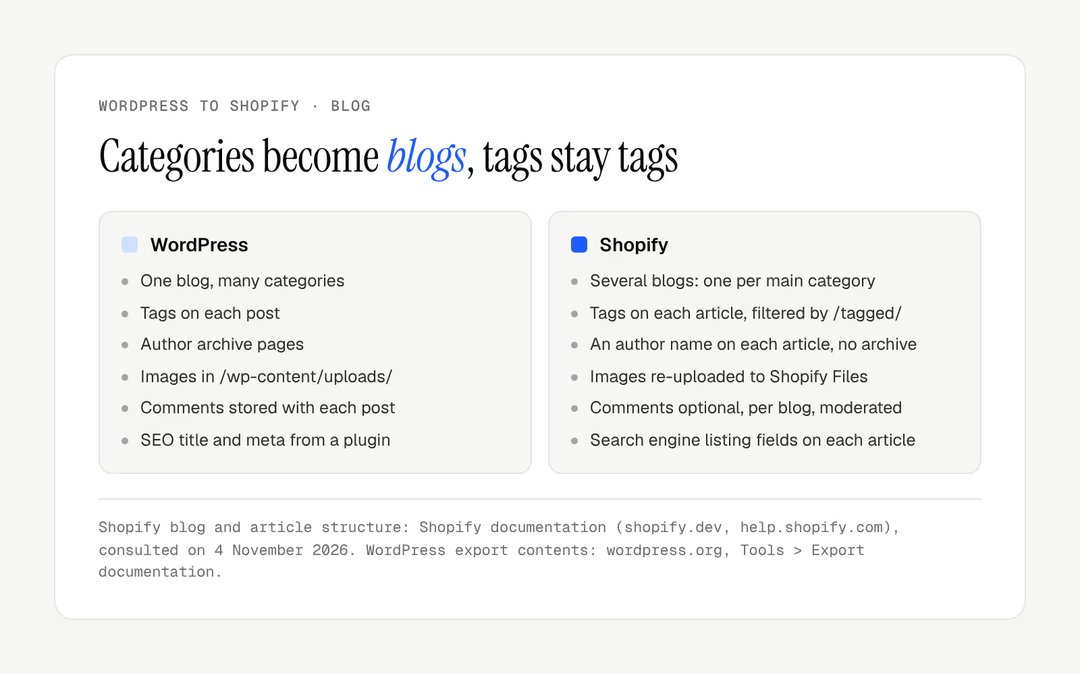
Shopify has no category system for articles: a store has one or more blogs, each with its own URL, and tags filter articles within a blog. A WordPress blog therefore moves by turning its main categories into separate Shopify blogs, keeping tags as article tags, and carrying over each post's slug, text, images and SEO fields.
Categories and tags
Several blogs suit a site with a few large, distinct sections, such as Guides and News. One blog with tags suits a site where categories overlap. On Shopify, a tag filters a blog at /blogs/<blog>/tagged/<tag>, as Shopify's theme documentation describes. A post in several WordPress categories goes to one blog only; its other categories become tags.
Authors, dates and comments
Authors: each Shopify article carries an author, chosen in the admin among staff with admin access (import apps can set it from the WordPress author), but there are no author archive pages, so
/author/<name>/URLs redirect to the blog.Publication dates: keep the original date on each article; check that your import tool preserves it, otherwise every post looks new.
Comments: a Shopify blog can disable comments, accept them pending moderation, or publish them automatically (Shopify Help Center). WordPress comments are in the WXR file; check whether your tool imports them, or archive them.
Images, excerpts and SEO fields
Images are not inside the export file: the posts only reference them. They must be uploaded to Shopify Files and every image URL in the post content rewritten, otherwise images break once the domain leaves WordPress. Featured images become the article image, excerpts the article excerpt. The SEO title and meta description written in Yoast SEO or Rank Math are stored as custom fields in WordPress; map them to each article's search engine listing in Shopify rather than letting the title regenerate.

Good to know
Internal links inside post content still point to the old WordPress URLs after import. Rewrite them to the Shopify URLs in the export file before import, so that no link passes through a redirect.
WordPress redirects to Shopify
Every WordPress URL changes on Shopify, so each indexed or linked URL needs a 301 redirect, imported by CSV before the switch-over. Shopify accepts up to 100,000 redirects per store, 20 million on Plus, set in Content > Menus > View URL redirects, and only redirects from broken URLs: the rows take effect once the old pages stop loading.
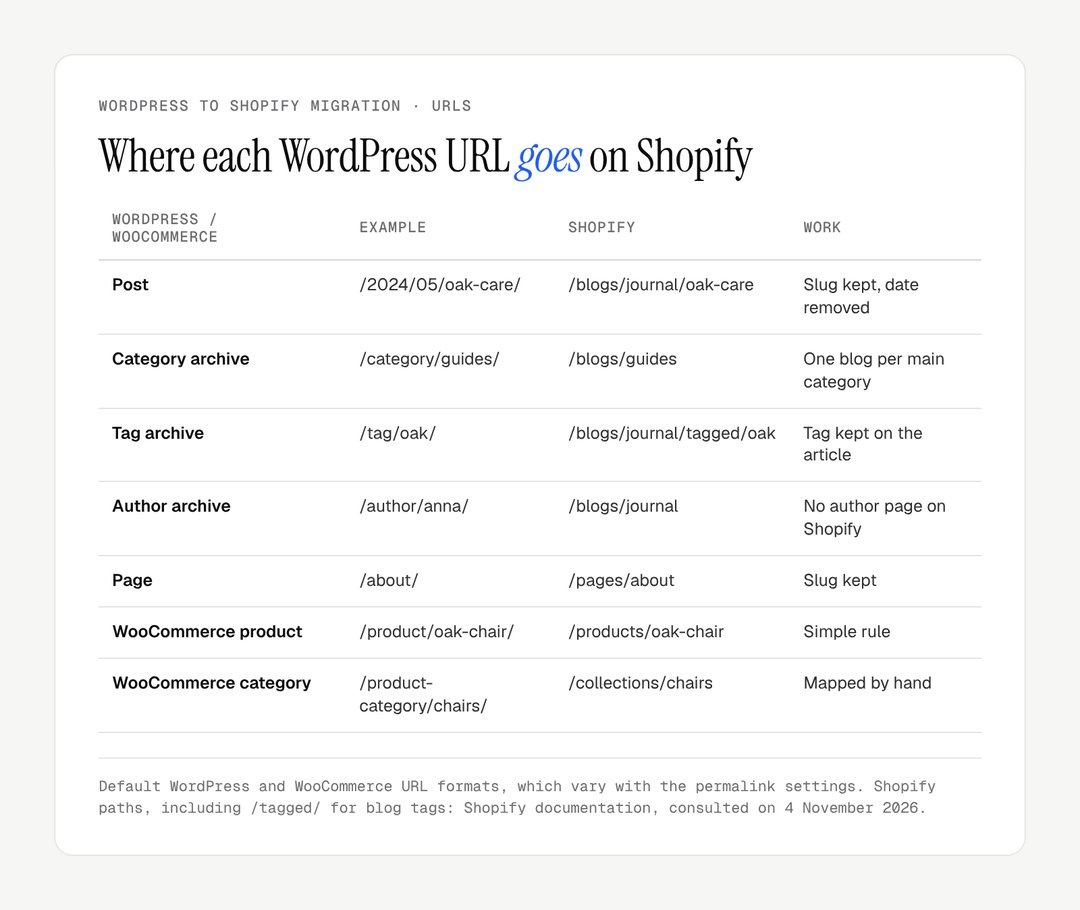
Each redirect pairs a "Redirect from" path with a "Redirect to" path. Worked example of a few rows:
Redirect from | Redirect to |
|---|---|
/2024/05/oak-care/ | /blogs/journal/oak-care |
/category/guides/ | /blogs/guides |
/tag/oak/ | /blogs/journal/tagged/oak |
/product/oak-chair/ | /products/oak-chair |
/product-category/chairs/ | /collections/chairs |
/about/ | /pages/about |
Four WordPress patterns need care:
date-based permalinks (
/2024/05/oak-care/): the date disappears on Shopify; each post still gets its own row;plain permalinks (
/?p=123): Shopify warns that URLs with query strings "might not work as expected" with URL redirects; test one before relying on them, or use an app;archives and feeds (
/page/2/,/feed/,/author/…): redirect the ones that receive links or traffic to the blog; the rest can return a 404;image URLs (
/wp-content/uploads/…): redirect the images that rank in Google Images or receive links.
Google recommends redirecting straight to the final destination and keeping redirects for at least a year (site moves with URL changes). Our Shopify SEO page covers what to optimise once the migration has settled.
Plugins and their Shopify replacements
Each WordPress plugin is replaced by a Shopify feature, an app or nothing. List them during the inventory: plugins are where budgets and timelines slip.
WordPress plugin role | Shopify replacement | Note |
|---|---|---|
SEO plugin (Yoast, Rank Math) | Native SEO fields, sitemap, canonicals | Structured data checked in the theme |
Multilingual plugin | Shopify Markets, Translate & Adapt | Hreflang tested on staging |
Email marketing connector | Shopify Email or an email app | Consent carried over |
Reviews plugin | Reviews app | Import reviews with their dates |
Subscriptions | Subscription app | Payment provider involved for card tokens |
Contact form | Theme contact form | Notifications tested |
Page builder | Theme sections and blocks | Layout rebuilt, not pasted |
Selling abroad after the move? Our guide to Shopify Markets covers currencies, languages and domains.
How much does a WordPress to Shopify migration cost?
The tools publish their prices; the labour depends on the number of URLs, posts and plugins. The table lists what is public.
Item | Published cost | Source |
|---|---|---|
Shopify Store Migration | free | apps.shopify.com |
Matrixify | free (10 items per file), $20, $50 or $200 a month | apps.shopify.com |
Blog Importer | 10 free credits, then $9.99 per 100 credits or $9.99 a month | apps.shopify.com |
Shopify Basic | $39 or £25 a month; $29 or £19 billed yearly | shopify.com/pricing, shopify.com/uk/pricing |
Shopify Grow | $105 or £65 a month; $79 or £49 billed yearly | same pages |
Redirects in Shopify | included, up to 100,000 | Shopify Help Center |
Prices read on 7 November 2026, before tax.
The duration follows the same logic: a small store with a short blog moves quickly; a large blog with years of backlinks and many plugins takes longer, mostly in mapping and testing. The line never to cut is the time spent on the redirect map.
Common WordPress to Shopify migration mistakes
The mistakes repeat from one migration to the next, and each has a simple fix.
Mistake | Effect | Fix |
|---|---|---|
Blog left out of the redirect map | Backlinks and rankings lost | Inventory from links, not from the catalogue |
Images still on /wp-content/ | Broken images after the switch | Upload to Shopify Files, rewrite URLs |
SEO titles regenerated | Long-tail queries lost | Import Yoast or Rank Math fields |
All categories as tags in one blog | Section pages lost | Main categories as separate blogs |
Original dates lost | Every post looks new | Check the date column before import |
Old WordPress redirects ignored | Chains of redirects | Point every row to the final Shopify URL |
WordPress site deleted at launch | Lost content impossible to recover | Keep it privately for a few weeks |
Two migrations to Shopify: Candle'lice and Maison Trungadi
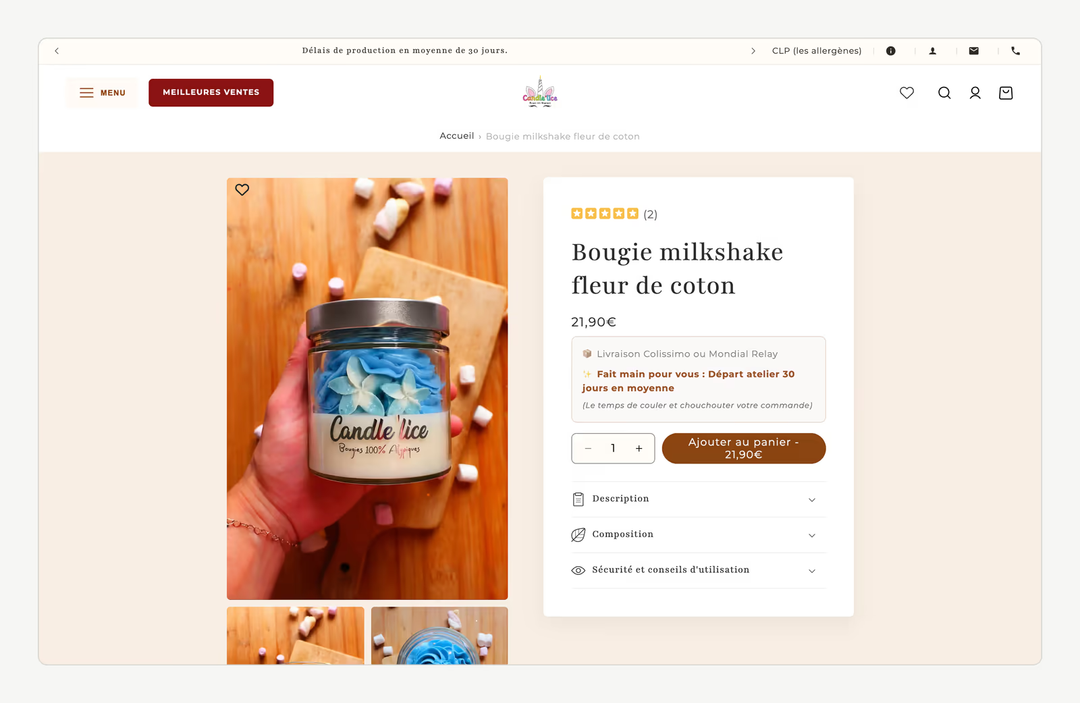
Neither started on WordPress, but both followed the same principles: full transfer, redesign and SEO. Candle'lice, candles hand-poured in France, left ePro Shopping, which capped its catalogue at 200 products and took a 3% commission on each sale, for Shopify, with a full catalogue transfer, a redesign, product pages enriched on how each candle is made and complete technical SEO. Maison Trungadi, bath linen made in Tuscany, migrated to Shopify with a redesign, detailed product pages on materials and fabric weight, and made-to-measure pieces given prominence.
For a store leaving Magento rather than WordPress, our Magento to Shopify migration guide covers configurable products and .html URLs.
Are you planning to migrate from WordPress to Shopify and want your products, posts and rankings to come across intact? Our Shopify migration page details how we work. To discuss your project, get in touch.
Frequently asked questions
Can I migrate from WordPress to Shopify without losing SEO?
Yes, provided every indexed WordPress URL has a 301 redirect to its Shopify equivalent, live at the switch-over, and the content, titles and meta descriptions come across unchanged. Google expects rankings to fluctuate while it recrawls the site. Lasting losses come from a technical cause: missing redirects, regenerated titles, broken images or a crawl block left over from staging.
Does Shopify import WordPress blog posts natively?
No. Shopify's own WooCommerce guide notes that blog posts and pages are not in WooCommerce exports, and the free Store Migration app handles products and customers only. To move posts, use Matrixify's WordPress route, a blog import app from the Shopify App Store, or manual entry. For a few dozen posts, manual entry gives the most control.
Can I keep my WordPress URLs on Shopify?
Only the slug. Shopify enforces fixed paths: /products/ for products, /collections/ for collections, /pages/ for pages and /blogs/<blog>/<article> for posts. A WordPress post at /oak-care/ becomes, for example, /blogs/journal/oak-care. Keeping the slug as the handle makes the redirect map simpler, but every old URL still needs a 301 redirect to its new address.
Do WooCommerce customer passwords transfer to Shopify?
No. Passwords are hashed differently by WordPress and Shopify, so no tool can transfer them. Shopify's new customer accounts, the only version offered to new stores since February 2026, sign customers in with a one-time code sent by email, so customers do not need to create a new password. Send an email on launch day explaining the new sign-in to avoid support requests.
Can WooCommerce orders be migrated to Shopify?
Yes, but not with the free tools. Shopify states that orders can't be imported by CSV, and its Store Migration app handles products and customers only. Matrixify and connection-based services such as LitExtension import order history, which then serves as a record in Shopify for customer service, returns and accounting. Import at least the period covered by your returns and warranty policy.
Should I keep my WordPress blog and only move the shop?
It is possible: the shop moves to Shopify on the main domain, and the blog stays on WordPress on a subdomain such as blog.example.com. You keep the WordPress editor and plugins, but you maintain two platforms and every blog URL still changes host, so redirects are needed anyway. For most brands, one platform and one domain are simpler to run.
How long does a WordPress to Shopify migration take?
It depends on three factors: the number of indexed URLs, the size of the blog and the number of plugins to replace. A small store with a short blog can move in a few weeks; a site with years of posts, backlinks and integrations takes longer, mostly in redirect mapping and testing. Google then needs a few weeks or more to process the new URLs.
Which Shopify plan do I need after leaving WooCommerce?
Start by comparing Basic and Grow. Shopify lists Basic at $39 or £25 and Grow at $105 or £65 a month on monthly billing, or $29 or £19 and $79 or £49 billed yearly. Grow adds up to five staff accounts and lower card rates (2.7% + 30¢ against 2.9% + 30¢ online in the US). Native B2B is available on Basic, Grow and Advanced since 2 April 2026. You can change plan later without migrating again.
Our work
Stores delivered by the studio
 Bath linenMigration and redesign · ShopifyMaison TrungadiBathrobes and bath linen made in Tuscany: a store that does justice to the materials.
 Personalised jewelleryRedesign · ShopifyMayaliceA minimalist luxury redesign and six product configurators to compose a piece of jewellery live.
 Handmade candlesMigration and redesign · ShopifyCandle’liceUnusual candles hand-poured in France, taken off a platform that held them back.