Shopify guides 11 min readPublished
Shopify product configurator: sell personalised products
A Shopify product configurator for personalised products: variants, line item properties, stock per component and live preview, with the Mayalice example.

Contents8 sections
A Shopify product configurator lets a customer compose a personalised product step by step, see it before buying, and send the workshop an order it can make without follow-up. Shopify's native variants and line item properties cover simple cases. Beyond them, when combinations explode or components share stock, a configurator built into the theme becomes worthwhile.
Key takeaways
Variants: Shopify natively handles up to three options and 2,048 variants per product, enough when each combination is a stocked item.
Line item properties carry free text and choices into the order, but change neither price nor stock.
Stock per component requires the order to contain the components, which bundles and the Cart Transform function make possible.
A good configurator shows the result before purchase, validates input and gives the workshop everything it needs.
Returns: in the EU and the UK, clearly personalised goods are excluded from the right of withdrawal, provided this is stated before purchase.
An engraved name, a chosen set of charms, a gift box the customer fills herself: a personalised product sells poorly through a standard product page. This guide is for brands that sell personalised or made-to-order products on Shopify. It explains the native mechanisms and their limits, when to move to a configurator, how to manage stock per component, and what the configurators built for Mayalice show. Shopify facts come from its documentation and changelog, consulted on 7 November 2026. Configurators are one of the developments we take on in a custom Shopify store build.
What Shopify does natively
Shopify natively handles personalisation through variants, line item properties and bundles, and each has a clear limit. Knowing those limits is what tells you whether you need a configurator at all.
Options and variants
A Shopify variant is a combination of option values, with its own price, SKU and stock. Shopify allows up to 2,048 variants per product and up to three options, a limit raised from 100 to 2,048 variants for all merchants on 15 October 2025.
That is the right answer when each combination is a real item, made in advance and stocked: a jumper in five sizes and four colours, for example. It is the wrong answer when the combination only exists at the moment of ordering. A necklace with a name of the customer's choice and three charms out of forty does not fit into variants, and would make no sense to stock.
On Shopify Plus, the Combined Listings app can also group separate products into a single listing, which helps when one product line exceeds the variant limits. It does not solve free-text personalisation; our guide to Shopify Plus lists the other features reserved for that plan.
Line item properties
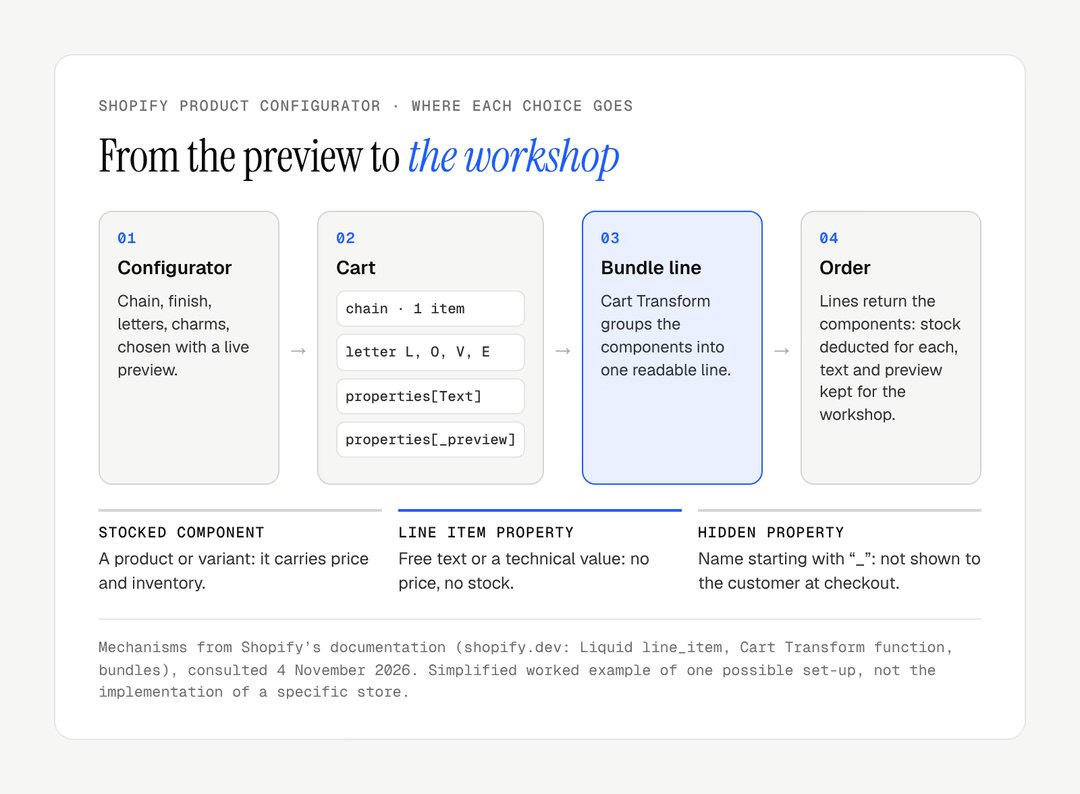
Shopify's own documentation says that to go beyond 2,048 variants or three options, you can use an app or customise the theme to collect line item properties. These are pieces of information attached to an item in the cart, entered by the customer in the product form. In the theme, each field has a name in the form properties[Name], and the value follows the item through to the order (Liquid documentation). They can also be sent through the Ajax Cart API. A property name that starts with an underscore, such as properties[_preview], is hidden from the customer at checkout: useful for passing technical data to the workshop.
Line item properties have two limits you need to know before designing anything. They do not change the price: the line price stays the variant's price. And they deduct no stock: writing "moon charm" in a property does not remove a moon charm from inventory.
Bundles
To sell several items together, Shopify offers the Shopify Bundles app, which handles fixed bundles (a predefined set of products) and multipacks. For bundles composed by the customer, Shopify points developers to customised bundles, built with the Cart Transform function. It can expand one cart line into several components, merge several lines into a single bundle, or override the price, title and image of a line. That last type of operation is limited to Shopify Plus stores and development stores.
The decisive point is on the order side: Shopify states that the lines of a bundle order return the components, with a reference to the parent bundle. That is what makes it possible to track stock and fulfilment component by component.
Need | Native mechanism | Limit |
|---|---|---|
A few stocked combinations | Options and variants | Three options, 2,048 variants per product |
Free text (engraving, message) | Line item properties | No effect on price or stock |
Fixed bundle or multipack | Shopify Bundles app | Composition set by the brand, not the customer |
Bundle composed by the customer | Customised bundle, Cart Transform function | Development required, with constraints (see below) |
When to move to a Shopify product configurator
Move to a configurator when the product is no longer chosen from a list but composed. Native mechanisms are enough as long as the customer picks a variant. These signals say otherwise:
Signal | What you see today | What a configurator changes |
|---|---|---|
Combinations explode | Names, initials, assemblies far beyond what variants can hold | Choices built step by step, with rules |
Components are shared | The same bead on a bracelet, a necklace and an earring | One stock per component, everywhere |
The customer needs to see | Hesitation, or questions by email after ordering | A live preview of the finished piece |
Orders are processed by hand | Details by email, checks, calls to the customer | A complete order, ready for the workshop |
The last signal is often the most expensive, and it is the one that started the Mayalice project.
The three building blocks of a Shopify product configurator
A configurator rests on three building blocks: a data model, an interface with a live preview, and a translation into cart lines the workshop can read.
The data model
Before the interface, describe the product. What are the components, which ones carry stock, which ones are compatible with each other, what is the minimum and maximum number, which characters can be engraved and over what length? In Shopify, stocked components are products or variants in their own right, with their inventory. Composition rules can live in metafields or metaobjects, which the team can edit from the admin without touching code.
This modelling work shapes everything else. A poorly framed model produces a configurator that cannot evolve without being rebuilt.
The interface and the live preview
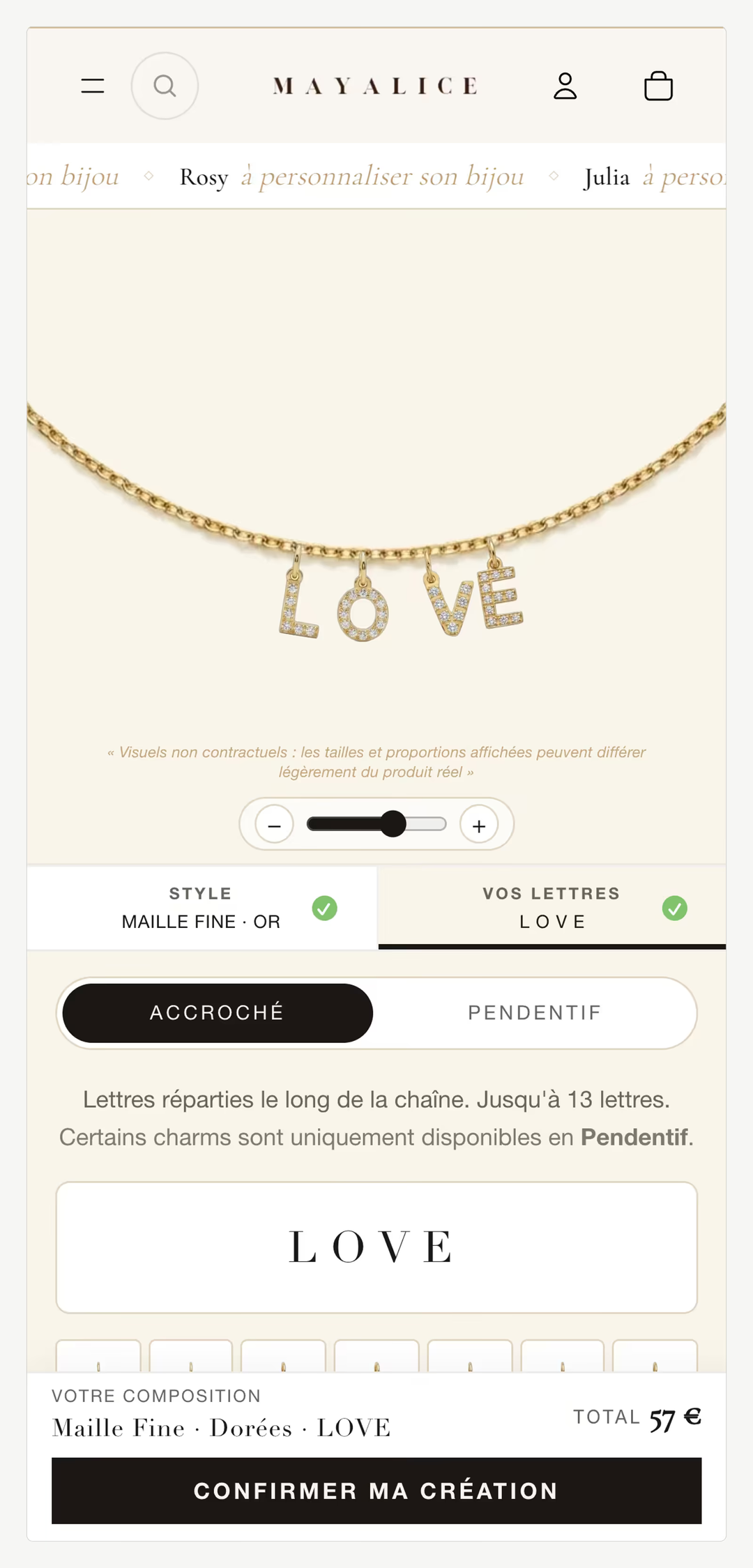
The customer builds her piece step by step, and each choice is visible immediately. On jewellery, the preview usually layers images of each component, shot with the same framing and lighting. A few rules prevent most failures:
one step at a time on mobile, with a summary of price and choices always visible;
constraints shown before the error: characters remaining, sold-out components greyed out with their name;
a preview that reacts instantly, without waiting for a server request, which means preloading images and keeping the code light. A slow configurator drags down the Shopify INP responsiveness of the whole page;
a configurator usable with a keyboard and a screen reader: each choice is a real form field with its label, and the preview has a text description, as the European Accessibility Act requires for stores selling to EU consumers.
Cart, order and workshop
When the item is added, the configurator translates the composition into cart lines. Free text goes into line item properties. Stocked components become items, grouped into a bundle. Information useful to the workshop but not to the customer, such as the composition ID or the URL of the preview image, goes into hidden properties. The aim is simple: the person making the piece should find everything they need in the order, without opening their inbox.
Stock per component
Stock per component means that each sale deducts the parts actually used, not a finished piece that was never stocked. If the finished piece is a variant with its own stock and its components have theirs, the two counters diverge at the first sale. There are three approaches.
Approach | Principle | Advantages | Limits |
|---|---|---|---|
Components as separate lines | Each component is a cart item, linked by a shared property | Simple, no server-side development | The cart shows parts, not a jewel; price hard to read |
Customised bundle (Cart Transform) | Components grouped into one bundle line; the order holds the components | Readable cart, stock per component | One cart transform function per app per store; rejected with a selling plan |
External sync | An app or service recalculates stock after each order | Very specific stock logic possible | One more piece to maintain, gaps between syncs |

The choice depends on volume, on how many components are shared and on how the team prepares orders. In every case, test the edge cases before launch: a component selling out while the customer is building her piece, a cancelled order, a partial refund, the return of a single element.
The Mayalice example
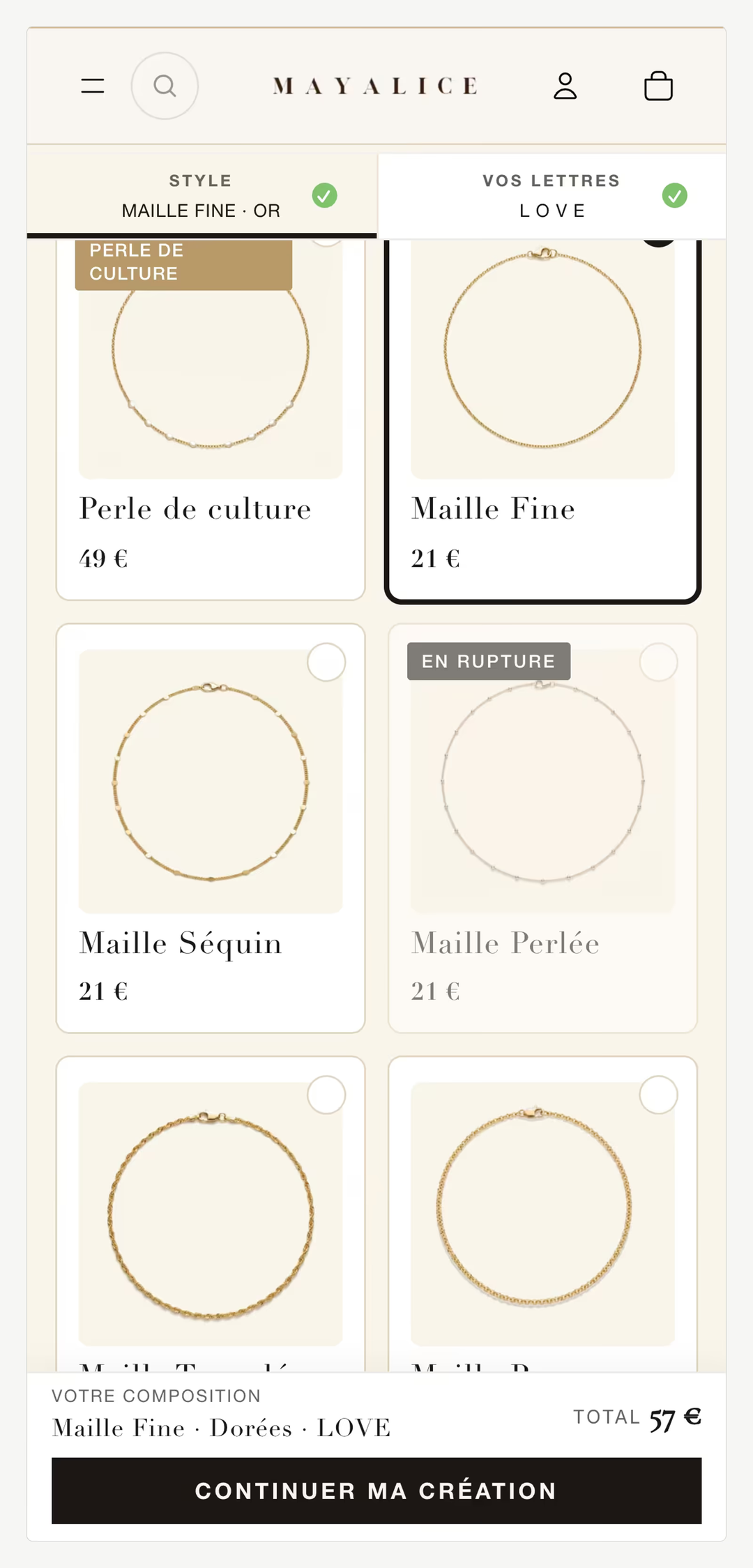
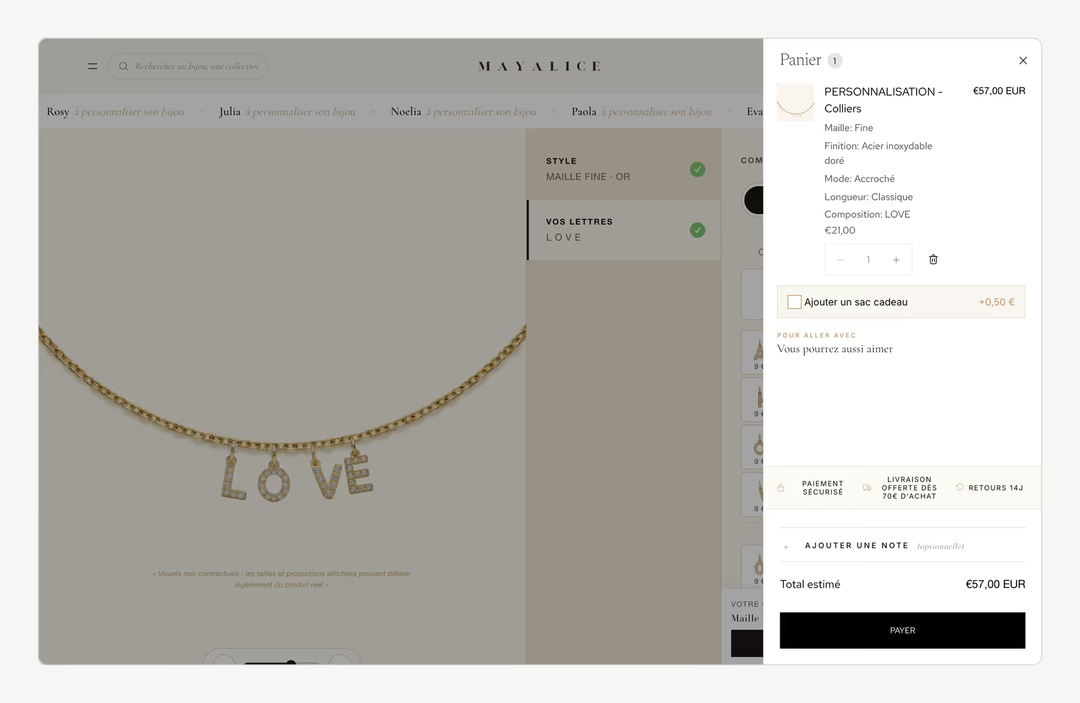
Mayalice shows what a configurator changes when personalisation is the product itself. The brand makes personalised stainless steel jewellery: name necklaces, pregnancy bolas, bracelets, individual charms. Before the project, the store relied on standard product pages. Every order was handled by hand: details arrived by email, the team checked each component, then assembled the piece.
The brief came down to three requirements: let customers compose their jewellery with a live preview, deduct stock for every component used, and keep Shopify's native checkout and shipping. We redesigned the theme and built six configurators: name necklaces, bracelets, bolas, Mother's Day necklaces, pearl necklaces and individual charms. The preview updates in real time, stock is unified between the finished piece and its components, synchronised with the Shopify admin, and a photo of the final composition is attached to every order.
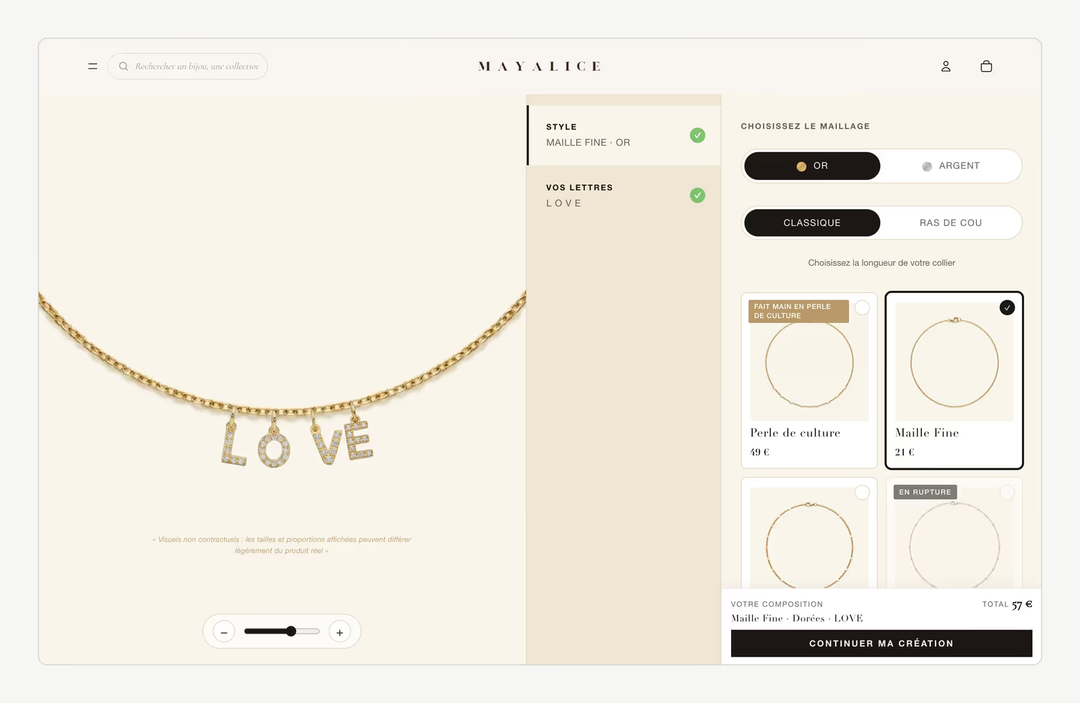
The result is above all operational: personalised orders are processed without manual intervention, and the stock of each component follows sales with no maintenance. That is often the main gain from a configurator, before any effect on sales.
Common configurator mistakes
The costliest mistakes are made before any code: forcing everything into variants, or letting the browser set the price.
Mistake | Effect | Correction |
|---|---|---|
Thousands of variants to avoid development | Tedious to manage, heavy to load, shared parts unsolved | Model components as products, compose them |
Price calculated only in the browser | The cart charges a different price: disputes | Price from the items added or a Cart Transform |
The whole product in an app iframe | Appearance, speed and accessibility out of your hands | Build the configurator into the theme |
Returns rule not stated | Disputes over personalised items | State the exception on the page and in the terms |
No validation step | Misspelt engravings, customer service load | A summary with preview, text, parts and price |
On price, note one constraint: merge and expand operations of Cart Transform can adjust a bundle's price, while overriding a line's price outright with an update operation is limited to Shopify Plus.
On returns, goods made to the consumer's specifications or clearly personalised are an exception to the 14-day right of withdrawal under Article 16(c) of the Consumer Rights Directive in the EU, and under regulation 28(1)(b) of the Consumer Contracts Regulations 2013 in the UK. Separate what is actually personalised (an engraving) from what is not (a standard chain sold with it). In the US, there is no general statutory right to cancel an online purchase, so your returns policy sets the rules.
What to prepare before starting the project
A configurator is costed and delivered on the quality of the brief. Prepare the list of components with their constraints, the compatibility rules, images of each part with the same framing, a description of how the workshop prepares an order today, and the edge cases you already know about. The more precise this material, the more reliable the estimate. A configurator also depends on the components around it, the cards, toggles and summary bar, which are easiest to keep consistent with an ecommerce design system.
Do your products need more than a variant picker? A configurator touches the theme, the catalogue, stock and order preparation, so it is designed with the team that makes the products. Our custom Shopify store and Shopify redesign pages describe how we work; to discuss it from your own products, get in touch.
Frequently asked questions
Should I use an app or a custom build?
It depends on the configurator's place in the sale. A personalisation app suits common needs: a text field, a font choice, an uploaded image. A custom build is justified when composition follows rules specific to the brand, when stock must be tracked per component or when the preview must be faithful to the real product. The more central the configurator, the more it pays to control it.
Can a Shopify product have more than three options?
Not with native options: a Shopify product has at most three options and 2,048 variants. Shopify itself points to two routes beyond that: a third-party app, or a theme customisation that collects the extra choices as line item properties. In the second case, the extra choices have no price or stock of their own unless you model them as components.
Can a personalised product be returned?
In the EU and the UK, the 14-day right of withdrawal does not apply to goods made to the consumer's specifications or clearly personalised. The exception must be stated clearly before purchase, and it does not cover manufacturing defects, which remain subject to the legal guarantee of conformity in the EU and to the Consumer Rights Act 2015 in the UK. In the US, returns follow your own policy.
Does a configurator hurt SEO?
Not if it is built into the theme and the product page keeps readable content: title, description, photos of the finished product, information on materials. The risk comes from configurators that replace the whole page content with a module loaded in JavaScript or in an iframe. The page should remain a proper product page, with the configurator on top.
Do I need Shopify Plus for a product configurator?
No. Variants, line item properties, bundles and the Cart Transform function's merge and expand operations are available on all plans. What is reserved for Shopify Plus and development stores is the update operation, which overrides a cart line's price, title or image outright. Design the pricing around the items added and you rarely need it.
Can I charge extra for a personalisation?
Yes, but not through a line item property, which never changes the price. The extra must come from an item: an engraving product added to the cart, a component with its own price, or a bundle whose price is adjusted by a Cart Transform merge or expand operation. That way the price the customer sees is the price Shopify charges.
Does a configurator work with Shopify's native checkout?
Yes. A configurator built into the theme ends by adding items and properties to the standard cart, then hands over to Shopify's checkout as any product would. That was one of the Mayalice requirements: keep Shopify's native checkout and shipping while customers compose their jewellery with a live preview.
Where does the workshop see the personalisation?
In the order. Line item properties are stored with each line and appear in the order details in the Shopify admin. Properties whose name starts with an underscore are hidden from the customer at checkout but still reach the order, which is how a composition ID or the URL of a preview image can be passed to the workshop.
Our work
Stores delivered by the studio
 Personalised jewelleryRedesign · ShopifyMayaliceA minimalist luxury redesign and six product configurators to compose a piece of jewellery live.
 Bath linenMigration and redesign · ShopifyMaison TrungadiBathrobes and bath linen made in Tuscany: a store that does justice to the materials.
 Handmade candlesMigration and redesign · ShopifyCandle’liceUnusual candles hand-poured in France, taken off a platform that held them back.