Shopify guides 13 min readPublished
Shopify Plus vs Shopify: cost, features and when it pays
Shopify Plus vs Shopify in 2026: Plus starts at $2,300, £1,800 or €2,100 a month. What is still reserved to it, and the sums that show when it pays off.

Contents11 sections
- What is Shopify Plus?
- How much does Shopify Plus cost?
- Shopify vs Shopify Plus: what really changes
- What is still Plus-only in 2026
- Features that moved into the standard plans
- Is Shopify Plus worth it?
- The signals that justify moving to Plus
- When to stay on Advanced or choose another platform
- A brand that moved to Shopify Plus
- Moving to Shopify Plus: the steps
- Frequently asked questions
Shopify Plus vs Shopify comes down to a few reserved features, not to lower fees. Plus starts at $2,300 a month in the US on a three-year term ($2,500 on one year), £1,800 in the UK (£1,950 on one year) and €2,100 in the eurozone (€2,250 on one year), against $299 to $399 for Shopify Advanced. Since native B2B, Shopify Flow and Functions through public apps opened to the standard plans, Plus is justified by checkout, custom code and multi-store needs.
Key takeaways
Price: from $2,300, £1,800 or €2,100 a month on a three-year term, more on one year, plus a possible variable platform fee whose rate Shopify does not publish.
Plus-only in 2026: extensions on the information, shipping and payment steps of checkout, Functions in custom apps, Launchpad, up to nine expansion stores, unlimited B2B catalogues and unlimited staff accounts.
Open to Basic, Grow and Advanced: Shopify Flow, native B2B (since 2 April 2026), Shopify Markets and Functions through public apps. Shopify Scripts stopped running on 30 June 2026.
Return on investment: in the US, Plus saves 0.25 points on a standard card over Advanced; that saving alone covers the subscription gap only above about $800,000 of monthly sales.
This guide is for brands already selling on Shopify Advanced, or on another platform, who want to know whether Shopify Plus is worth its price. Prices come from Shopify's pricing page, its UK pricing page and the Help Center page on the Shopify Plus plan, excluding tax, read on 7 November 2026. If you are planning the store of an established brand, our custom Shopify store page explains how we work, whatever the plan.
What is Shopify Plus?
Shopify Plus is the highest Shopify plan, sold on a one- or three-year contract. The software is the same as on Basic, Grow or Advanced: same admin, same themes, same App Store. Plus adds rights, higher limits and support, not a different platform.
That continuity matters. Moving from Advanced to Plus requires no data migration and no redesign: the features switch on in the existing store, and the effort goes into what you build with them.
The vocabulary used in the rest of this guide:
Checkout: Shopify's payment flow, from the address to the confirmation, hosted by Shopify on every plan.
Checkout Extensibility: the framework for adding blocks and rules to checkout since
checkout.liquidwas retired. For Plus stores, that happened on 13 August 2024 for the information, shipping and payment pages and on 28 August 2025 for the Thank you and Order status pages; other plans had until 26 August 2026 to upgrade those last two pages.Shopify Functions: code run by Shopify to change a piece of logic (discounts, shipping, payment methods, cart validation), which replaced Shopify Scripts.
Expansion store: an additional Shopify store attached to the same Plus contract, with its own domain, catalogue and settings.
Variable platform fee: an amount based on revenue and business model that Shopify may add to the subscription.
How much does Shopify Plus cost?
The Help Center lists Shopify Plus at $2,300 a month in the US on a three-year term and $2,500 on a one-year term. In the UK it costs £1,800 or £1,950, and in the eurozone €2,100 or €2,250. The "from" price shown on Shopify's pricing pages is the three-year rate, so check which term a quote assumes.
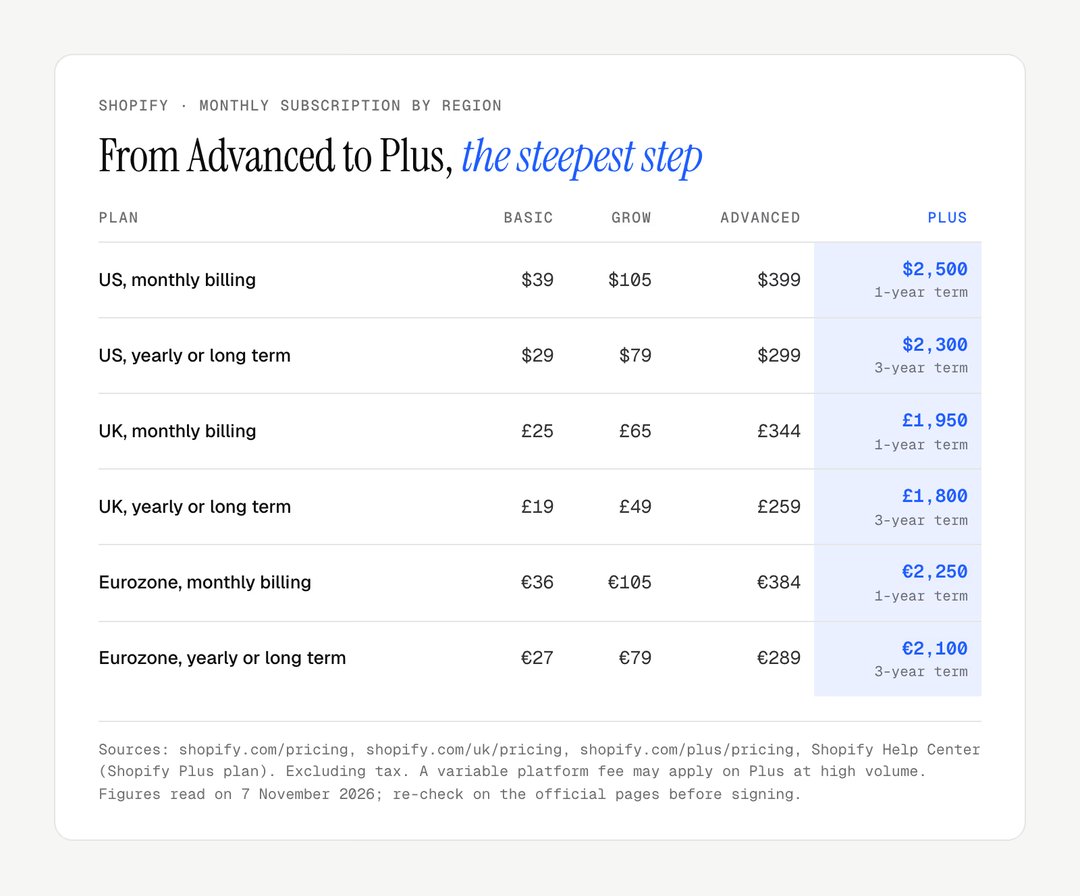
Item | US | UK | Eurozone |
|---|---|---|---|
Subscription, one-year term | $2,500/month | £1,950/month | €2,250/month |
Subscription, three-year term | $2,300/month | £1,800/month | €2,100/month |
Standard online card, Shopify Payments | 2.25% + 30¢ | 1.3% + 25p | 1% + €0.25 |
Third-party payment provider fee | 0.2% | 0.2% | 0.2% |
Variable platform fee | possible, rate not published | possible | possible |
Expansion stores | up to 9 | up to 9 | up to 9 |
Staff accounts | unlimited | unlimited | unlimited |
Over a year, the subscription alone comes to $30,000 on a one-year term in the US, or $27,600 a year on a three-year term, that is $82,800 over the contract. For comparison, Shopify Advanced costs $399 a month on monthly billing and $299 on yearly billing, or $3,588 a year.
The variable platform fee
The Help Center states that there "might be a variable platform fee based on your revenue and business model", which differs between B2B and direct-to-consumer businesses. Shopify publishes neither the rate nor the threshold. Percentages quoted on third-party sites are not Shopify's figures: ask for the rate, threshold and any cap in writing, in the commercial proposal, before you compare.
The costs on top of the subscription
Plus changes nothing about the other costs of a store: the theme (each live expansion store needs its own theme licence, the Help Center notes), apps, the development of checkout extensions or custom Functions, and maintenance. These are the items that separate a Plus contract that is used from one that is merely paid for.
Good to know
The FAQ on Shopify's pricing pages states that a one- or three-year Plus subscription can be cancelled when the term commitment expires. The three-year term saves $200 a month in the US, but binds you for longer: choose it only if the need is lasting.
Shopify vs Shopify Plus: what really changes
Between Shopify Advanced and Shopify Plus, the difference lies less in fees than in rights over checkout, code and the number of stores. The table uses the US and UK grids.
Criterion | Basic | Grow | Advanced | Plus |
|---|---|---|---|---|
Monthly billing (US) | $39 | $105 | $399 | $2,500 (1 year) |
Yearly or long term (US) | $29 | $79 | $299 | $2,300 (3 years) |
Monthly billing (UK) | £25 | £65 | £344 | £1,950 (1 year) |
Standard online card (US) | 2.9% + 30¢ | 2.7% + 30¢ | 2.5% + 30¢ | 2.25% + 30¢ |
Standard online card (UK) | 2% + 25p | 1.7% + 25p | 1.5% + 25p | 1.3% + 25p |
Third-party provider fee | 2% | 1% | 0.6% | 0.2% |
Staff accounts | none extra | 5 | 15 | unlimited |
Active B2B catalogue assignments | 3 | 3 | 3 | unlimited |
Extensions on checkout steps | no | no | no | yes |
Expansion stores | — | — | — | up to 9 |
Two readings stand out. First, the step from Grow to Advanced is modest, while the step from Advanced to Plus is about sixfold on monthly billing: nobody should move to Plus out of habit. Second, on card fees Plus saves only a quarter of a point over Advanced in the US and a fifth of a point in the UK; the gap widens only with a third-party provider, from 0.6% to 0.2%.
What is still Plus-only in 2026
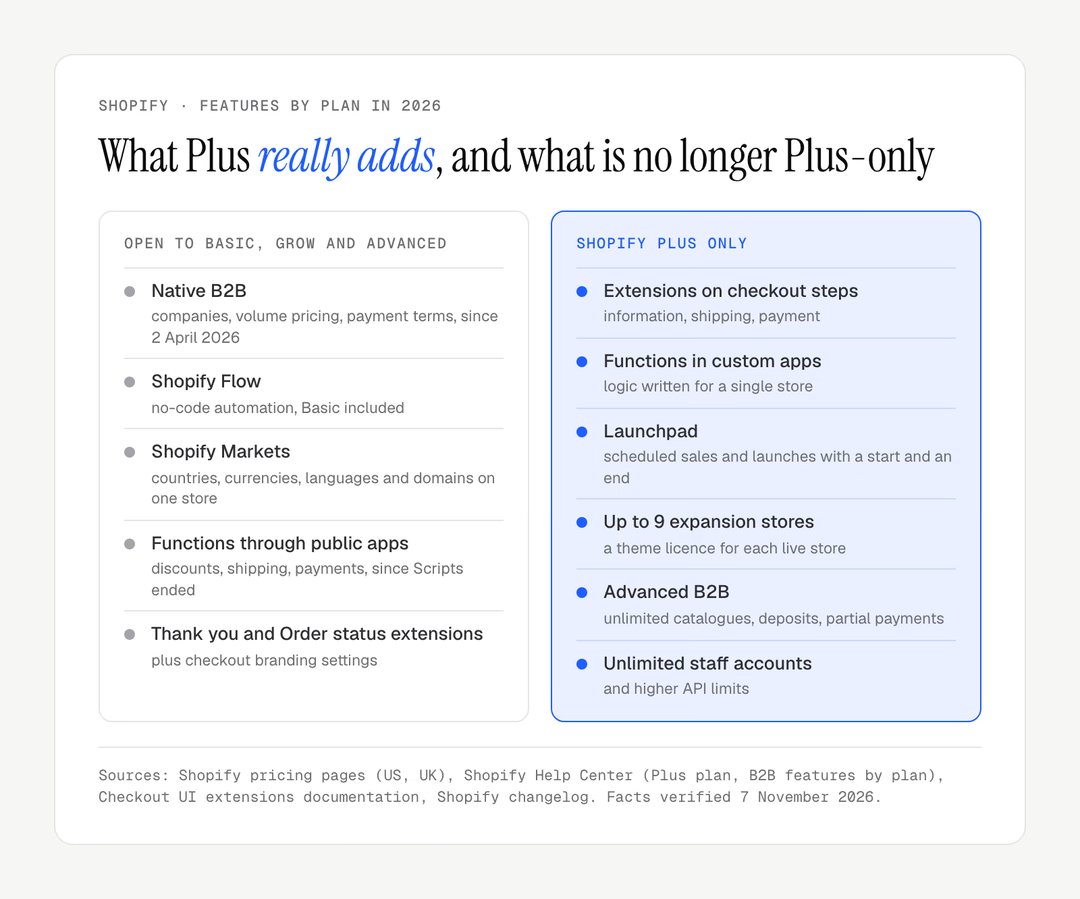
Six groups of features remain reserved to Shopify Plus in 2026: the full checkout, custom code, scheduled events, multiple stores, advanced B2B and higher technical limits. The diagram separates what is reserved from what no longer is.
The full checkout
The Checkout UI extensions documentation says it in one line: extensions for the information, shipping and payment steps are available only to stores on Shopify Plus. On other plans, you set checkout branding in the editor and add blocks to the Thank you and Order status pages, not inside the flow itself.
In practice, Plus lets you add a field (VAT number, gift message, preferred delivery date), an offer before payment, a loyalty reminder, or separate journeys for trade and consumer buyers in the same store. Each extension has to be designed and built: the right is included, the work is not.
Functions in custom apps
Stores on any plan can use Shopify Functions through public apps from the App Store. Only Plus stores can use custom apps that contain Functions, written for a single store, as the Functions documentation states. The distinction matters since Shopify Scripts were retired on 30 June 2026: a discount or shipping rule specific to your brand, which no public app covers, now goes through Plus.
Launchpad and commercial events
Launchpad, available only to Shopify Plus customers, schedules sales, product releases, theme changes and discounts with a start and an end time. Other plans can publish a product at a given date; Launchpad orchestrates the whole event. It suits brands that live by launches and private sales.
Expansion stores
Plus supports up to nine expansion stores. Each is a complete store with its own domain, theme, apps and team. To sell to several countries from one store, Shopify Markets is enough on every plan; expansion stores help when a market needs separate operations (catalogue, logistics, customer service). Managed Markets, where Global-e acts as merchant of record, is open to merchants based in the continental US and to certain stores in Canada and the UK, not to EU-based ones.
Advanced B2B
Native B2B has been open to Basic, Grow and Advanced since 2 April 2026: company accounts, volume pricing, quantity rules, payment terms, vaulted cards. According to Shopify's B2B features by plan, Plus lifts the limit of three active catalogue assignments and adds catalogues assigned directly to a company, deposits, partial payments and payment requests per fulfilment. Our guide to Shopify B2B details that base.
Technical limits and support
On the GraphQL Admin API, a Plus store restores 1,000 points a second, against 200 on Advanced and 100 on the other plans. Plus also opens Plus-only API resources (Multipass, gift cards, users), allows up to 25 headless storefronts and adds priority support around the clock. These rights mainly concern brands that connect the store to an ERP, an in-house loyalty programme or a storefront built separately.
Features that moved into the standard plans
Several historical arguments for Shopify Plus no longer hold in 2026, because the matching features moved into the standard plans. Much of what is written about Plus predates these changes.
Feature | Before | In 2026 | Source |
|---|---|---|---|
Shopify Flow | higher plans only | Basic, Grow, Advanced and Plus | Shopify changelog, July 2023 |
Native B2B | Plus only | Basic, Grow, Advanced and Plus | Shopify changelog, 2 April 2026 |
Coded discount logic | Shopify Scripts, Plus only | Functions through public apps | Help Center, Scripts retired 30 June 2026 |
Multi-country selling | one store per country | Shopify Markets on one store | Help Center, Markets |
Thank you and Order status pages |
| extensions, every plan | Help Center, deadline 26 August 2026 |
The consequence is simple: a brand that considered Plus to automate orders, sell to trade buyers or sell abroad can often stay on Advanced. Before signing, list your needs and tick only those that are genuinely in the "Plus only" column.
Is Shopify Plus worth it?
Shopify Plus is worth it when its reserved features add more margin than the extra subscription costs; fee savings alone almost never cover it. With Shopify Payments in the US, Plus saves 0.25 points on a standard card over Advanced: it takes $800,400 of monthly sales for that saving to offset the $2,001 subscription gap on its own (Plus on a three-year term against Advanced on yearly billing). With a third-party provider, the fee gap is 0.4 points and the threshold falls to $500,250 a month.
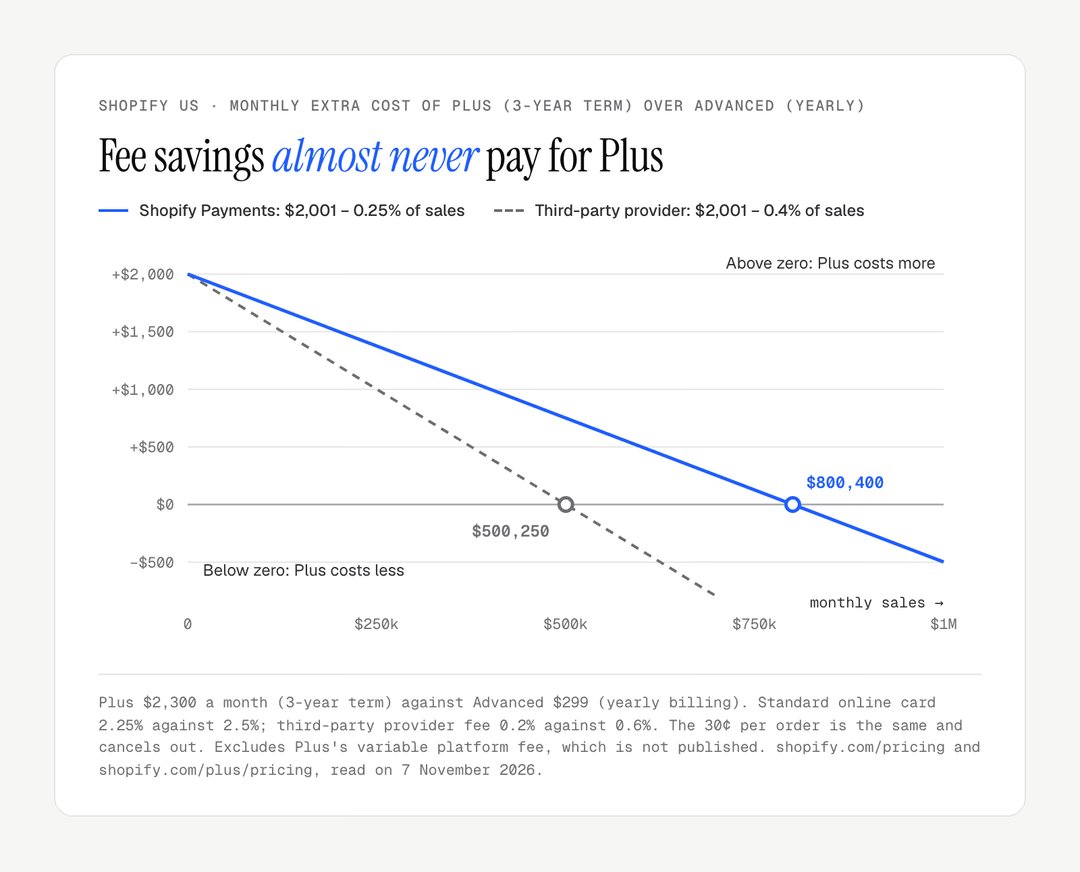
In the UK, the arithmetic is similar: £1,800 on Plus (three-year term) against £259 on Advanced with yearly billing, a gap of £1,541, and a card saving of 0.2 points, so the fee saving pays for the subscription only above about £770,000 of monthly sales.
Worked example: a brand with $150,000 of monthly sales
Take a US brand selling $150,000 a month with an average order of $90, about 1,667 orders, all paid by standard cards through Shopify Payments.
Item | Assumption | Advanced (yearly) | Plus (3 years) |
|---|---|---|---|
Subscription | US grid, November 2026 | $299 | $2,300 |
Percentage fee | 2.5% or 2.25% of $150,000 | $3,750 | $3,375 |
Fixed fee | 30¢ × 1,667 orders | $500 | $500 |
Monthly cost | $4,549 | $6,175 | |
Extra cost of Plus | $1,626 a month, $19,512 a year |
To cover that gap, Plus features must produce $1,626 of extra margin every month. With a gross margin of 40% (assumption) and the payment fees on those sales deducted, that means about $4,350 of extra sales a month, or 2.9% of revenue. The question becomes concrete: will an offer added to checkout, a B2B journey with deposits or a custom discount rule bring 2.9% more sales?

The same brand with a third-party provider would pay $900 of Shopify fees on Advanced and $300 on Plus, bringing the extra cost of Plus down to $1,401 a month. In both cases, the calculation runs on your margin, not on your revenue, and must include the variable fee if Shopify's proposal contains one.
The signals that justify moving to Plus
Moving to Shopify Plus is justified when a precise need can only be met by a reserved feature, and that need weighs on sales or operations. The table pairs each signal with how to handle it without Plus.
Signal | Why Plus answers it | What works without Plus |
|---|---|---|
Checkout needs fields or offers | Extensions on checkout steps | Richer cart in the theme, Thank you page |
A discount or shipping rule specific to the brand | Functions in a custom app | Public discount or shipping app |
More than three B2B catalogues, deposits, partial payments | Advanced B2B | Native B2B with three catalogues |
Several markets with separate operations | Up to 9 expansion stores | Shopify Markets on one store |
Many launches at a set time | Launchpad | Scheduled publishing, a scheduling app |
More than 15 people in the admin | Unlimited staff accounts | Advanced and its 15 accounts |
A heavy ERP integration | Higher API limits | Market connector, batch sync |
High revenue is not a signal in itself. Shopify writes that there is no universal revenue threshold for the Plus plan. A brand selling $300,000 a month with a standard checkout, one market and a team of ten has, on paper, no reason to pay for Plus.
When to stay on Advanced or choose another platform
Shopify Plus is the wrong choice for a brand whose needs sit in the "open to the standard plans" column, and for a project whose logic falls outside Shopify's model. In the first case, Advanced is enough; in the second, another platform may fit better. The last four rows are our assessment, not vendor figures.
Platform | Pricing model | When it fits | The limit |
|---|---|---|---|
Shopify Advanced | $299 to $399 a month | Standard needs, simple B2B, several markets through Markets | Limited checkout, three B2B catalogues |
Shopify Plus | from $2,300 a month | Extended checkout, custom logic, multiple stores | One- to three-year term, possible variable fee |
Adobe Commerce | on quote | Very specific business logic, full control of code | Technical team and maintenance at your charge |
BigCommerce Enterprise | on quote | API-first architecture | Smaller app ecosystem |
Salesforce Commerce Cloud | on quote | Groups already on Salesforce | Heavy implementation |
commercetools | on quote | Fully headless architecture | Needs a dedicated development team |
For smaller catalogues, the question is sometimes Shopify against an open-source stack; our comparison of Shopify vs WooCommerce covers that trade-off. For many brands, the question is not the plan but the design: a well-built theme and a clear product page change sales more than a right over checkout. Our comparison of a custom or premium Shopify theme sets out that choice.
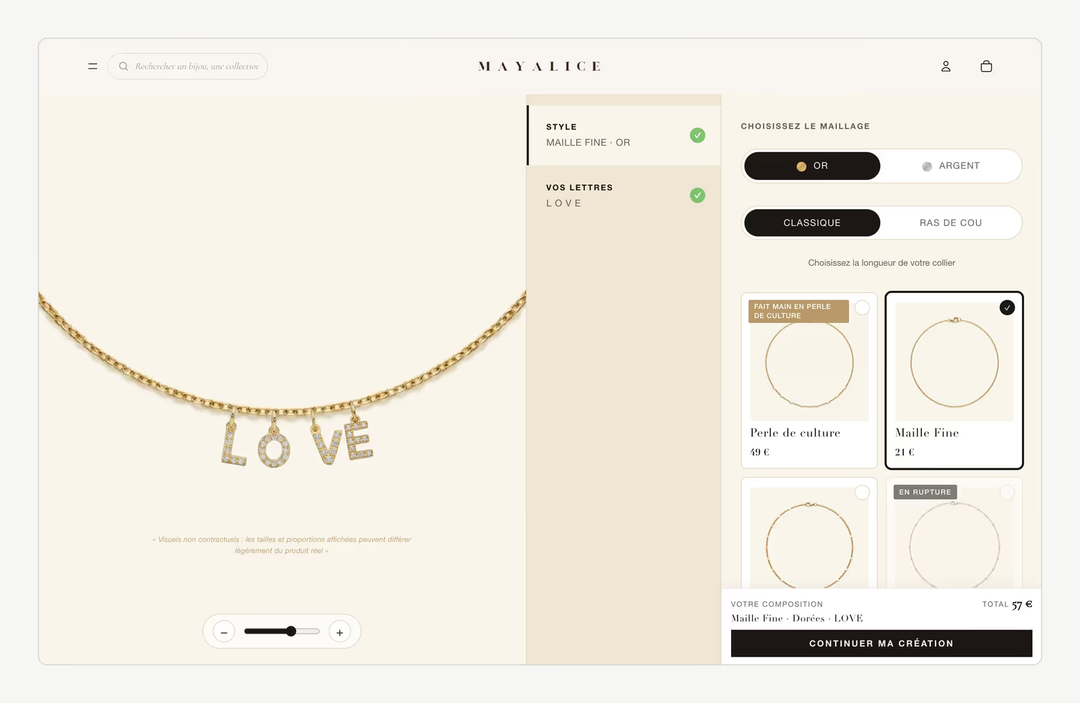
Our guide to the Shopify product configurator explains how that kind of personalisation is built without Plus.
A brand that moved to Shopify Plus
Shopify's own case studies show why brands choose Plus, not what it would earn for another business. In its Gymshark case study, Shopify reports that the British sportswear brand's Adobe Commerce (Magento) site went down for eight hours one Black Friday, at an estimated cost of £100,000, before the move to Shopify Plus. The reason given is capacity under load, a need that most brands meet long before they reach Gymshark's size on the standard plans, which run on the same infrastructure.
Moving to Shopify Plus: the steps
Moving to Shopify Plus from a Shopify store is a change of contract; coming from another platform is a full migration. The two paths carry neither the same risk nor the same budget.
From a standard Shopify plan
Data, theme and apps stay in place: Shopify changes the plan once the contract is signed. The work starts afterwards, with the checkout extensions, custom Functions or expansion stores that motivated the move. Prepare the list of those projects before signing, so that a one- to three-year commitment starts with a plan for using it.
From another platform
Coming from Magento, PrestaShop or WooCommerce calls for a proper migration:
Inventory of data, extensions and existing integrations.
Data migration: products, customers, orders, content.
Design and build of the theme, then of the Plus-specific extensions.
Redirect map from every old address to the new one.
Acceptance testing of checkout, emails and integrations, then launch.
The most underestimated item is the redirect map: without it, the store loses the rankings it has built on Google. Our guides to Magento to Shopify migration and to Shopify migration SEO detail the method.
Do you need a Shopify Plus agency?
No. Shopify Plus does not require a particular provider, and the contract is signed directly with Shopify. For a Plus store, ask any provider above all for examples of checkout extensions or Functions already delivered, and who will maintain them.
Are you weighing Advanced against Shopify Plus, or preparing a move from another platform? Our Shopify migration page explains our method, and our Shopify redesign page our approach for an existing store. To discuss your project, get in touch.
Frequently asked questions
Does Shopify Plus take a commission on sales?
Partly. With Shopify Payments, you pay card rates, 2.25% + 30¢ for a standard online card in the US or 1.3% + 25p in the UK. With a third-party payment provider, Shopify adds a 0.2% fee on top of that provider's charges. Some contracts also include a variable platform fee, set in the proposal.
At what revenue should you move to Shopify Plus?
Shopify itself says there is no universal revenue threshold for Plus. The decision depends on needs only Plus covers: checkout steps to customise, custom logic, several stores, advanced B2B. On fees alone, Plus pays for itself in the US only above about $800,000 of monthly sales with Shopify Payments, or $500,000 with a third-party provider.
Can you cancel Shopify Plus at any time?
No. Shopify Plus is sold on a one- or three-year subscription, and the FAQ on Shopify's pricing pages states that you can cancel when the term commitment expires. The three-year term costs less per month, $2,300 against $2,500 in the US, but commits you for longer.
Can you customise checkout without Shopify Plus?
In part. On every plan, you can brand checkout in the editor and add extensions to the Thank you and Order status pages. Extensions on the information, shipping and payment steps, such as an extra field or an offer before payment, are reserved for Shopify Plus. Since checkout.liquid was retired, Checkout Extensibility is the only way to customise checkout.
Is Shopify Plus available in the UK and Europe?
Yes. Shopify Plus is sold in the UK at £1,800 a month on a three-year term or £1,950 on one year, and in the eurozone at €2,100 or €2,250. Managed Markets, the Global-e option that acts as merchant of record, has been open to certain UK stores since 15 July 2026, but not to merchants based in the EU.
Shopify Plus or Adobe Commerce: which should you choose?
Shopify Plus suits most established brands: hosted, maintained by Shopify, quick to launch and backed by a large app ecosystem. Adobe Commerce fits projects with very specific business logic that need full control of the code, provided a technical team maintains it. With Adobe Commerce, licence, hosting and development are all at your charge, so compare total costs over three years, not subscriptions.
Our work
Stores delivered by the studio
 Personalised jewelleryRedesign · ShopifyMayaliceA minimalist luxury redesign and six product configurators to compose a piece of jewellery live.
 Bath linenMigration and redesign · ShopifyMaison TrungadiBathrobes and bath linen made in Tuscany: a store that does justice to the materials.
 Handmade candlesMigration and redesign · ShopifyCandle’liceUnusual candles hand-poured in France, taken off a platform that held them back.