Comparisons 16 min readPublished
Shopify vs WooCommerce: cost, SEO and which to choose
Shopify vs WooCommerce compared on year-one cost, SEO, speed, security and exit, with a worked cost example and the cases where each one wins.

Contents14 sections
- Shopify and WooCommerce at a glance
- Shopify vs WooCommerce: the verdict by criterion
- Ease of use and day-to-day running
- Design and customisation
- Native ecommerce features
- Shopify vs WooCommerce for SEO
- Performance and Core Web Vitals
- Shopify vs WooCommerce cost over a year
- Security, maintenance and compliance
- Scalability and international selling
- Leaving the platform: data and portability
- Which should you choose?
- Migrating from WooCommerce to Shopify
- Frequently asked questions
In the Shopify vs WooCommerce choice, Shopify suits most brands that want to sell without running a server; WooCommerce suits teams that already run WordPress, have a developer and want full control of code and hosting. The price gap is smaller than it looks: WooCommerce is free to install, not to run.
Key takeaways
Model: Shopify is a hosted platform paid by subscription; WooCommerce is a free WordPress plugin that you host, update and secure.
Cost: Shopify Basic is $39 a month in the US, £25 in the UK and €36 in the euro area ($29, £19 and €27 billed yearly). WooCommerce costs less in cash only if someone in-house maintains it.
Strengths: Shopify wins on checkout, maintenance, traffic peaks and native features; WooCommerce wins on technical freedom, editorial content and data ownership.
SEO: a draw. Both give you what ranking needs; content and execution decide.
One disclosure before you read on: Lyvora builds its online stores on Shopify, and its brand websites on Webcosa, the studio's in-house platform. We are not neutral, and we say so. We will not run WooCommerce down either: it is a good platform for a different profile, and this comparison names the cases where it is the better choice.
The figures come from the platforms' own pages, dated in each sentence, and from a worked example with its assumptions written out. If you have already decided on Shopify and want to know how a store gets built, our page on custom Shopify store development explains how we work.
Shopify and WooCommerce at a glance
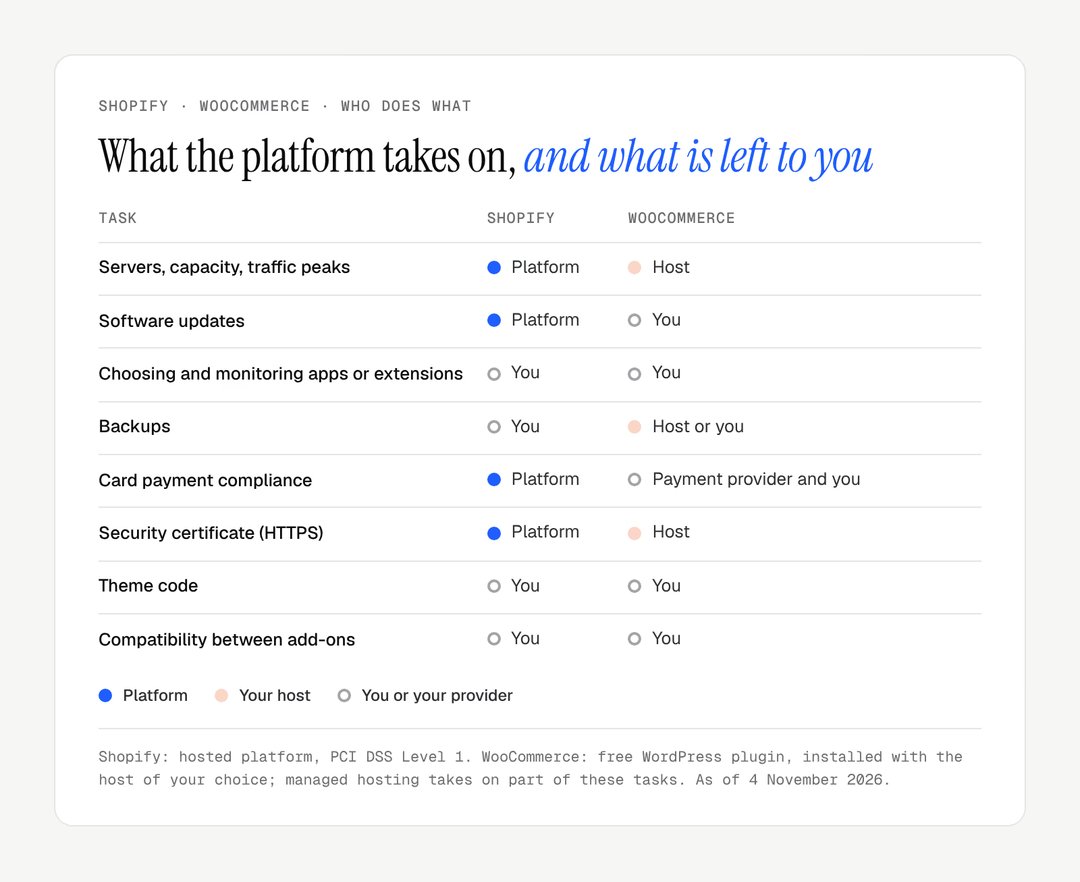
Shopify is a hosted ecommerce platform sold by subscription; WooCommerce is open-source software that turns a WordPress site into a store. Everything else in this comparison follows from that difference: who hosts, who updates, who answers when something breaks.
Shopify is software as a service. You pay a monthly plan, and hosting, security, software updates, the SSL certificate and the checkout are included. It is like renting a fitted shop: you move in, stock the shelves and open.
WooCommerce is a plugin for WordPress, published by Automattic. It is free to download, but you choose a host, install WordPress, add a theme and the extensions you need, and keep all of it up to date. It is like buying a plot and building the shop yourself: more freedom, more work.
Criterion | Shopify | WooCommerce |
|---|---|---|
Model | Hosted platform (SaaS) | Open-source WordPress plugin |
Hosting | Included | Your choice, your bill |
Software updates | Automatic | Yours: WordPress, theme, extensions |
Entry price | $39, £25 or €36 a month | Free, plus hosting |
Share of all websites | 5.3% (W3Techs, November 2026) | 7.8% (W3Techs, 7 November 2026) |
Skills needed to launch | None | Basic to intermediate |
According to W3Techs, Shopify runs on 5.3% of all websites and 7.9% of sites whose content management system is known (November 2026 report), while WooCommerce runs on 7.8% of all websites (7 November 2026). That count includes many dormant WooCommerce installs, since installing it costs nothing: it measures presence, not sales.
Shopify vs WooCommerce: the verdict by criterion
Shopify comes out ahead on running the store, WooCommerce on freedom and content, and the two are level on SEO. The table sums up the sections that follow; each line is argued below, with its limits.
Criterion | Shopify | WooCommerce | Verdict |
|---|---|---|---|
Ease of use | Guided admin, no server | WordPress plus extensions to set up | Shopify |
Design freedom | Wide, within Liquid and the theme | Total, in PHP | WooCommerce |
Native ecommerce features | Checkout, tax, B2B, POS included | Minimal core, extensions for the rest | Shopify |
SEO | Sound technical base, fixed URL paths | Full control, strong for blogs | Draw |
Performance over time | Stable, managed CDN | Depends on host and extensions | Shopify |
Cash cost, year one | Predictable | Lower if maintained in-house | Depends on who maintains |
Security and maintenance | Handled by Shopify | Your job, weekly | Shopify |
Exit and data ownership | Data exportable, theme stays | Everything is yours | WooCommerce |
No score is given: a verdict that counts lines treats a checkout and a blog as equals, which they rarely are for a given brand. Weigh the criteria against your own priorities.
Ease of use and day-to-day running
Shopify is easier to launch and to run day to day; WooCommerce asks for setup and ongoing technical attention. This is the criterion that weighs most if nobody on the team is a developer.
On Shopify, the admin walks you through products, shipping, taxes and payments. A store that takes payment can go live quickly once the products are ready; a finished store with its design and content takes longer on any platform. The theme editor, built on sections and blocks, changes pages without code.
On WooCommerce, before the store itself, you need to:
choose and configure hosting;
install WordPress, then WooCommerce;
pick a compatible theme;
add and configure the extensions for payments, shipping, tax and email;
check that all of these work together.
None of this is out of reach, and many agencies and freelancers know WordPress well. The real difference comes later: WordPress, the theme and each extension are updated by different publishers, and one update can break another piece. On Shopify, platform updates arrive without any action from you.
Design and customisation
WooCommerce offers more raw design freedom; Shopify offers enough for almost every brand, with less to maintain. WordPress lets a developer change anything in PHP, and page builders such as Elementor or Bricks give designers wide control.
Shopify was long criticised for its limits. The section architecture changed that: Horizon, the family of free themes Shopify released with its Summer '25 Edition, and Dawn, still maintained, build pages from sections and blocks. Liquid, Shopify's templating language, lets a developer go further. For Le Cercle des Plantes, Lyvora built the Shopify theme from scratch so that packing to order shows across the whole journey.
Aspect | Shopify | WooCommerce |
|---|---|---|
Free themes | Official themes maintained by Shopify (Horizon, Dawn) | Many, of variable quality |
Paid themes | 1,342 on the Theme Store; first page from $170 to $500 | Third-party marketplaces, prices vary |
No-code editing | Sections and blocks in every recent theme | Depends on theme and page builder |
Code customisation | Liquid, CSS, JavaScript | PHP, CSS, JavaScript, no limit |
The paid theme figures come from the Shopify Theme Store, read on 7 November 2026. Whether to start from such a theme or have one built is a decision of its own, covered in our comparison of a custom vs premium Shopify theme.
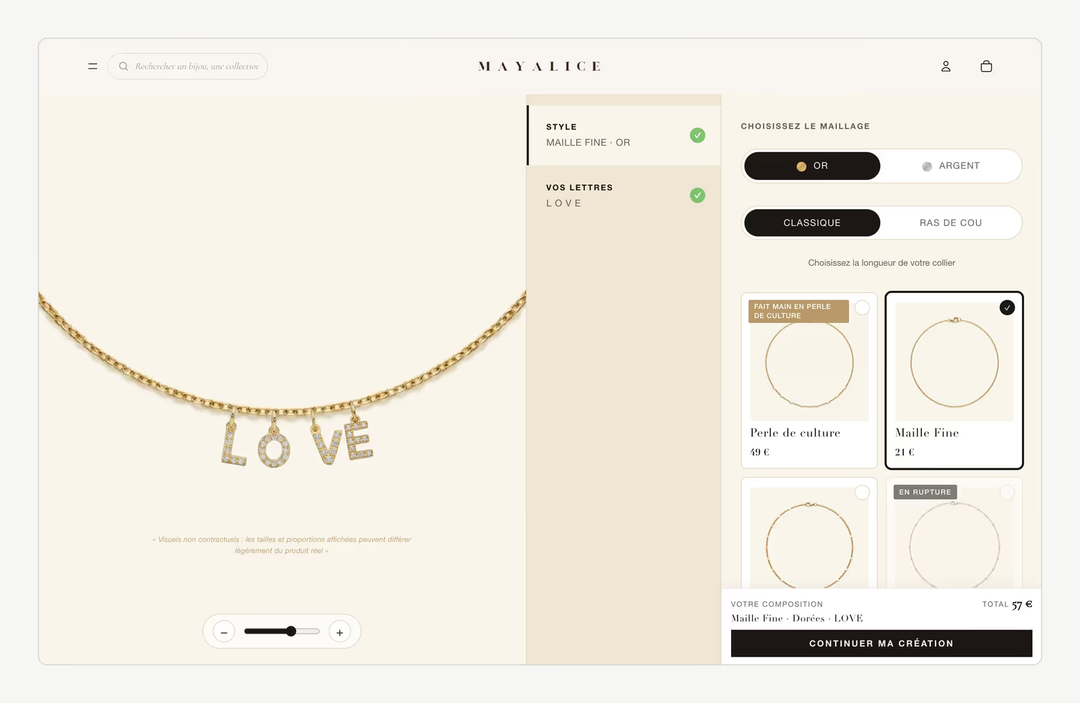
The limit of Shopify is structural, not visual. The checkout is not part of the theme, URL paths are fixed, and some logic must go through apps or Shopify Functions. For Mayalice, Lyvora developed six configurators with a live preview and stock tracked component by component, all on Shopify; our guide to the Shopify product configurator explains when that is worth building.
Native ecommerce features
Shopify includes most commerce features natively; WooCommerce starts with a minimal core and grows by extensions. That is the clearest difference between the two for a store that sells every day.
What Shopify includes without an app:
a checkout built and maintained by Shopify, with Shop Pay and the main wallets;
Shopify Payments, with no extra transaction fee;
stock across several locations and a point of sale for physical shops;
tax calculation, discounts, gift cards and transactional emails;
Shopify Markets for currencies, languages and local domains, detailed in our guide to Shopify Markets;
B2B on Basic, Grow and Advanced since 2 April 2026, with up to three active B2B catalogue assignments outside Plus (Shopify Help Center), covered in our Shopify B2B guide;
up to 2,048 variants per product, a limit raised from 100 on 15 October 2025.
Shopify says its checkout converts up to 36% better than competing checkouts, and 15% better on average, according to a study it commissioned from one of the three largest strategy consultancies (Shopify). Treat it as vendor data: the study is Shopify's own.
WooCommerce gives you a cart, a checkout and product management. Payments, subscriptions, advanced tax rules, multiple currencies, bookings and marketplace connections come through extensions, free or paid. The issue is not needing extensions; it is choosing them, checking that they work together and keeping them updated. Each one is code from a different publisher.

Shopify's catalogue tools cover detailed products well. For Maison Trungadi, whose bathrobes are made in Tuscany, the product pages carry material, weight and making, plus made-to-measure orders. WooCommerce would do this too, with custom fields; the difference is who maintains the code that does it.
Shopify vs WooCommerce for SEO
Neither platform wins on SEO: both give you what ranking needs, and content and execution decide. For a long time, WooCommerce had the edge thanks to WordPress and plugins such as Yoast SEO or Rank Math. That gap has closed.
WooCommerce's SEO strengths:
full control of URL structure, robots.txt and server rules;
Yoast SEO or Rank Math to guide on-page work;
WordPress's editor, still the reference for a large blog with nested categories.
Shopify's SEO strengths:
fast pages on a managed CDN, which helps Core Web Vitals;
an editable robots.txt through the
robots.txt.liquidtemplate;an automatic XML sitemap and HTTPS on every page;
a redirect offered automatically when a product URL changes;
product structured data in recent themes, enriched with metafields.
The limit of Shopify is its fixed URL paths: products live under /products/, collections under /collections/, pages under /pages/. Google indexes these structures well; the cost shows up during a migration, when every old URL needs a redirect. A product in several collections also creates duplicate paths, which a correct canonical tag handles.
If your strategy rests on hundreds of articles, WordPress remains more comfortable to write in. For product and category pages, Shopify does as well. Our Shopify SEO page describes the technical work we do on stores.
Performance and Core Web Vitals
Shopify keeps performance stable without server work; WooCommerce can be very fast, but only as fast as its hosting and extensions allow. Speed affects both rankings and conversion.
Since 12 March 2024, Google's Core Web Vitals measure loading (LCP), visual stability (CLS) and responsiveness with INP, which replaced FID. On Shopify, a global CDN, image resizing and modern formats are included on every plan. What slows a Shopify store down is usually the theme and its apps, not the infrastructure: each storefront app injects scripts. Our guide to Shopify INP shows how to measure their weight.
On WooCommerce, everything depends on choices you make:
shared hosting keeps costs low, with response times that vary as the store grows;
managed WordPress hosting is much faster, at a higher monthly price;
caching, a CDN and image compression are configured by you or your host;
every extension adds code and database queries.
The recurring WooCommerce problem is drift. A store fast at launch slows after months of new extensions, products and scripts, unless someone watches it. On Shopify, the same drift happens through apps, but the server side stays out of your hands, for better and for worse.
Shopify vs WooCommerce cost over a year
In cash, a WooCommerce store maintained in-house costs less than Shopify Basic; once maintenance is outsourced, it usually costs more. The real comparison is not subscription against free, but subscription against hosting, extensions and the time someone spends keeping the store safe.
The Shopify plans
Prices read on 7 November 2026 on Shopify's US pricing page, UK pricing page and the euro version of the same page; Plus prices from the Shopify Plus plan page of the Help Center. Each cell gives the monthly price, then the monthly price billed yearly.
Plan | US | UK | Euro area | Staff accounts |
|---|---|---|---|---|
Basic | $39 / $29 | £25 / £19 | €36 / €27 | none extra |
Grow | $105 / $79 | £65 / £49 | €105 / €79 | 5 |
Advanced | $399 / $299 | £344 / £259 | €384 / €289 | 15 |
Plus, 3-year term | from $2,300 | from £1,800 | from €2,100 | unlimited |
With Shopify Payments, no transaction fee is added: you pay the card rate only. On Basic, a standard online card costs 2.9% + 30¢ in the US, 2% + 25p in the UK and 1.5% + €0.25 on the euro page. If you use another payment provider, Shopify adds 2% on Basic, 1% on Grow, 0.6% on Advanced and 0.2% on Plus, on top of that provider's own fees. Our guide to Shopify Plus covers when the enterprise plan pays off.
A worked example over one year
Worked example: a UK store selling about £10,000 a month, 200 orders, running costs only. The build, VAT and payment processing are left out; payment is treated separately below. Every rate marked "assumption" is a hypothesis to replace with your own quotes.
Cost item | Assumption | Shopify Basic | WooCommerce, in-house | WooCommerce, outsourced |
|---|---|---|---|---|
Subscription or hosting | Basic billed yearly; managed hosting £25/month | £228 | £300 | £300 |
Theme | Horizon; WooCommerce Storefront | £0 | £0 | £0 |
Apps or extensions | 3 apps at £15/month; 5 extensions at £70/year | £540 | £350 | £350 |
Domain | £12/year | £12 | £12 | £12 |
Maintenance | £400 a day: 1 day; none; 4 days | £400 | £0 | £1,600 |
Total, year one | £1,180 | £662 | £2,262 |
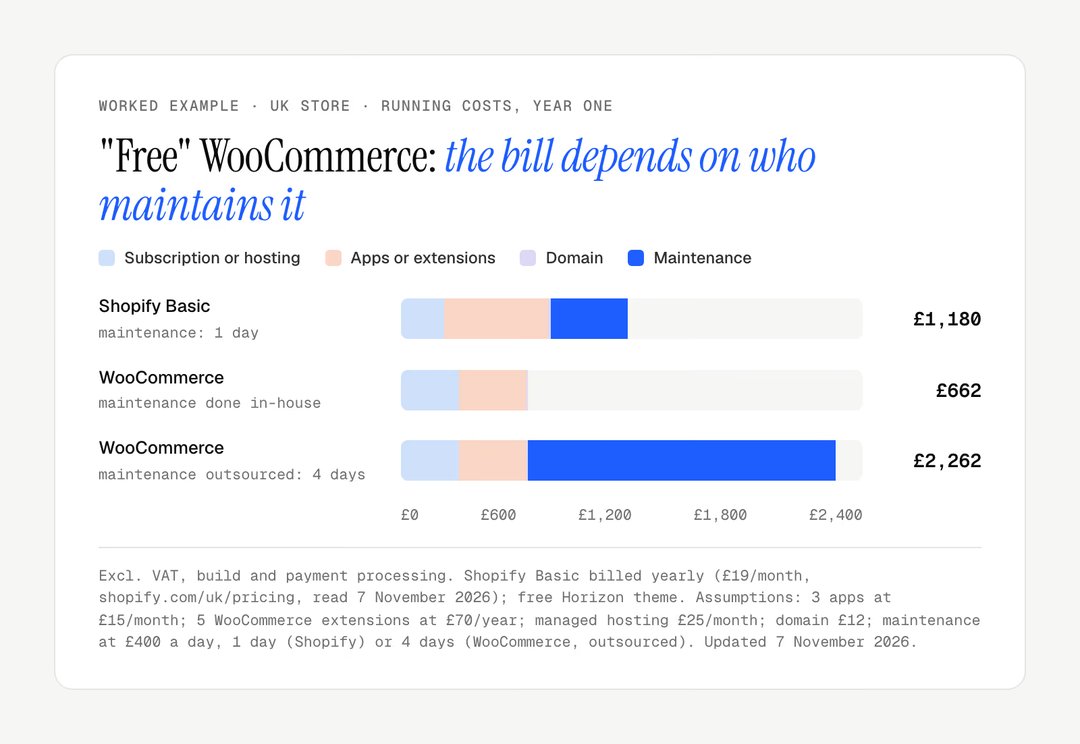
The in-house column leaves out your time: updates, testing after each one, backups and the odd conflict. If that takes four hours a month, it is 48 hours a year not spent on product or marketing. If nobody in the team can do it safely, the outsourced column is the honest one.
Payment processing, the larger line
On the same worked example, payment processing outweighs every line above. With Shopify Payments on Basic in the UK, 2% + 25p per UK card order gives 2% of £10,000 plus 200 × 25p, so £250 a month, £3,000 a year. On WooCommerce, the line depends on your provider's published rate: if it matched Shopify Payments, the two stores would pay the same. If you kept Shopify but used an outside provider, the 2% Basic fee would add about £200 a month.
Good to know
Compare platforms on your own basket and order count. A store with a high average order and few orders pays mostly percentages; a store with many small orders feels the fixed fee per transaction.
The build budget comes on top in all three columns and depends on the ambition of the project more than on the platform.
Security, maintenance and compliance
Shopify handles platform security and updates; on WooCommerce, they are a weekly job for you or your provider. This is where the hosted model shows its value most.
Shopify takes care of the SSL certificate, PCI DSS Level 1 compliance for card payments, platform updates, DDoS protection and capacity. You have no server to patch. One caveat: Shopify backs up its platform, not your own mistakes, so a backup app is still advisable to restore a product or a theme edited in error.

WordPress, as the most widely used CMS, is also the most targeted. Patchstack, a WordPress security firm, recorded 11,334 new vulnerabilities in the WordPress ecosystem in 2025, 91% of them in plugins and 9% in themes, with only six in the core. The core is solid; the risk sits in the add-ons a store installs. Securing WooCommerce means updating every week, a security plugin, a firewall, tested backups and someone watching.
Compliance adds to the workload. Since 28 June 2025, the European Accessibility Act applies to online stores selling to EU consumers. Since 19 June 2026, online sales to EU consumers must also offer a withdrawal function under Directive (EU) 2023/2673. On Shopify, part of this comes through platform updates and themes; on WooCommerce, building it in is your job.
Scalability and international selling
Shopify scales without infrastructure work; WooCommerce scales too, but each stage is a technical project. The question is less whether a platform can grow than who pays for the growth.
Over the 2025 Black Friday Cyber Monday weekend, Shopify reports $14.6 billion in sales by its merchants, up 27% on a year, with a peak of $5.1 million a minute, and more than 94,900 merchants having their best day (Shopify, 2 December 2025). A merchant does not size servers before a sale; the plans add staff accounts, reports and lower card rates as volume grows.
On WooCommerce, growth shows up as heavier database queries, a slower admin with large catalogues, and hosting that must be upgraded before traffic peaks. Well-run WooCommerce stores handle large volumes; they have a team or a host that plans for it.
For international selling, Shopify Markets handles currencies, languages, duties and local domains from one admin. Managed Markets, where Global-e acts as merchant of record, is open to businesses based in the continental United States and to certain stores in Canada and the UK; merchants based in the EU cannot use it. On WooCommerce, multi-currency and multi-language come from extensions, which work but add pieces to maintain.
Remember
Shopify changes its platform on its own schedule. Shopify Scripts could no longer be edited or published from 15 April 2026 and stopped running on 30 June 2026, replaced by Shopify Functions (Shopify changelog). It is the price of a maintained platform, and it has to be planned for.
Leaving the platform: data and portability
WooCommerce gives you full ownership of code and data; Shopify lets you export your data, not your theme. It is the question least often asked at the start and the most expensive at the end.
On WooCommerce, the files and the database are yours: you can change host, developer or theme whenever you want. On Shopify, you export products, customers, orders and blog posts as CSV or through the API. You do not take the Liquid theme elsewhere in a reusable form, nor the data held by some apps. Leaving Shopify is possible and is prepared like a migration.
Lyvora's own platform, Webcosa, is not an alternative to either for a store: it is a website platform for brand sites, recent, with an ecosystem nothing like WordPress's, and set up through Lyvora. Our comparison of the CMS for a brand website covers that case, export included.
Which should you choose?
Choose Shopify if selling is the core of the site and nobody should have to maintain servers; choose WooCommerce if WordPress is already central and a developer is on hand. Each option has its winning cases.
When WooCommerce is the better choice
You already have a WordPress site that brings traffic: adding WooCommerce is simpler than moving everything.
Content leads and the store follows: a large blog, guides, a magazine with a shop attached.
You have a developer or a technical team who wants full control of code and hosting.
Your logic is unusual: a marketplace, complex bookings, a checkout step no hosted platform allows.
Data must stay where you decide, for policy or contractual reasons.
The WordPress community is also very large: according to W3Techs, WordPress runs 39.4% of all websites (7 November 2026), so developers and providers are easy to find.
When Shopify is the better choice
You are launching or relaunching a brand and want to sell without learning server administration.
Selling is the core: checkout, payments, stock, shipping and returns matter more than a blog.
You sell on several channels: online store, social, marketplaces and physical shops from one stock.
You have no in-house developer and want predictable running costs.
You expect peaks: launches, sales, press, without sizing servers.
Where Shopify is the wrong choice
Shopify is a poor fit if your checkout must include a step that only Plus allows, if your margins cannot absorb percentage fees, or if your site is editorial first. checkout.liquid stopped working on 13 August 2024 for the information, shipping and payment pages; for the Thank you and Order status pages, the deadline was 28 August 2025 on Plus and 26 August 2026 on other plans. Checkout customisation now goes through checkout extensions, and those on the information, shipping and payment steps are reserved for Plus.
Migrating from WooCommerce to Shopify
A WooCommerce to Shopify migration moves products, customers and orders, then redirects every old URL. Shopify's free Store Migration app imports products and customers from WooCommerce; tools such as Matrixify also carry orders, coupons, blog posts and pages.
The work that decides the result is elsewhere: mapping each WooCommerce URL to its Shopify path, rebuilding what extensions did, and checking rankings after launch. Our guide to Shopify migration SEO details the redirects, and the WordPress to Shopify migration guide covers the blog side. For Candle'lice, Lyvora moved the whole catalogue to Shopify from ePro Shopping, a platform that capped the catalogue at 200 products and took 3% of each sale.

You are weighing a move from WooCommerce, or a first store, and want to see what Shopify would change for your catalogue? Our Shopify migration page describes how we transfer data, URLs and rankings. To talk about your project, get in touch.
Frequently asked questions
Is WooCommerce cheaper than Shopify?
In cash, often yes, if someone in-house maintains it. In our worked example, a UK WooCommerce store costs about £662 a year in hosting, extensions and domain, against £1,180 for Shopify Basic billed yearly with apps and a day of maintenance. Once four days of maintenance are outsourced at £400 a day, WooCommerce reaches about £2,262. Payment processing, the largest line, comes on top in both cases.
Does Shopify charge a fee on every sale?
Not with Shopify Payments: you pay the card rate only, for example 2.9% + 30¢ for a standard online card on Basic in the US, or 2% + 25p in the UK. If you use an outside payment provider, Shopify adds 2% on Basic, 1% on Grow, 0.6% on Advanced and 0.2% on Plus, on top of the provider's own fees. WooCommerce adds no platform fee; your payment provider's rate applies.
Can Shopify handle a large catalogue?
Yes. Each product can carry up to 2,048 variants since October 2025, and loading speed does not depend on server sizing on your side. For very large or complex operations, Shopify Plus adds unlimited B2B catalogues and up to nine expansion stores, at a monthly price from $2,300, £1,800 or €2,100 on a three-year term.
Should I choose Shopify or WooCommerce for a first store?
For most first stores, Shopify, because it removes hosting, updates and payment compliance from the to-do list. WooCommerce makes sense for a first store if you already run WordPress, know it well or have a developer, and want to keep costs low by doing maintenance yourself. In both cases, list your must-have features and test them before deciding.
Our work
Stores delivered by the studio
 Personalised jewelleryRedesign · ShopifyMayaliceA minimalist luxury redesign and six product configurators to compose a piece of jewellery live.
 Bath linenMigration and redesign · ShopifyMaison TrungadiBathrobes and bath linen made in Tuscany: a store that does justice to the materials.
 Handmade candlesMigration and redesign · ShopifyCandle’liceUnusual candles hand-poured in France, taken off a platform that held them back.