Comparisons 12 min readPublished
Custom vs premium Shopify theme: how to choose
Custom vs premium Shopify theme: the three real options, what an update keeps, hidden costs, technical debt and when headless Shopify makes sense.

Contents10 sections
- Custom vs premium Shopify theme: the three options
- What a premium Theme Store theme guarantees
- The modified theme trap
- What a custom Shopify theme brings
- Custom vs premium Shopify theme: the decision criteria
- The hidden costs of each option
- Technical debt, in concrete terms
- Headless Shopify: a fourth option, rarely the right one
- Framing a custom theme properly
- Frequently asked questions
Choosing between a custom vs premium Shopify theme is first an operating question: a premium Theme Store theme is updated for you, a custom theme fits the brand exactly and its maintenance is yours. The riskiest choice is the one in between, a premium theme edited in code without a plan for its next update.
Key takeaways
Three options, not two: a Theme Store theme configured in the editor, a Theme Store theme modified in code, and a theme built for the brand.
Theme Store themes are updated at no cost, and theme editor settings carry over; code edits only carry over when they do not conflict.
A custom theme is justified when the store needs features or an identity no theme covers without being bent out of shape.
Technical debt comes from undocumented edits and code left behind by apps, whatever the option.
Headless Shopify is a fourth option, for teams with developers and needs a theme cannot meet.
The usual framing sets "premium theme" against "custom theme" as a question of taste. This comparison sets out what separates them in practice: who updates the theme, who can extend it and what each change costs in three years. If you are already planning a redesign, our page on Shopify redesign explains how we scope the theme decision with your catalogue in front of us.
The facts come from Shopify's own documentation, linked in each sentence and read on 7 November 2026. A Shopify theme is the code that controls how the store looks: templates, sections, styles and scripts, written in Liquid, Shopify's templating language.
Custom vs premium Shopify theme: the three options
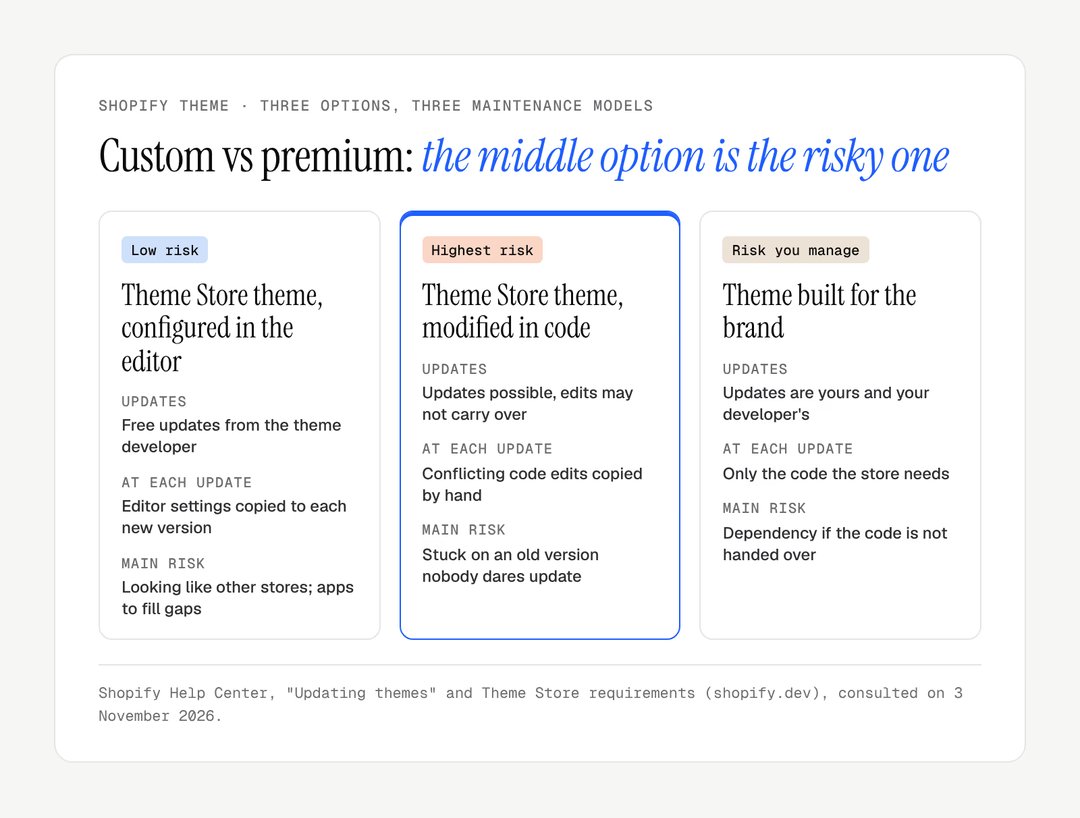
Most stores sit in a third case: a premium theme bought, then edited in code as requests come in. Each of the three options has a different maintenance model, and the middle one carries the most risk.
Criterion | Theme Store theme, configured | Theme Store theme, modified in code | Theme built for the brand |
|---|---|---|---|
Updates | Free, from the theme developer | Possible, edits can block them | Yours and your developer's |
Design freedom | What the settings allow | Wide, at a maintenance cost | Complete, within Shopify's rules |
Custom features | Through apps | Apps and added code | Built into the theme |
Code weight | Every option, used or not | The same, plus additions | What the store needs |
Main risk | Looking like other stores | Stuck on an old version | Depending on one developer |
What a premium Theme Store theme guarantees
A Theme Store theme, free or premium, guarantees a reviewed code base and free updates. Those are the two reasons to start from one.
Every theme sold on the Theme Store goes through a review by Shopify. Its requirements are precise: every template in JSON, and therefore built from sections; support for app blocks in the main product and featured product sections; blocks for most product page elements; an average Lighthouse score of at least 60 for performance and 90 for accessibility across the home, collection and product pages, on desktop and mobile; full keyboard access; a version number and release notes.
The second guarantee is updates. Shopify states that the updated version of a Theme Store theme can be added for free, and that customisations made in the theme editor are copied to it. You get fixes and new Shopify features without development work.
The choice is wide. On 7 November 2026, the Theme Store listed 1,342 paid themes, and the first page showed prices from $170 to $500, paid once. Horizon, the family of free themes Shopify released with its Summer '25 Edition, and Dawn, still maintained, are serious starting points too.
These guarantees have two limits. The scores are measured on the theme's demo store, not on yours, with your images and apps. And a general-purpose theme carries settings for dozens of use cases: every unused option is still code that is loaded, or at least maintained.
The modified theme trap
A premium theme edited in code without version control ends up on an old version nobody dares update. The scenario is familiar: an adjustment the editor does not allow, a developer edits a file, then another, and two years later the store is several releases behind.
Shopify's documentation explains why. During an update, code edits are carried over only if they do not conflict with the new version. Otherwise, the theme card shows "code edits could not be included", and they have to be copied across by hand. Shopify advises always saving a copy of customised code before updating. Themes bought outside the Theme Store cannot be updated this way at all: you go back to their author.
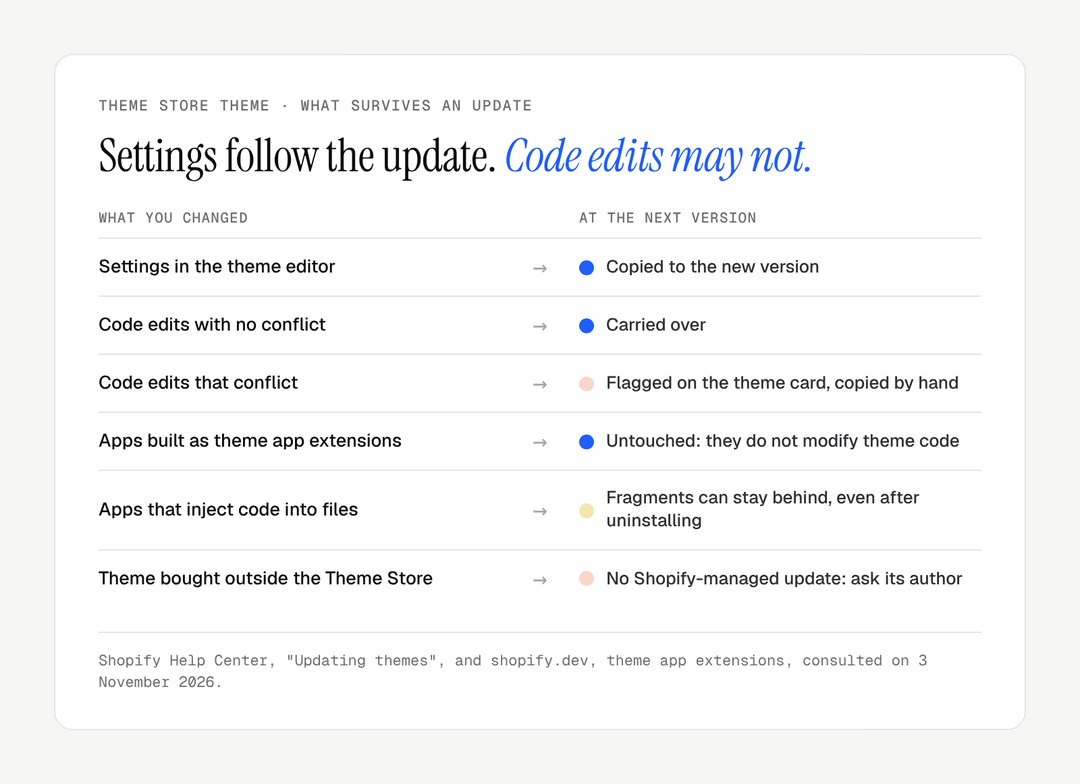
Apps often make things worse. Shopify distinguishes apps that integrate through app blocks and app embeds from those that add code directly to the theme. The former, built as theme app extensions, do not edit theme code, which Shopify says decreases the risk of breaking the theme. The latter write into the theme files themselves, so their code has to be found and removed by hand when the app goes.
Warning
Editing a Theme Store theme is not a mistake. Doing it without a Git repository, without documenting each change and without a plan for the next update is.
What a custom Shopify theme brings
A custom Shopify theme brings only the components the store needs, features no theme offers and an identity no other store shares; in exchange, its maintenance is yours.
The components you need, and only those
A theme built for a brand starts from its catalogue and customer journeys, not from a demo store.

A custom theme is cut to the catalogue, like a made-to-measure garment: nothing extra to carry, but alterations are yours. It contains the sections the team will use, with settings that make sense to them. The code loaded matches what is displayed, which helps responsiveness: our guide to Shopify INP shows how storefront code weighs on it.
Features no theme offers
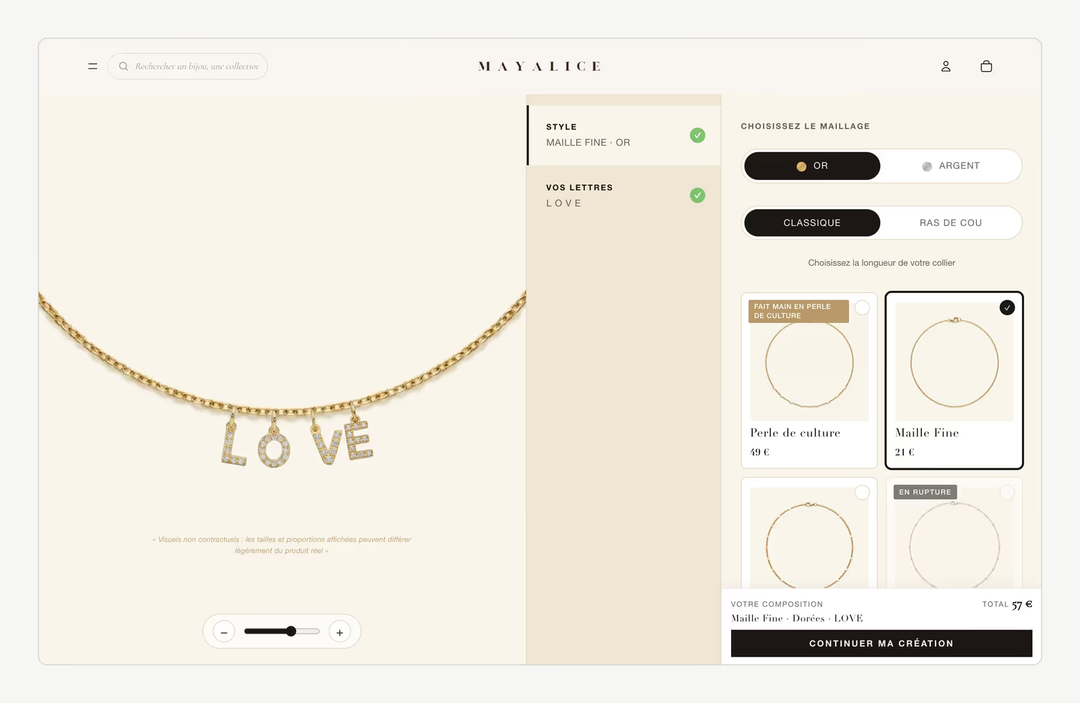
Some stores have a functional core no general-purpose theme anticipates. For Mayalice, a personalised jewellery brand, Lyvora developed six configurators with a live preview and stock tracked component by component: that is not a theme setting, it is the product. Such features can come from apps, but when they sit at the centre of the sale, building them into the theme gives control over interface, performance and accessibility. Our guide to the Shopify product configurator covers the options.
An identity that looks like no other store
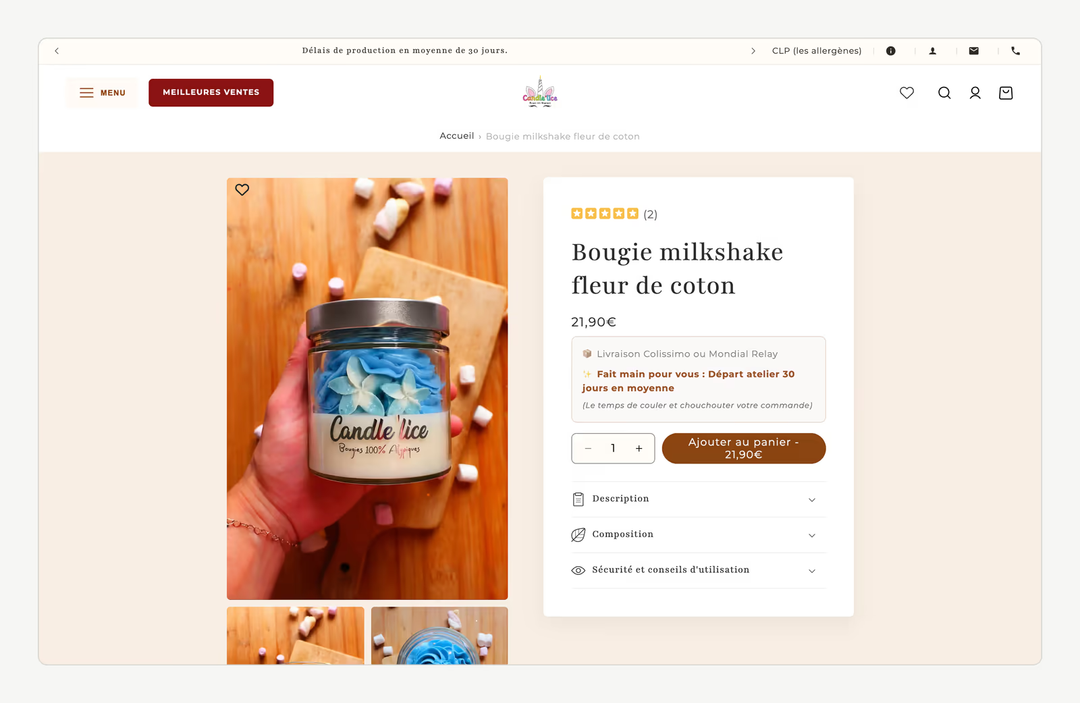
A Theme Store theme can be well configured and still be recognisable. When the brand has a strong art direction, the gap between what it wants and what the theme allows gets filled with layers of CSS overrides. For Le Cercle des Plantes, the brief was explicit: a theme that looks like no other, built from scratch. The guidelines then live in the theme itself, the approach described in our guide to an ecommerce design system.
The other side: maintenance is yours
Shopify keeps evolving. Recent years brought section-based templates, theme blocks that can be nested and reused across sections (documentation) and theme-wide colour schemes. A Theme Store theme picks these up with each release; a custom theme only does if someone takes care of it. A custom theme without a maintenance budget ages faster than a well-kept premium theme.
Custom vs premium Shopify theme: the decision criteria
Six criteria decide: the catalogue's templates, unusual features, the distance between your identity and existing themes, the team, maintenance capacity and the apps needed to compensate.
Templates: count the templates that really differ. The more standard the structure, the better a Theme Store theme fits.
Unusual features: a configurator, made-to-measure sizing, bookings, bundles built from components, members-only content. If none, a custom theme brings nothing on this front.
Distance to existing themes: browse the Theme Store with your art direction in front of you. If one theme comes close through its settings alone, start from it.
The team: who publishes products, builds launch pages, changes banners? Both options work if the team knows what it must do alone.
Maintenance capacity: without anyone following Shopify's changes, a Theme Store theme configured in the editor remains the safest choice.
Compensating apps: if reaching the result takes five storefront apps, add up their subscriptions, their weight and their risk of conflict.
Situation | Best-suited option |
|---|---|
Standard catalogue, identity close to a theme, no developer | Theme Store theme configured in the editor |
A theme that fits, with two or three precise adjustments | Theme Store theme, edits versioned and documented |
A core feature nothing covers | Custom theme, or premium theme plus targeted development |
A very distinctive art direction, a content-rich catalogue | Custom theme |
A store piling up storefront apps | Custom theme bringing those features into the code |
The hidden costs of each option
Each option hides a different cost: apps and sameness for a premium theme, every update for a modified one, maintenance and dependency for a custom one.
On a Theme Store theme, the purchase price is a small part of the cost. Add the apps that fill gaps, paid monthly, the time spent working around settings, and the weight of unused features. The heaviest cost is often invisible: the store looks like others.
On a modified Theme Store theme, every update becomes a small project: compare files, carry edits across, test. When it keeps being postponed, the store falls behind on fixes and new features, until the only reasonable way out is a redesign.
On a custom theme, the build is the visible investment. The hidden cost is maintenance: following Shopify's changes, fixing, adding sections. The hidden risk is dependency: if the code is not delivered, documented and versioned, the brand cannot change developer without starting again.
Technical debt, in concrete terms
A theme's technical debt shows in a short audit, through a handful of recurring signs:
a published theme several versions behind its developer's current release;
a
theme.liquidfile full of app fragments, some from apps no longer installed;stylesheets full of
!importantrules correcting other rules;duplicated sections ("product-v2", "product-final") with nobody sure which one is used;
JavaScript errors in the browser console on pages that seem to work;
no Git repository, and edits made directly in the admin's code editor.
None of these signs stops you selling today. All of them make the next change more expensive than the last. Changing theme does not change URLs on Shopify, since paths such as /products/ are fixed, but titles, structured data and content must be checked, as our guide to Shopify migration SEO describes.
Headless Shopify: a fourth option, rarely the right one
Headless Shopify keeps Shopify for catalogue, stock and checkout, and replaces the Liquid theme with a separate front end; it suits teams with developers and needs a theme cannot meet. Shopify's own toolkit for this is Hydrogen, which since its 2026-10 release adds commerce features to frameworks such as React Router, Next.js, Nuxt, Astro or SvelteKit, and reads data through a typed Storefront API client. Its React Router starter deploys to Oxygen, Shopify's hosting for these storefronts, and the 2026-10 release notes state that a Hydrogen storefront can now be hosted elsewhere too.
The gain is total front-end freedom: one front end for a store and an editorial site, unusual interactions, content from a separate CMS. The cost is everything a theme gives for free. The theme editor no longer applies, so the team edits content in another tool; apps built as theme app extensions need another integration; and the developers own performance, SEO and accessibility of the front end. The checkout remains Shopify's.
For most brand stores, a well-built custom Liquid theme gives the same identity with far less to maintain. Headless makes sense when the store is one channel among several sharing one front end, or when a team of developers is already in place to run it.
Framing a custom theme properly
A custom theme is a good decision only if it is built to last. Here is what you can reasonably ask of a developer:
Ownership: the code belongs to you and is delivered in a Git repository you can access.
Current architecture: JSON templates, sections and blocks configurable in the editor, app block support, so apps install without touching code.
Shopify's tools: the code is checked with them, starting with Theme Check, which flags errors and bad practice in Liquid.
Targets: a performance budget and an accessibility target, measured before launch on your real content.
Documentation: the list of sections, their settings, what the team can do alone and what needs a developer.
Maintenance plan: even a light one, stating who follows Shopify's changes and how often.
The same platform question, Shopify or not, is covered in our comparison of Shopify vs WooCommerce; for a brand website without a store, see our comparison of the CMS for a brand website.
The right theme is the one your team can keep running. If you are weighing a premium theme against your own, we work through that question when scoping a Shopify redesign or a custom Shopify store, with your catalogue and constraints in front of us. To discuss it, get in touch.
Frequently asked questions
Who owns the code of a custom Shopify theme?
It is a contractual question, to settle before work starts. The healthiest arrangement is for the code to be delivered to you in a repository you control, with the right to have it developed further by the developer of your choice. Without that clause, the brand depends on whoever wrote the theme, and changing provider can mean rebuilding the theme from scratch.
Does a custom theme stop me installing Shopify apps?
No, as long as the theme follows Shopify's current architecture. Modern apps integrate through app blocks and app embeds, which the theme must support in its sections, a requirement Shopify sets for Theme Store themes and that a serious custom theme meets too. Apps that still inject code into theme files work as well, but leave fragments to clean up if removed.
Do I need a new theme at every redesign?
Not necessarily. A well-built Shopify theme, organised in sections and components, can evolve in stages: new sections, new typography, new colour schemes. A full rebuild is needed mainly when the theme's structure no longer matches the store, or when technical debt makes every change too expensive. A design audit usually tells which case you are in.
Is headless Shopify better for SEO?
Not by itself. A headless front end can be very fast and fully controlled, but titles, canonical URLs, structured data, sitemaps and redirects that a Liquid theme and Shopify handle must be rebuilt and maintained by developers. Done well, headless matches a good theme on SEO; done poorly, it loses ground. For most brand stores, a custom Liquid theme is the simpler route to strong technical SEO.
Will switching to a custom theme hurt my SEO?
Usually not, because URLs do not change on Shopify when you change theme: products stay under /products/ and collections under /collections/. What can change is the page content, heading structure, internal links, structured data and speed. Compare these on the new theme before publishing it, keep product descriptions and titles, and monitor Search Console in the weeks after the switch.
Is Horizon good enough for a brand store?
Often, yes, as a starting point. Horizon is the family of free themes Shopify released with its Summer '25 Edition, built on sections and nestable theme blocks, and maintained by Shopify. For a standard catalogue and an identity that fits its structure, a well-configured Horizon store can be enough. A distinctive art direction or a core feature it lacks points to a custom theme.
Our work
Stores delivered by the studio
 Personalised jewelleryRedesign · ShopifyMayaliceA minimalist luxury redesign and six product configurators to compose a piece of jewellery live.
 Bath linenMigration and redesign · ShopifyMaison TrungadiBathrobes and bath linen made in Tuscany: a store that does justice to the materials.
 Handmade candlesMigration and redesign · ShopifyCandle’liceUnusual candles hand-poured in France, taken off a platform that held them back.