Shopify guides 13 min readPublished
Shopify Markets: how to sell internationally on Shopify
Shopify Markets explained: markets, currencies, translations, local domains, duties, hreflang and Managed Markets, with the fees for UK, US and EU brands.

Contents10 sections
- What is Shopify Markets?
- Setting up Shopify Markets step by step
- Shopify multi-currency: automatic conversion or fixed prices
- Shopify translation: languages that sell
- Local domains, subdomains and subfolders
- Taxes and duties: DDP or DAP
- International SEO with Shopify Markets
- Managed Markets: who is it for?
- Common Shopify Markets mistakes
- Frequently asked questions
Shopify Markets is the international selling tool built into Shopify: one store sells to several countries with local currencies, translations, local domains or subfolders, and duties calculated at checkout. It adds nothing to the subscription; fees apply on use, for currency conversion and for duties collected at checkout. Managed Markets, its Global-e version, is open to merchants based in the continental US and to certain Canadian and UK stores, not to EU-based ones.
Key takeaways
Cost: Markets adds no subscription. You pay a currency conversion fee (1.5% for US-based stores, 2% in the other Shopify Payments countries) and a fee on orders where Shopify collects duties.
Duties at checkout (DDP) have been open to every plan since 2 February 2025: 0.85% per order with Shopify Payments, 1.5% with another provider, temporarily reduced to 0.5%.
Market types: country or region markets, B2B markets, retail markets and channel markets; submarkets inherit their parent's settings.
Hreflang tags are added automatically for each domain, subdomain or subfolder you assign to a market with a language.
Managed Markets (Global-e as merchant of record) charges 3.5% per international order, or 3.25% on Plus.
This guide is for brands that already sell on Shopify in one country and want to open others without a second store. The fees come from Shopify's Help Center pages on Markets fees and duties, read on 7 November 2026. International growth depends as much on structure and search as on translation; our Shopify SEO page sets out how we approach multi-country stores.
What is Shopify Markets?
Shopify Markets is the part of the Shopify admin that adapts one store to each country or region: currency, language, address, prices, catalogue, taxes and duties. A market is a group of buyers, usually a country or a region, to which you apply a set of settings. Before Markets, selling abroad meant a separate store per country or fragile third-party apps.
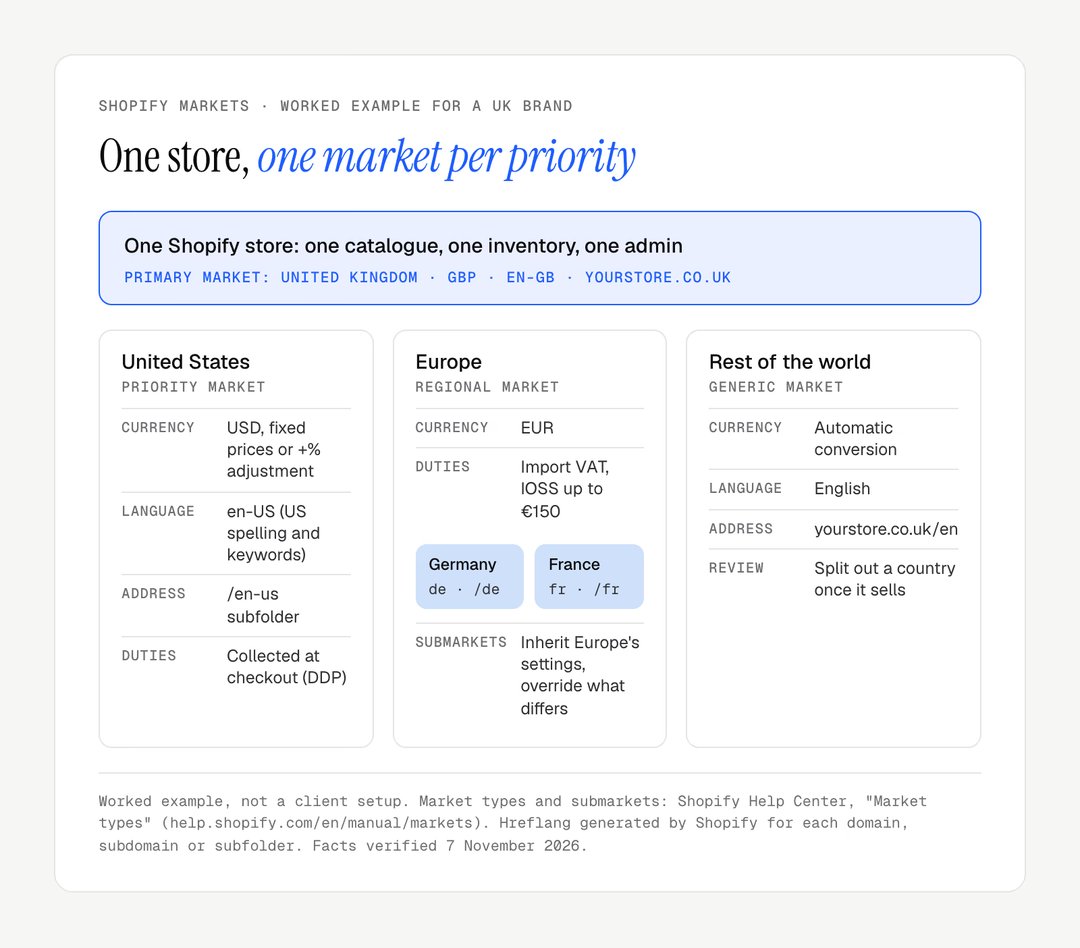
A market is no longer just a group of countries. Shopify now offers several market types: country or region markets, B2B markets, retail markets for point of sale, and channel markets. You can also create submarkets that inherit the settings of a parent: Shopify's own example is a France submarket inside a Europe market, which keeps the euro and the European catalogue but gets its own French-language domain and promotion.
The vocabulary used in the rest of this guide:
Primary market: your home country, whose currency and language are the store defaults.
Market: a country or group of countries with its own currency, language, domain, prices and catalogue.
Submarket: a market nested in another, which inherits its settings unless you override them.
DDP and DAP: whether duties are paid at checkout (Delivered Duty Paid) or on delivery (Delivered At Place).
Merchant of record: the business legally responsible for the sale, its taxes and its compliance; with Shopify Markets, that is you.
In practice, Shopify Markets lets you show prices in local currency, translate the store, assign a domain or subfolder per market, adjust prices and catalogues per market, and collect taxes and duties at checkout, all from one admin and one inventory.
Setting up Shopify Markets step by step
Shopify Markets is set up in the Markets section of the admin, market by market, starting with the structure. The order below avoids the most common rework: deciding currencies and domains before translating anything.
Step | What you do in Shopify | What to decide first |
|---|---|---|
1. Structure | Create markets and submarkets | Which countries already bring orders |
2. Currency | Enable local currency per market | Automatic conversion or fixed prices |
3. Language | Publish languages, assign them to markets | Machine translation, review or professional |
4. Address | Add domains, subdomains or subfolders | Subfolders first, country domains later |
5. Shipping | Set rates and zones per market | Who pays duties: DDP or DAP |
6. Taxes | Register and enable tax collection | OSS, IOSS, UK VAT, US sales tax |
7. Review | Read reports by market after a quarter | Keep, fix or close each market |
Create your markets
A new store starts with a primary market and often a generic international market covering the rest of the world. The first task is to reorganise this deliberately. Taking a UK brand as an example:
primary market: the United Kingdom;
priority markets: one market for each country that already brings revenue, such as the United States, Ireland or Australia;
regional market: secondary European countries grouped in a Europe market, with submarkets where a country needs its own language or prices;
rest of the world: every other country, with generic settings.
Each market can have its own prices, currency, domain and shipping. The more specific the market, the closer the experience is to a local store, and the more you have to maintain. Note that a theme customised per market is reserved for the Advanced and Plus plans.
Enable currencies and languages
For each market, enable the local currency and the matching language. With Shopify Payments, a currency conversion fee applies to payments collected in a currency other than your store's: 1.5% for stores based in the US, 2% in the other Shopify Payments countries, including the UK and France.
Shopify multi-currency: automatic conversion or fixed prices
Shopify multi-currency works in two ways: automatic conversion from your store currency, or prices fixed per market. The choice has a direct effect on your margins.
Automatic conversion
Shopify converts prices from your store currency to the customer's at the current exchange rate and can apply rounding rules, so that a converted price ends in .99 or .00 rather than an odd number of pence or cents.
Advantage: nothing to maintain; prices follow exchange rates.
Drawback: your margin moves with the exchange rate.
When to use it: secondary markets with low volume.
Fixed prices or adjustments per market
You set the price of each product in each currency, or more simply apply a percentage adjustment to a whole market (for example +10% for the United States to cover shipping and returns).
Advantage: full control of margins and stable prices for the customer.
Drawback: you have to watch exchange rates and revise prices.
When to use it: priority markets with significant volume.
A sensible sequence is to start with automatic conversion, then move a market to fixed prices once it carries a meaningful share of revenue and its pricing deserves a decision of its own.
Good to know
The conversion fee is deducted from your payout, not added to the customer's total: the customer pays the converted price shown on the product page.
Shopify translation: languages that sell
A Shopify store sells better abroad in the customer's language. According to CSA Research's "Can't Read, Won't Buy" study (July 2020, 8,709 consumers in 29 countries), 76% of online shoppers prefer to buy products with information in their native language, and 40% will never buy from websites in other languages.
Translation options on Shopify
Option | Price (App Store, 7 November 2026) | What it suits |
|---|---|---|
Translate & Adapt, by Shopify | Free; automatic translation for up to 2 languages, or 8 in select countries | Most stores, with manual or imported translation beyond that |
Free plan (1 language, 2,000 words), then from $17 a month | Large catalogues, visual editor, priced by languages and words | |
Free plan, then from $17.50 a month | Manual translation of a few languages | |
Professional translation | Billed per word by translators or agencies | Pages that sell, strategic markets |
A hybrid translation strategy
The most effective approach is machine translation for the bulk of the catalogue and human review for the pages that sell: home page, best sellers, size guides, checkout messages and transactional emails. Worked example: a catalogue of 400 products with 150-word descriptions holds 60,000 words; at an assumed rate of €0.10 per word, full professional translation would cost €6,000 per language, against a fraction of that to review only the 40 best sellers.
Local domains, subdomains and subfolders
Shopify Markets lets you assign a domain, a subdomain or a subfolder to each market, and that choice decides how search engines and customers see each country.
Option | Example | Setup | Best for |
|---|---|---|---|
Subfolder | yourstore.com/en-us | No extra domain, no DNS | Starting out, one domain's authority shared |
Subdomain | us.yourstore.com | One DNS record per market | Teams that want separation |
Country domain | yourstore.de | One domain to buy and renew per country | Established markets, strong local signal |
Start with subfolders, which Shopify also recommends for most stores: they cost nothing, are set up in minutes and keep all the search authority on one domain. Move a market to its own country domain once it brings enough revenue to justify the maintenance and the gain in local trust. If you change addresses later, or delete a subfolder market, plan redirects as you would for any migration; our guide to Shopify migration SEO explains the method.
Taxes and duties: DDP or DAP
With Shopify Markets, duties and import taxes can be collected at checkout (DDP) or left for the customer to pay on delivery (DAP). This is the most technical choice in international selling, and the one that causes the most refused parcels when it is handled badly.
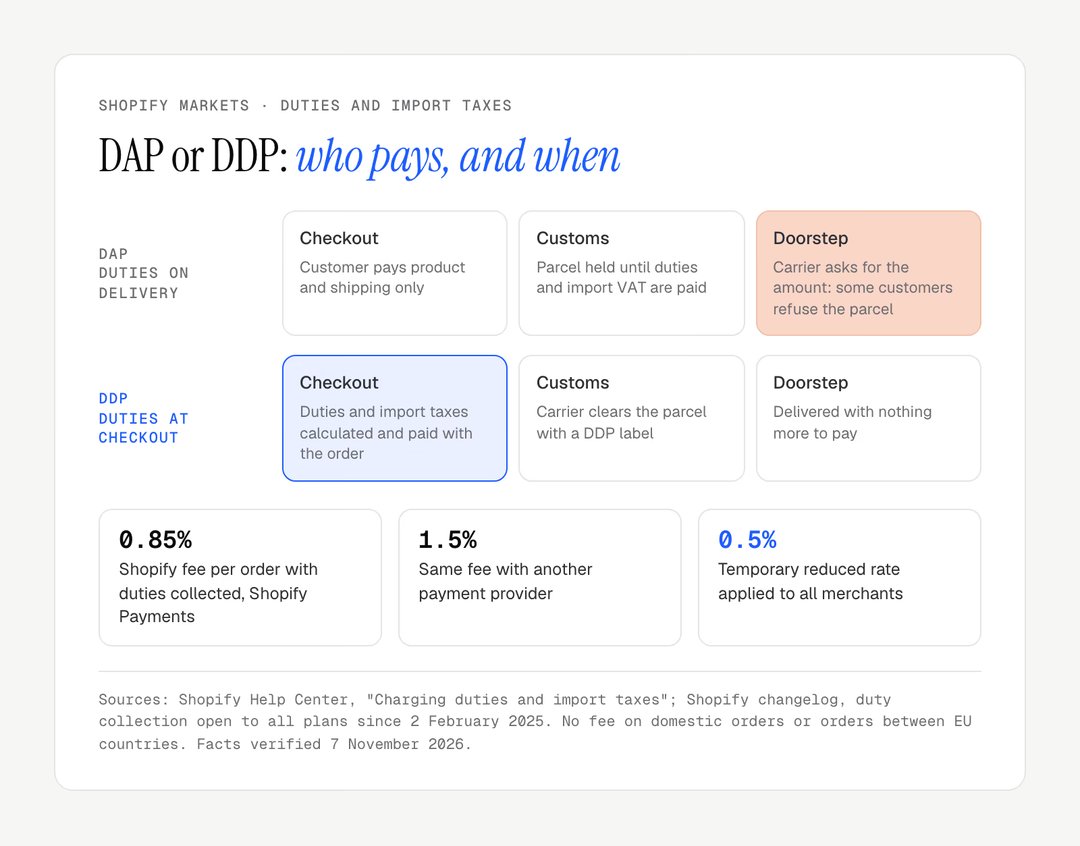
DAP: duties on delivery
The customer pays for the product and shipping at checkout, and the carrier collects import taxes and duties before handing over the parcel. It is simple for the merchant, but the customer discovers extra charges at the door: some refuse the parcel, and the return costs you shipping and a customer.

DDP: duties at checkout
Import taxes and duties are calculated and collected at checkout, and the parcel arrives with nothing more to pay. Since 2 February 2025, every plan can collect them; before that date, only Advanced and Plus could. The standard fee is 0.85% of the order with Shopify Payments and 1.5% with another provider, temporarily reduced to 0.5% for all merchants. No fee applies to domestic orders or to orders shipped between EU countries. You need HS codes and a country of origin on your products, and a carrier that supports DDP labels.
DDP is the right default for regular cross-border selling. Three points depend on where you sell from:
Within the EU, there are no customs duties between member states, only VAT. Above €10,000 of cross-border sales to EU consumers a year, you charge the customer's VAT and usually declare it through the One Stop Shop (OSS).
From outside the EU into the EU, import VAT applies to every parcel; for consignments up to €150, the Import One Stop Shop (IOSS) lets you collect it at checkout. Into the UK, the seller charges UK VAT at the point of sale on consignments of £135 or less.
Into the US, duty-free treatment for parcels of $800 or less was suspended for all countries on 29 August 2025, and the suspension has since been extended, so most orders now carry duties. Check the current rules before opening a US market: they have changed several times.
Shopify calculates the amounts; tax registrations, filings and payments remain your responsibility.
International SEO with Shopify Markets
Shopify Markets handles the technical base of international SEO, the hreflang tags, but rankings in each country still depend on translated metadata, local keywords and indexing.
Hreflang tags
Hreflang tags tell Google which language and regional versions of a page exist. According to Shopify's hreflang documentation, when you assign a domain, subfolder or subdomain to a market with a language, the matching tags are added to every page of the store; the setting is on by default. For a product sold in British English, American English and German, for example, the page head lists one alternate per version plus an x-default. Turn the setting off only if a theme or app already adds hreflang tags, to avoid duplicates.
What remains for you to do
Translate title tags and meta descriptions, not only visible content.
Adapt keywords by country: "trainers" in the UK, "sneakers" in the US, "jumper" against "sweater". Literal translation is a common mistake, even between two versions of English.
Write local content: landing pages and guides that answer each market's questions.
Check canonical URLs: each language version must be its own canonical, not point to the default version.
Monitor indexing per market in Google Search Console, by country and by language.
Speed matters in every market, and more so on mobile networks abroad: our guide to Shopify INP explains how to measure responsiveness, and the one on the European Accessibility Act covers the accessibility rules that apply to stores selling to EU consumers.
Managed Markets: who is it for?
Managed Markets, formerly Shopify Markets Pro, makes Global-e the merchant of record for your international orders. You no longer need tax registrations in the destination countries: Global-e handles duties, tax remittance and customs paperwork. In return, each international order carries a transaction fee of 3.5% on Basic, Grow and Advanced, or 3.25% on Plus, on top of currency conversion and payment processing.
Eligibility depends on where your business is based. Managed Markets is available to businesses based in the continental United States and, since 15 July 2026, to certain stores in Canada and the UK; it requires Shopify Payments. It is not offered to merchants based in the EU, who sell abroad with Shopify Markets and its duties and taxes features.
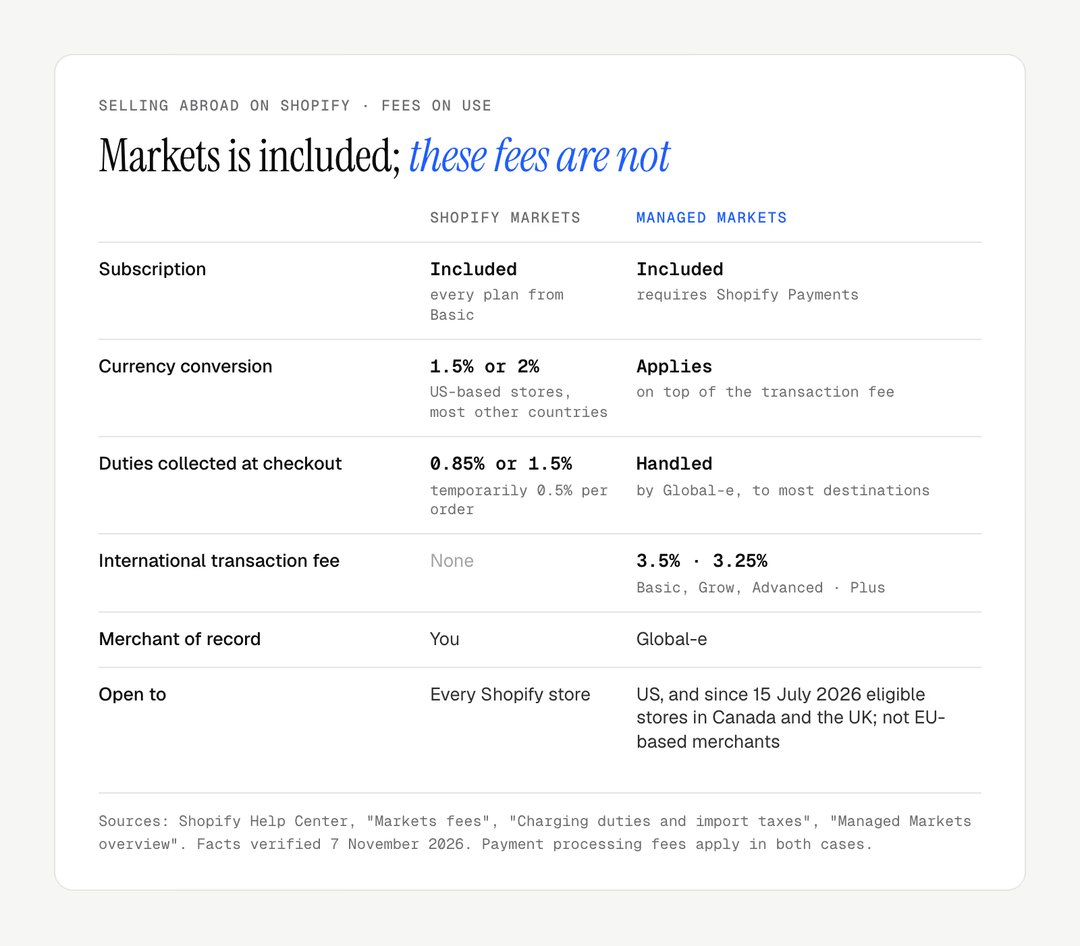
Feature | Shopify Markets | Managed Markets |
|---|---|---|
Currencies, languages, domains | Yes | Yes |
Duties at checkout (DDP) | Yes, fee per order | Yes, guaranteed by Global-e |
Merchant of record | You | Global-e |
Foreign tax registrations | Your responsibility | Not needed |
Fee per international order | None beyond conversion and duties | 3.5%, or 3.25% on Plus |
Available to | Every Shopify store | Continental US, certain Canadian and UK stores |
If you are based in the US, Canada or the UK and do not want to manage foreign registrations, compare the Managed Markets fee with what those registrations would cost you. For markets that need fully separate operations, Shopify Plus also supports up to nine expansion stores.
Common Shopify Markets mistakes
Most international problems on Shopify come from settings left on their defaults, not from the platform's limits.
Mistake | Effect | Fix |
|---|---|---|
One "International" market for every country | One currency and one message for very different buyers | Split out each country that sells |
Duties left to the carrier | Charges at the door, refused parcels | Enable duty collection, add HS codes |
Machine translation published unread | Odd product names, wrong sizes | Review best sellers and checkout texts |
Metadata not translated | Pages rank in the wrong language | Translate titles and descriptions per language |
Country domains bought too early | Authority split, renewals to manage | Start with subfolders |
Tax registrations forgotten | VAT owed without having been collected | Check OSS, IOSS, UK VAT before opening |
No review per market | Unprofitable markets left open | Read reports by market each quarter |
Shopify's reports filter sales by market and country; add country segments in Google Analytics 4. A useful rule of thumb is to review each new market after three months of data: a market whose acquisition, shipping and returns exceed its margin should be fixed or closed. Five markets served well beat fifty served badly.
If you also sell to trade buyers abroad, our guide to Shopify B2B explains how B2B markets sit alongside consumer markets. For a store whose theme needs to carry several languages cleanly, from menus to product templates, compare a custom or premium Shopify theme before you start translating.
Are you preparing to open new countries on Shopify and want a structure that search engines read correctly? Our Shopify SEO page describes our approach, and our custom Shopify store page covers multi-language builds. To discuss your project, get in touch.
Frequently asked questions
Is Shopify Markets free?
Shopify Markets adds no subscription cost. Fees apply on use: a currency conversion fee of 1.5% for US-based stores or 2% in the other Shopify Payments countries on payments collected in another currency, and a fee on orders where Shopify collects duties. Managed Markets, run with Global-e, charges a separate fee per international order.
Is Translate & Adapt free?
Yes. Translate & Adapt is Shopify's free translation app. It includes automatic translation for up to two languages, or eight in select countries; beyond that, you translate manually or import files. For many languages or a very large catalogue, a paid app such as Weglot or Langify can be easier to manage.
Can I set different prices for each country?
Yes. Shopify Markets lets you set prices per market in two ways: a percentage adjustment applied to the whole market, or a fixed price per product and currency. You can also publish a different catalogue per market, so that a product is sold in one country and hidden in another. Fixed prices protect your margin; automatic conversion needs less work.
Are international taxes handled automatically on Shopify?
Partly. Shopify calculates VAT, GST and sales tax from your settings and, since February 2025, can collect duties and import taxes at checkout on every plan. Registrations and filings remain yours: the EU's OSS or IOSS schemes, a UK VAT registration or US sales tax permits. Without duty collection, customers pay on delivery and some refuse the parcel.
Can EU-based merchants use Managed Markets?
No. In November 2026, Managed Markets is open to businesses based in the continental United States and, since 15 July 2026, to certain stores in Canada and the UK. Merchants based in an EU country sell internationally with standard Shopify Markets, collecting duties at checkout through Shopify and handling their own registrations, such as the OSS and IOSS schemes.
Do I need a separate Shopify store for each country?
No, in most cases. Shopify Markets runs several countries from one store, with one catalogue, one inventory and one admin. Separate stores make sense when a market needs its own team, apps, stock or legal entity. Shopify Plus supports up to nine expansion stores for that situation; on other plans, each extra store needs its own subscription.
Does Shopify Markets work with B2B?
Yes. B2B markets are one of the market types in Shopify Markets. They let you attach companies, catalogues and wholesale prices to a market, alongside your consumer markets in the same store. Since 2 April 2026, native B2B is available on Basic, Grow, Advanced and Plus, with up to three active catalogue assignments outside Plus.
Our work
Stores delivered by the studio
 Personalised jewelleryRedesign · ShopifyMayaliceA minimalist luxury redesign and six product configurators to compose a piece of jewellery live.
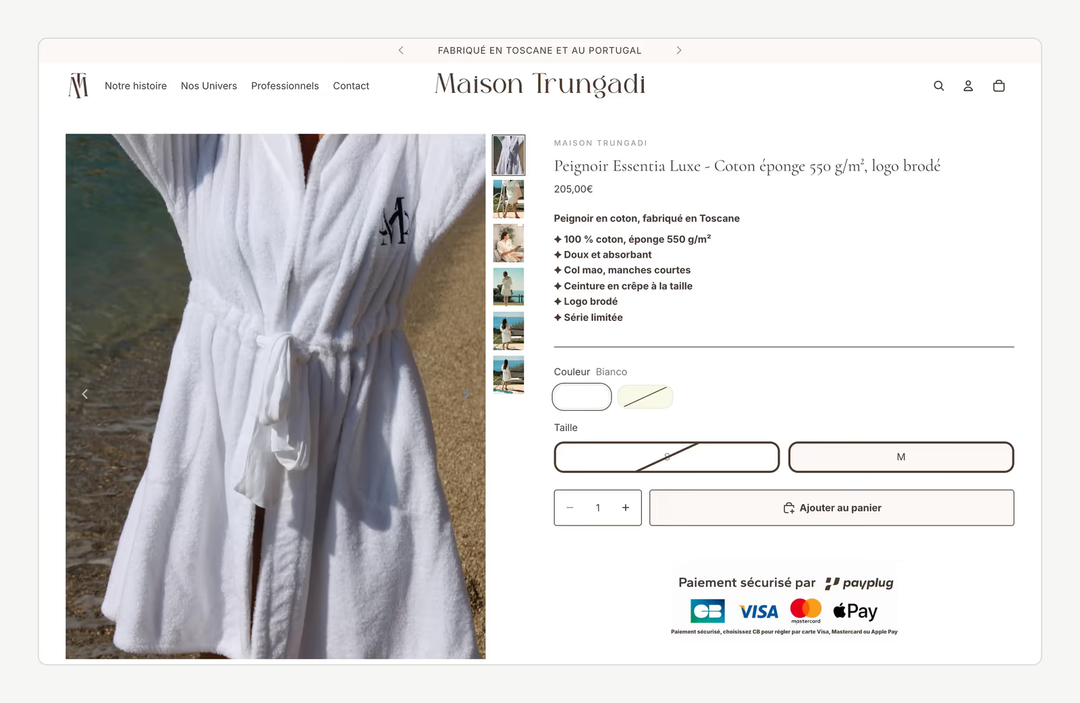
 Bath linenMigration and redesign · ShopifyMaison TrungadiBathrobes and bath linen made in Tuscany: a store that does justice to the materials.
 Handmade candlesMigration and redesign · ShopifyCandle’liceUnusual candles hand-poured in France, taken off a platform that held them back.