Shopify guides 13 min readPublished
Magento to Shopify migration: steps, data and redirects
Magento to Shopify migration, step by step: support dates, data mapping, variants, customers, 301 redirects and what the migration tools cost.

Contents9 sections
- Why merchants leave Magento
- Preparing a Magento to Shopify migration
- The Magento to Shopify migration steps, in order
- Seven mistakes that ruin a Magento migration
- Post-migration checklist
- Migration tools and what they cost
- Product data done properly: Maison Trungadi
- What you gain on Shopify
- Frequently asked questions
A Magento to Shopify migration moves your products, customers, orders and content to Shopify, then redirects every old URL to its new address so that search rankings carry over. Done in the right order, it loses no orders, no customers and no positions in Google. The hard parts are configurable products with more than three options, Magento extensions that need a Shopify equivalent, and the .html URLs that all change.
Key takeaways
Magento 1 support ended on 30 June 2020; on Magento 2, regular support for 2.4.6 ended on 11 August 2026, and 2.4.7, 2.4.8 and 2.4.9 follow on 31 May 2027, 2028 and 2029.
Shopify allows 2,048 variants per product, but still three options: configurable products with more attributes need restructuring.
Customer passwords cannot be migrated; Shopify's new customer accounts sign in with a one-time email code instead.
The 301 redirect map is the most critical step; Shopify accepts up to 100,000 redirects per store, 20 million on Plus.
Shopify's free Store Migration app does not list Magento as a source: use Matrixify, a service such as LitExtension or Cart2Cart, or CSV imports.
This guide covers each stage of the move, from the audit to the weeks after launch: data, SEO, redirects, tools and what the tool vendors charge. Facts were checked on 7 November 2026. For the redirect method in depth, read our guide to Shopify migration SEO; for how we run these projects, see our Shopify migration page.
Why merchants leave Magento
Magento remains a capable platform, but its power has a price that many teams no longer want to pay: servers, patches, extension conflicts and scarce specialist developers. The upgrade cycle and the cost of keeping a self-hosted platform secure are the two reasons that come up most.
End of Magento 1, and the upgrade cycle on Magento 2
Adobe ended support for Magento 1 on 30 June 2020, with a last security patch published a week earlier (Adobe security bulletin APSB20-41). Stores still on that version have run without security patches for more than six years, with security and PCI DSS compliance left entirely to the merchant.
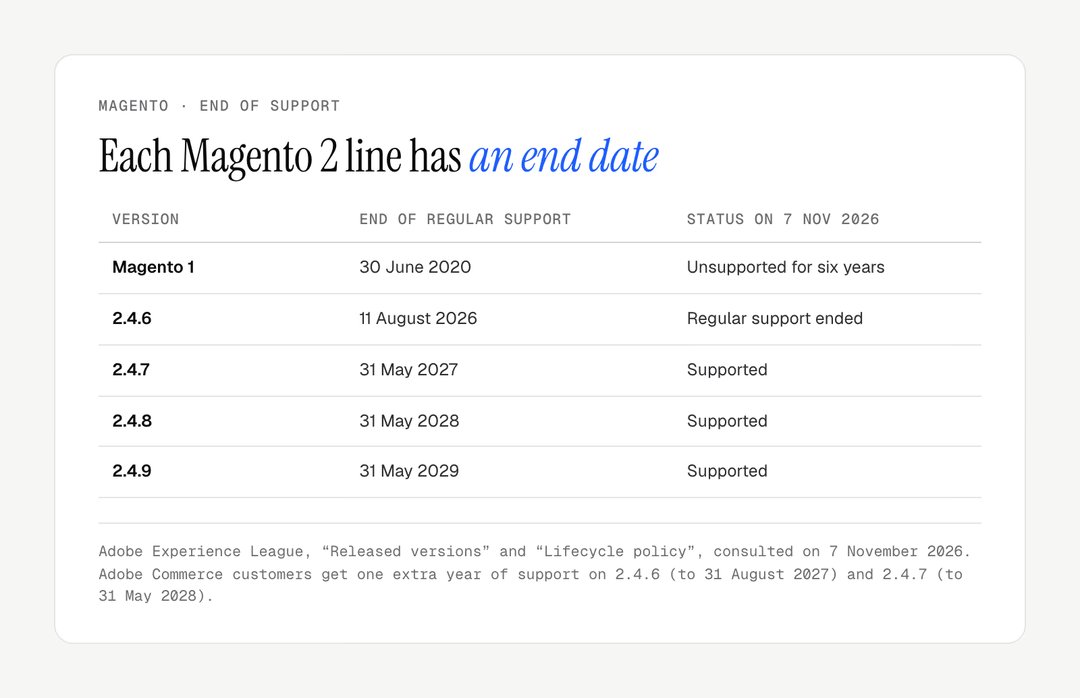
Magento 2 does not escape the problem. Adobe publishes an end date for each release line (released versions, lifecycle policy): regular support for 2.4.6 ended on 11 August 2026, 2.4.7 ends on 31 May 2027, 2.4.8 on 31 May 2028 and 2.4.9, released in May 2026, on 31 May 2029. Adobe Commerce customers get one extra year on 2.4.6 and 2.4.7. Each line gets about three years of regular support, so staying supported means moving to a new line every few years.
Running costs you carry yourself
On Magento Open Source, you pay for everything around the software: hosting sized for Magento, a CDN, a web application firewall, security patches, extension licences and the developer time to keep them compatible after each update. None of these lines has a standard price; list your own from the last twelve months of invoices before comparing.

On Shopify, hosting, security, PCI DSS compliance and platform updates are included in the subscription. What you add are apps, which have their own monthly fees, and any custom development. The fair comparison is your Magento invoices against a Shopify subscription plus the apps that replace your extensions.
Day-to-day operations
On Magento, routine tasks often need a developer: clearing caches after a change, fixing an extension after a patch, editing templates in PHP. On Shopify, merchandising, pages and promotions are handled in the admin and the theme editor.
Preparing a Magento to Shopify migration
A migration is decided in preparation: an audit of what exists, a scope of what moves, and the choice of plan. Rushing into the data transfer is the surest way to end up with a broken store and damaged SEO.
Audit what you have
Before changing anything, document your current Magento store in full:
catalogue: number of products, variants, custom attributes, and configurable, grouped and bundle products;
customers: number of accounts, customer groups and group-specific pricing;
orders: the history you need for service and accounting;
content: CMS pages, static blocks, widgets and blog posts;
extensions: a full list with what each one does, since each needs a Shopify equivalent or must be dropped;
integrations: ERP, CRM, marketplaces, email marketing, accounting;
URLs: every indexed URL from a crawl, Search Console and Magento's own
url_rewritetable, which lists the rewrites the store serves.
Define the scope
Not everything deserves to be migrated. This is the moment to clean up:
obsolete or permanently discontinued products: leave them behind, but redirect their URLs;
customer accounts inactive for years: decide with your data protection obligations in mind;
very old orders: archive them as CSV rather than importing them;
extensions nobody uses: simplify rather than replace.
Choose your Shopify plan
We usually start the comparison with Grow and Advanced. Shopify's pricing page lists Grow at $105 and Advanced at $399 a month on monthly billing, or $79 and $299 a month billed yearly; the UK page gives £65 and £344, or £49 and £259 billed yearly. Native B2B has been available on Basic, Grow and Advanced since 2 April 2026, with up to three active catalogue assignments outside Plus, as our guide to Shopify B2B explains. If you run Adobe Commerce with several storefronts, heavy B2B or high volumes, read whether Shopify Plus is worth it.
The Magento to Shopify migration steps, in order
A Magento to Shopify migration runs in seven steps, and the order matters. The table summarises them; the detail follows.
Step | Action | Deliverable |
|---|---|---|
1. Configure Shopify | Legal pages, taxes, shipping, payments, theme | Store ready to receive data |
2. Products | Map Magento types to Shopify products and variants | Catalogue checked on a sample |
3. Customers | Import accounts and marketing consent | Customer list, launch email drafted |
4. Orders | Import the history you need | Orders available for service |
5. Content | Rebuild CMS pages, blocks and posts | Pages and blog in place |
6. Redirects | Map every indexed URL | CSV imported and tested |
7. Test and launch | Test journeys, then switch the domain | Response codes checked |
Step 1: configure the Shopify store
Create the Shopify store and set up the basics before migrating any data:
legal information and mandatory pages, including, if you sell to consumers in the EU, the online withdrawal function that applies from 19 June 2026 under Directive (EU) 2023/2673;
currency, taxes and shipping zones;
payment providers (Shopify Payments, PayPal and any regional methods);
the collection structure, Shopify's equivalent of Magento categories;
the chosen theme, configured.
Step 2: migrate products
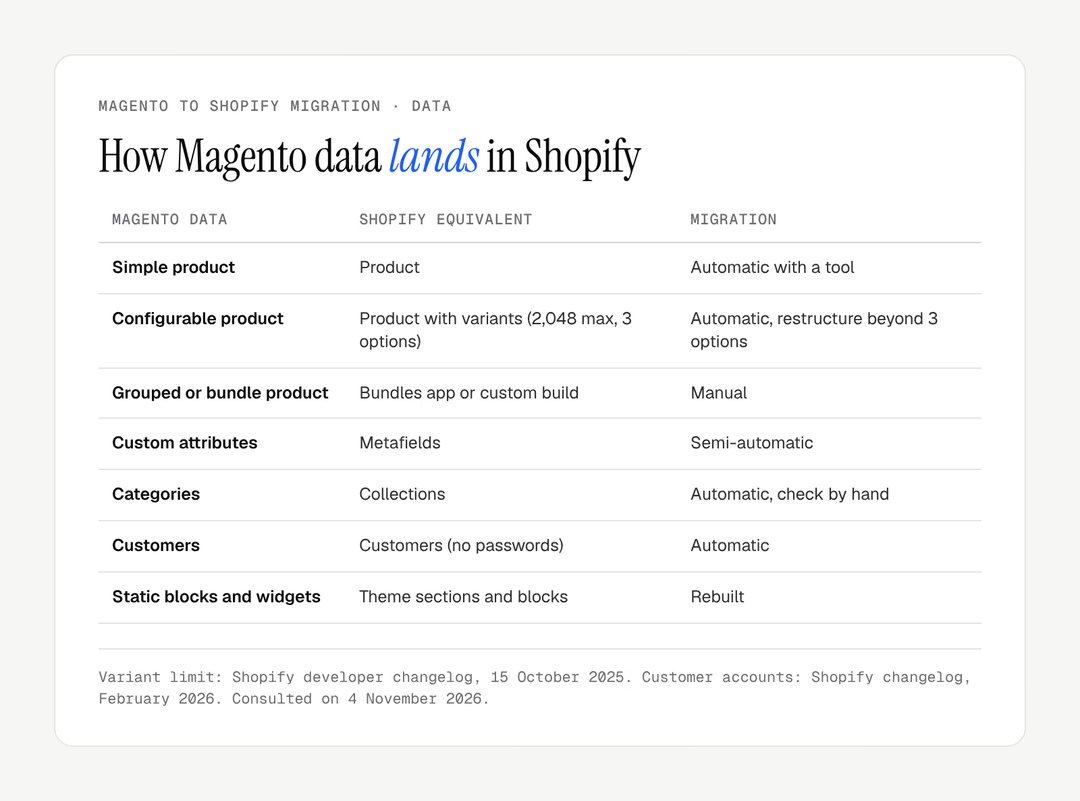
This is the core of the data transfer. Magento product types map to Shopify as follows.
Magento data | Shopify equivalent | Migration |
|---|---|---|
Simple product | Product | Automatic with a tool |
Configurable product | Product with variants | Automatic up to 3 options |
Grouped or bundle product | Bundles app or custom build | Manual |
Custom attributes | Metafields | Semi-automatic |
Categories | Collections | Automatic, checked by hand |
Images | Product media | Automatic |
SKUs and barcodes | SKUs and barcodes | Automatic |
Since 15 October 2025, every Shopify store can create up to 2,048 variants per product, against 100 before, but each product still has three options at most. Beyond three attributes, restructure the catalogue (several products linked by metafields) or use a product options app; our guide to the Shopify product configurator covers the options-heavy cases.
Step 3: migrate customers
Customer data (name, email, addresses, phone) migrates easily. The major exception is passwords: Magento and Shopify hash them differently, so they cannot be transferred.
This matters less than it used to. Shopify's new customer accounts, the only version offered to new stores since legacy accounts were deprecated in February 2026, are passwordless: customers sign in with a one-time code sent by email. Plan a launch-day email explaining the new sign-in, and carry over each contact's marketing consent: under the GDPR and UK GDPR, consent collected on Magento must stay documented after the move. Customer groups with their own prices become B2B companies and catalogues on Shopify.
Step 4: migrate orders
Order history matters for customer service, returns and accounting. Migration tools transfer orders with their status, but in Shopify they serve as a record: you do not process them again. Shopify's native CSV files import products, customers and inventory, but orders are export-only, so this step needs Matrixify or a migration service. Migrate at least the period covered by your returns and warranty policy.
Step 5: migrate content
Magento CMS pages become Shopify pages (/pages/…), and blog posts move to a Shopify blog (/blogs/<blog>/…). Static blocks and widgets have no direct equivalent: their content is rebuilt in the theme's sections and blocks. A store with several store views for languages or countries moves to Shopify Markets, with translations and hreflang to test before launch.
Step 6: set up SEO redirects
This is the most critical step of the whole migration: get it wrong and you lose rankings built over years. Magento and Shopify URLs follow different structures, and almost none survives as it is.
Page type | Magento URL (example) | Shopify URL |
|---|---|---|
Product | /black-running-shoe.html | /products/black-running-shoe |
Product in a category path | /shoes/running/black-running-shoe.html | /products/black-running-shoe |
Category | /shoes/running.html | /collections/running |
CMS page | /about-us | /pages/about-us |
Blog post | /blog/post-title | /blogs/news/post-title |
The Magento formats are common defaults with URL rewrites and the .html suffix on; they vary with configuration and extensions.
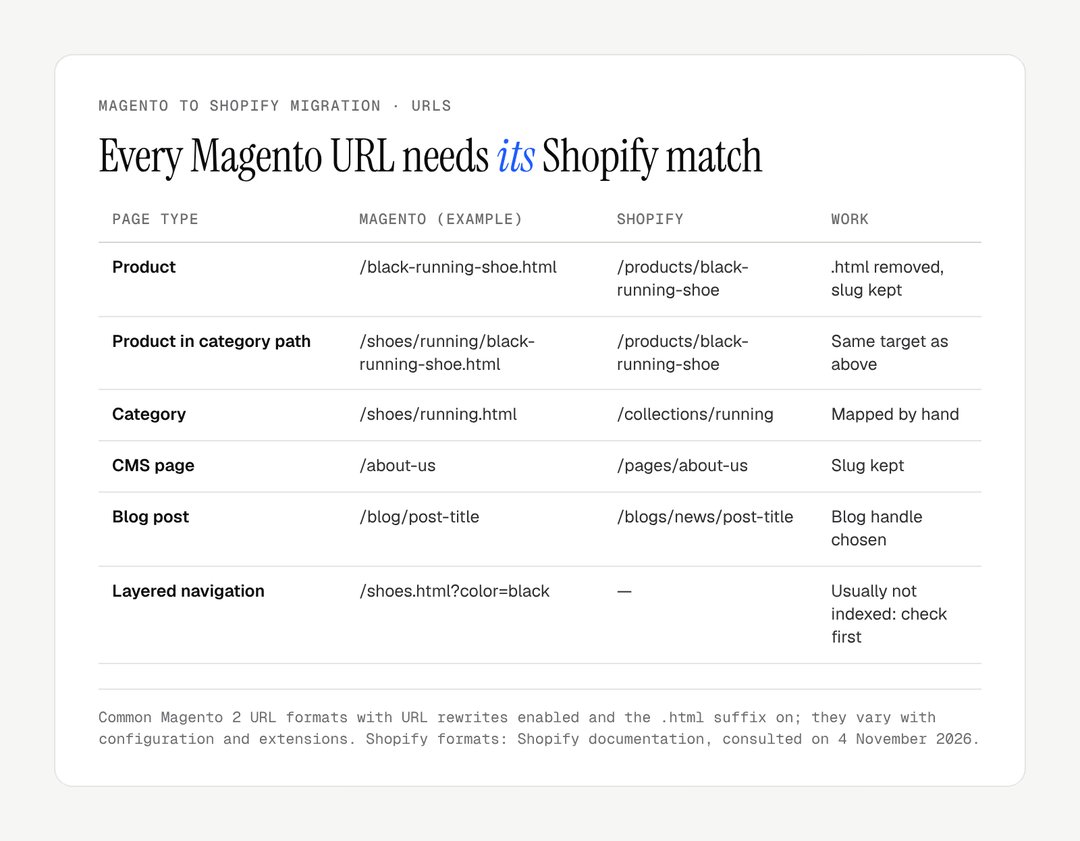
Every URL indexed by Google needs a 301 redirect to its new Shopify URL:
crawl the Magento site and export the
url_rewritetable to list every URL;cross-reference with Search Console to find the pages that bring traffic and links;
build a mapping file, old URL to final new URL, one row per URL;
import it into Shopify (Content > Menus > View URL redirects > Import);
test the response codes after launch.
Beyond a few dozen URLs, the CSV import is essential. Shopify accepts up to 100,000 redirects per store, and 20 million on Plus, and only redirects from broken URLs, so the file can be imported before launch.
Step 7: test and launch
Before switching the domain, test everything:
the full purchase journey, from add to cart to confirmation;
every payment method and every carrier rule;
transactional emails, including the sign-in code;
SEO redirects, on a representative sample;
mobile and tablet display;
third-party integrations (ERP, email marketing, analytics).
Switch the domain at a low-traffic moment, early in the week. Keep the old Magento store available privately, in read-only mode, to handle orders in progress and to check data afterwards.
Seven mistakes that ruin a Magento migration
Failed Magento migrations repeat the same faults. The table links each one to its effect and its fix.
Mistake | Effect | Fix |
|---|---|---|
Forgetting SEO redirects | Pages drop out of the index | One 301 per indexed URL, live at launch |
Migrating without cleaning up | Obsolete products weigh down the store | Sort the catalogue first, redirect what goes |
Underestimating configurable products | Products beyond 3 options do not import | Restructure or use an options app |
Ignoring integrations | ERP or stock out of sync on day one | Treat each integration as its own project |
Not telling customers | Wave of support requests about sign-in | Clear email on launch day |
Launching in peak season | Fixes made under pressure | Leave several weeks before a peak |
Not testing payment | No sales on launch day | Real transactions, then refunds |
Post-migration checklist
Launch is not the end of the project. Check the following in the first month after go-live.
Action | When | Priority |
|---|---|---|
Check 301 redirects | Day 1 | Critical |
Submit the new sitemap in Search Console | Day 1 | Critical |
Monitor 404 errors in Search Console | Days 1 to 30 | High |
Check analytics and tracking | Day 1 | High |
Tell customers about the new sign-in | Day 1 | High |
Check third-party integrations | Days 1 to 3 | High |
Track rankings of the top pages | Days 1 to 30 | High |
Compare conversion before and after | Weeks 2 to 4 | Medium |
Decommission the old Magento store | Once everything is checked | Medium |
Google warns that a medium-sized site can take "a few weeks or more" to be processed, and recommends keeping redirects for at least a year (site moves with URL changes).
Migration tools and what they cost
Several tools automate the data transfer from Magento to Shopify; none handles the whole migration. Design, SEO, integrations and testing stay with you or your agency. The costs below are the ones the vendors publish on their Shopify App Store listings.
Tool | What it moves from Magento | Published cost |
|---|---|---|
Matrixify | Products, customers, orders, pages, posts, redirects, from files | Free plan, then $20, $50 or $200 a month |
LitExtension | Products, customers, orders, categories, via connection | Free to install, priced by entities migrated |
Cart2Cart | Products, customers, orders, categories, via connection | Free to install, priced by store size and options |
Shopify Store Migration | Magento not listed as a source | Free |
Shopify CSV import | Products and customers | Free |
Matrixify: bulk import and export through Excel or CSV files, well suited to attribute-heavy catalogues. Its free plan is limited to 10 items per file; the paid plans raise the per-file limits (5,000 products on the $20 plan, 50,000 on the $50 plan, unlimited at $200).
LitExtension: a connector that lists Magento among its sources, priced by the number of entities, with a free demo migration of 20 products, 20 customers and 20 orders.
Cart2Cart: a similar connector, with a test migration before going live; its listing also mentions moving SEO URLs with 301 redirects.
Shopify Store Migration, Shopify's free app, lists Square, WooCommerce, Etsy, Wix, Amazon, eBay, Clover and Lightspeed R/X as sources (listing), not Magento.
Worked example of a cost comparison: add up last year's Magento invoices (hosting, CDN, developer maintenance, extension licences, security), then compare them with twelve months of the Shopify plan you need, the apps that replace your extensions, and the migration itself. The result depends entirely on your figures; no general ratio holds.
Product data done properly: Maison Trungadi
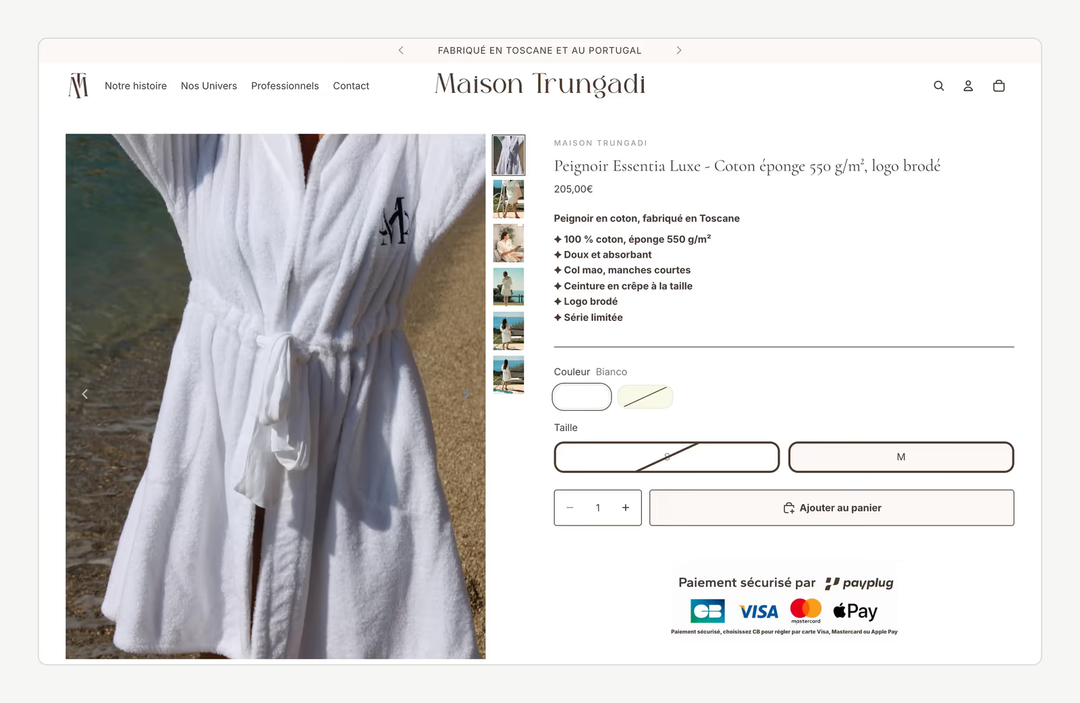
Maison Trungadi, bath linen made in Tuscany, migrated to Shopify with a redesign. The project rebuilt the product pages to detail materials, fabric weight and how each piece is made, with made-to-measure pieces given their own place in the journey. Whatever the source platform, it illustrates the point of Step 2: material and fabric weight are shown as clear information on every product page, not buried in a description.
Another migration to Shopify, Le Cercle des Plantes, teas and infusions, combined the transfer of the whole catalogue with a theme built from scratch. If your Magento store also runs a WordPress blog, our guide to WordPress to Shopify migration explains how posts, categories and authors move.
What you gain on Shopify
Beyond running costs, moving to Shopify brings operational gains that show quickly:
hosting and scale: Shopify runs the infrastructure and its content delivery network, with no servers to size before a peak;
autonomy: editing a page, adding a product or launching a promotion no longer needs a developer;
security: no server patches to apply, SSL included, PCI DSS compliance handled by Shopify;
ecosystem: apps installed from the Shopify App Store, updated by their developers;
checkout: Shopify's checkout and Shop Pay are maintained by Shopify, and customisation goes through apps and checkout extensions rather than edited templates.
Are you planning a Magento exit and want the data and the rankings to come across intact? Our Shopify migration page sets out how we run these projects, and the Maison Trungadi case study shows a migration with a redesign. To discuss your project, get in touch.
Frequently asked questions
How long does a Magento to Shopify migration take?
It depends far more on integrations and URL count than on the number of products. A small catalogue with no ERP can move in a few weeks; an Adobe Commerce store with several store views, B2B pricing and an ERP takes several months. The longest parts are rarely the data transfer: they are rebuilding the design, mapping the redirects and testing every integration before the switch-over.
Will I lose my SEO rankings when moving from Magento to Shopify?
No, provided every indexed Magento URL has a 301 redirect to its Shopify equivalent, live at launch, and the content is kept. Google expects rankings to fluctuate while it processes the new addresses. Lasting drops almost always come from a technical error: missing redirects, .html variants forgotten, regenerated title tags or a robots.txt that blocks crawling.
What data can be migrated from Magento to Shopify?
You can migrate products with titles, descriptions, images, variants, SKUs and prices, plus customers, orders, categories as collections, CMS pages, blog posts and discount codes. Customer passwords and custom extensions cannot be transferred. With Shopify's new customer accounts, customers sign in with a code sent by email, so nobody needs to recreate a password. Extensions are replaced by apps or custom development.
How much does a Magento to Shopify migration cost?
The tools publish their prices: Matrixify has a free plan for tests and paid plans at $20, $50 and $200 a month, LitExtension and Cart2Cart charge by the volume migrated, and Shopify's own CSV import is free. The rest is labour: design, redirect mapping, integrations and testing, which depend on your catalogue and systems. Ask for a quote broken down by those lines rather than a single total.
What happens to Magento customer groups and tier prices?
They move to Shopify B2B. Since 2 April 2026, Shopify's native B2B features are available on Basic, Grow and Advanced, with companies, volume pricing, quantity rules and payment terms, and up to three active catalogue assignments outside Plus. A Magento store with many customer groups, each with its own price list, should check whether three catalogues are enough or whether Plus is needed.
Should I migrate Magento myself or use an agency?
For a small catalogue without complex integrations, a self-managed migration with Matrixify, LitExtension or Cart2Cart is realistic if you are comfortable with CSV files. With thousands of products, an ERP, several store views or significant organic traffic to protect, specialist support is safer, because errors cost more to fix than to avoid. Either way, stay in control of the redirect map.
Can I keep my Magento URLs on Shopify?
Only the slug. Shopify enforces the /products/, /collections/, /pages/ and /blogs/ prefixes and does not use the .html suffix, so every Magento URL changes. Keeping the slug, the part after the prefix, makes the redirect map simpler and lets you build most product rows by rule. Categories and their nested paths still need to be mapped by hand.
What should I do with Magento extensions?
List each one and decide: replace it with a Shopify app, rebuild it as custom development, or drop it. Many Magento extensions cover features Shopify includes natively, such as SEO fields or sitemaps. Others, such as ERP connectors or complex promotion rules, need an equivalent before launch. The extension list is often where a migration budget is really decided.
Our work
Stores delivered by the studio
 Bath linenMigration and redesign · ShopifyMaison TrungadiBathrobes and bath linen made in Tuscany: a store that does justice to the materials.
 Personalised jewelleryRedesign · ShopifyMayaliceA minimalist luxury redesign and six product configurators to compose a piece of jewellery live.
 Handmade candlesMigration and redesign · ShopifyCandle’liceUnusual candles hand-poured in France, taken off a platform that held them back.